
|
Category |
Details |
|
App Name |
Arcmark |
|
Developer |
Ahmed Sulaiman |
|
Launch Date |
February 2026 |
|
Platform |
macOS (14 and above) |
|
Category |
Bookmark Manager / Productivity |
|
Built With |
Swift and AppKit |
|
License |
Open Source (MIT License) |
|
Pricing |
Free (core) / Pro at $2.49/month or $39.99 lifetime |
|
Data Storage |
Local JSON file (no cloud) |
|
Browser Support |
Chrome, Safari, Brave, Arc, Firefox |
|
GitHub |
github.com/Geek-1001/arcmark |
|
Official Website |
arcmark.app |
|
Icon Polls Rating |
2.1 / 10 |
What Is Arcmark?
Arcmark is a native macOS bookmark manager built with Swift and AppKit. The core idea is that it attaches itself as a sidebar to whichever browser window you are using, whether that is Chrome, Safari, Brave, Firefox, or Arc. You can organize your bookmarks into workspaces with nested folders, drag and drop things around, and search through everything quickly.
It was created by Ahmed Sulaiman, a developer who previously had a successful app called Flawless that got acquired. Arcmark is open source under the MIT license, so anyone can look at the code on GitHub or contribute to it. The app stores all your data locally in a single JSON file on your Mac. No cloud. No accounts. No sign ups.
That local first approach is one of the things that initially caught our attention at Icon Polls. In a world where every app wants your email address and your data on their servers, Arcmark goes the opposite direction. But as we will explain, the privacy focus does not make up for the gaps in usability and polish.
Arcmark App
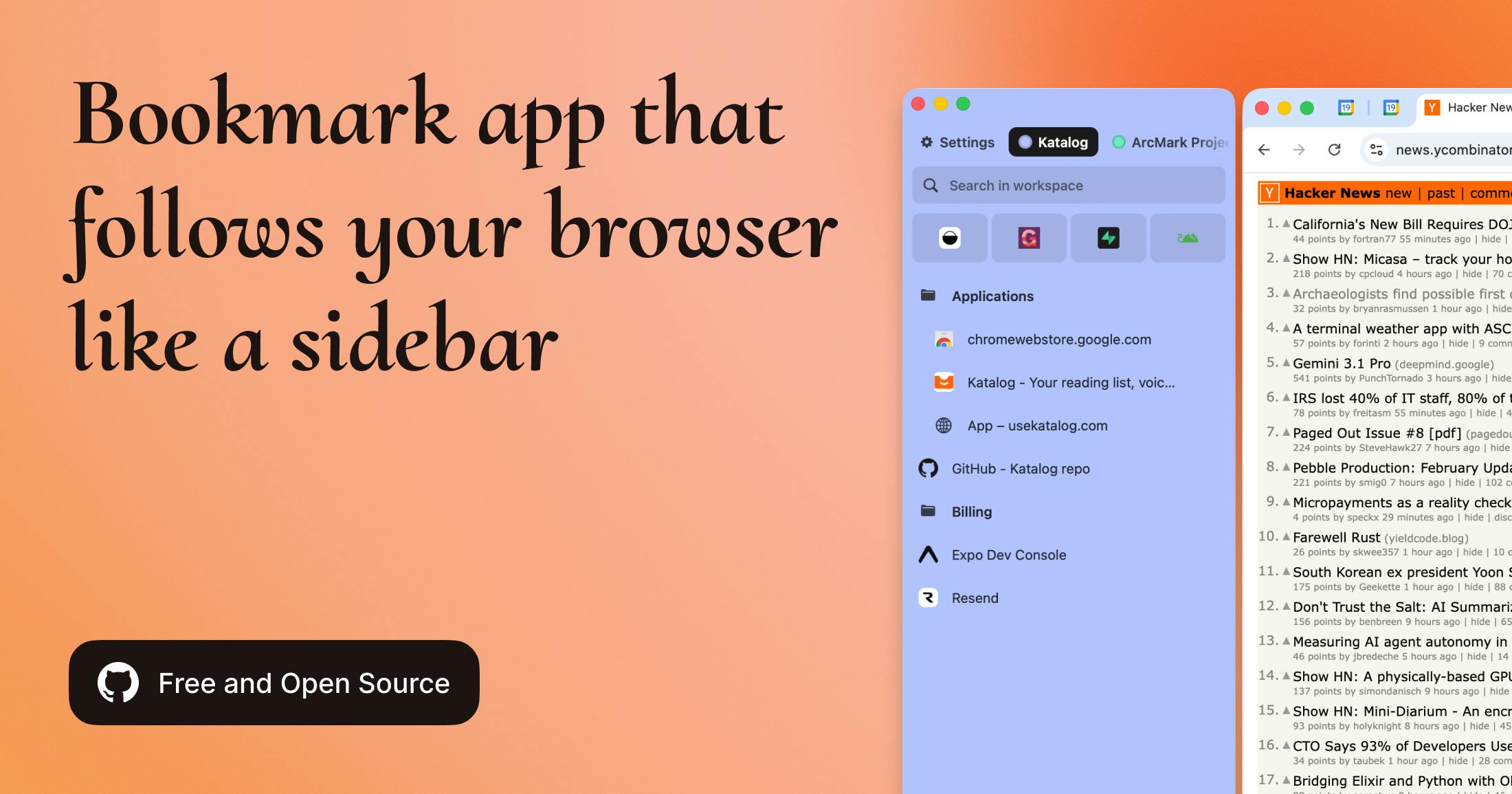
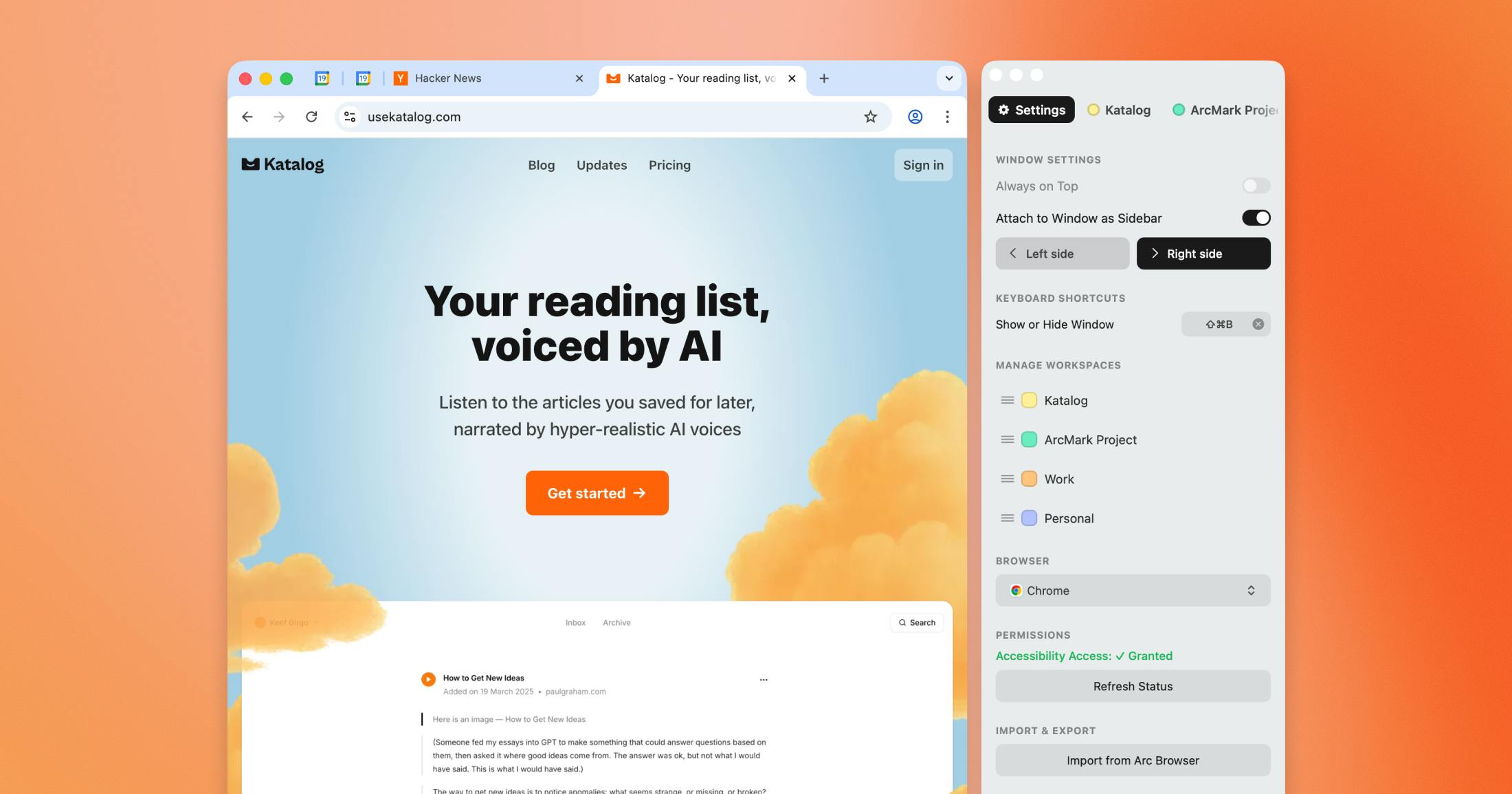
The Arcmark app itself runs from your Mac's menu bar. Once you launch it and grant Accessibility permissions in System Settings, the sidebar can attach to your active browser window and follow it around as you move or resize it. You can also use it as a standalone floating window if you prefer.
The interface is clean enough. It borrows heavily from the Arc Browser aesthetic, which makes sense given that the whole project was born out of wanting Arc's sidebar in other browsers. You get workspaces with color coding, nested folders, and the ability to import bookmarks from Safari, Chrome, and even Arc's pinned tabs.
But here is where the problems start. The app feels very early stage. During our testing at Icon Polls, we ran into multiple situations where the sidebar would not properly attach to the browser window after switching between spaces on macOS. The drag and drop worked most of the time, but occasionally dropped items in the wrong folder. And the search, while fast, had trouble with bookmarks that had long or unusual URLs.
For a tool that is supposed to streamline your workflow, these kinds of hiccups add friction instead of removing it.
Arcmark Download
Downloading Arcmark is straightforward. You grab the DMG file from the GitHub releases page, open it, and drag the app into your Applications folder. There is no Mac App Store listing as of mid 2026, which means you are relying entirely on GitHub for updates and installation.
For tech savvy users, that is fine. But for the average person who just wants a bookmark tool, downloading from GitHub and then manually granting Accessibility permissions in System Settings is a barrier. macOS will also throw up a security warning the first time you open it since the app is not code signed through Apple's notarization process.
The download size is small, and the app runs light on resources, which is a positive. But the installation experience is not exactly welcoming for anyone outside the developer community.
Arcmark Old Version vs Latest Version
Arcmark launched with version 0.1.0 in February 2026. That initial release had the basics: sidebar attachment, workspaces, folders, drag and drop, and browser import. It worked, but it was rough around the edges.
Since then, there have been a handful of updates on GitHub, but the pace of development has been slow. This is a one person open source side project, not a funded startup with a team behind it. So while newer versions have fixed some bugs and improved stability, the core experience has not changed dramatically.
If you are running an older version, you will want to update manually by downloading the latest DMG from GitHub. There is no built in auto update mechanism in the free version, which means you could easily fall behind on patches without realizing it.
Based on what we have seen at Icon Polls, the difference between the earliest version and the latest is marginal. The app is still very much in its early stages, and it shows.
Arcmark APK
Let us clear this up because a lot of people search for it. There is no Arcmark APK. Arcmark is a macOS only application. It does not exist on Android, iOS, Windows (officially), or Linux. There is no mobile version at all.
A community made Windows port does exist on GitHub, built with WPF and .NET 8, but that is an unofficial project and not maintained by the original developer. If you are on Windows and curious, you can try it, but expect even more rough edges than the Mac version.
If you landed on this page looking for an Arcmark APK download, you are out of luck. The app simply does not exist outside of macOS. Anyone offering an Arcmark APK file online is either confused or trying to get you to download something you should not be downloading.
Arcmark on Reddit
Arcmark got some traction on Reddit when it first launched, mainly in subreddits focused on productivity, macOS apps, and the Arc Browser community. The initial reception was cautiously positive, with people appreciating the open source approach and the local first data model.
However, the conversation on Reddit has been pretty quiet since those first few weeks. There is no dedicated Arcmark subreddit, and discussion threads have dried up. The users who did try it reported a similar experience to what we found during our review: good concept, but too early and too limited to replace existing solutions.
Some Reddit users pointed out that the Accessibility permissions requirement felt uncomfortable, even though the app is open source and you can verify the code yourself. Others mentioned that without cloud sync, switching between multiple Macs made the app impractical for their workflow.
Arcmark User Experience
This is where things really fall apart, and it is the biggest reason behind our low rating. The user experience of Arcmark in its current state is not good enough for daily use.
The sidebar concept is clever. When it works, having your bookmarks right there next to your browser window is genuinely useful. But the execution is inconsistent. The sidebar sometimes detaches when you switch between macOS spaces or full screen apps. Reattaching it requires clicking through the menu bar icon, which defeats the purpose of having it always available.
There is no cloud sync, which means if you use more than one Mac, your bookmarks live on one machine only. You would have to manually copy the JSON file between computers, which is not a realistic workflow for most people.
There is no mobile companion app, so your carefully organized bookmarks are stuck on your desktop. In 2026, most people expect at least some level of cross device access.
The import feature works for Safari and Chrome bookmarks, but it is a one time pull. It does not stay in sync with your browsers. So if you add a bookmark in Chrome after importing, it will not show up in Arcmark unless you import again.
Keyboard shortcuts exist but are limited. The search is functional but basic. There are no tags, no smart folders, no AI powered organization, and no integrations with other productivity tools.
Icon Polls tested the app across multiple workflows including research, project management, and everyday browsing. In each case, we found ourselves going back to built in browser bookmarks or third party tools like Raindrop.io within a few days. Arcmark just could not hold up as a daily driver.
Icon Polls Rating: 2.1 out of 10
Here is how we arrived at that number. Design and interface scored around 4 out of 10 because it looks decent but lacks polish. Functionality scored about 3 out of 10 since the core features work but have noticeable bugs. Reliability scored 2 out of 10 due to the sidebar detachment issues and general instability. Cross platform support scored 0 out of 10 because it is macOS only with no mobile or web version. User onboarding scored 1 out of 10 given the GitHub only download, security warnings, and manual permission setup. Overall value scored 2 out of 10 because while the free tier is generous, the app is not usable enough to justify the time investment.
When you average all of that out and weigh it against what competitors are offering in the same space, a 2.1 is where Arcmark lands. It is not a scam and it is not a bad idea. It is just not ready for real users yet.
Who Should Use Arcmark?
In its current form, Arcmark is really only suitable for a very narrow group of people. If you are a macOS power user who specifically misses the Arc Browser sidebar, you are comfortable with early stage open source software, you do not need cloud sync or mobile access, and you are okay with occasional bugs, then Arcmark might scratch that itch.
For everyone else, we would recommend looking at more established alternatives like Raindrop.io, the built in bookmark systems in your browser, or even simple note taking apps for link management.
Frequently Asked Questions About Arcmark
1. Is Arcmark free to use?
Yes, Arcmark has a free tier that covers the core features including sidebar attachment, workspaces, folders, drag and drop, and browser import. There is a Pro version available at $2.49 per month or $39.99 for a lifetime license that unlocks advanced filtering, duplicate detection, and additional export formats.
2. Is there an Arcmark APK for Android?
No. Arcmark is a macOS only application. There is no Android version, no APK file, and no mobile app of any kind. If you see an Arcmark APK being offered online, do not download it. It is not legitimate.
3. Does Arcmark work on Windows?
Not officially. The original app is built for macOS only. However, a community created Windows port exists on GitHub, built with WPF and .NET 8. It is unofficial and not maintained by the original developer, so expect limited support and potential issues.
4. Is Arcmark safe to use?
Arcmark is open source under the MIT license, so anyone can review the code on GitHub. The app requires macOS Accessibility permissions to attach the sidebar to browser windows, which can feel invasive. However, since the code is publicly available, you can verify that it is not doing anything malicious. That said, the app is not notarized through Apple, so macOS will show a security warning on first launch.
5. Does Arcmark sync bookmarks across devices?
No. Arcmark is entirely local. All your data is stored in a single JSON file on your Mac. There is no cloud sync, no account system, and no way to automatically share bookmarks between devices. You would have to manually copy the JSON file if you wanted to move your data to another machine.
6. What browsers does Arcmark support?
Arcmark works with most major browsers on macOS including Chrome, Safari, Brave, Arc, and Firefox. The sidebar attaches to the active browser window using macOS Accessibility APIs, so it is not limited to any specific browser.
7. How does Arcmark compare to Raindrop.io?
Raindrop.io is a much more mature and feature rich bookmark manager with cloud sync, cross platform apps, tags, collections, and integrations. Arcmark is a lightweight, local first alternative that focuses on the sidebar experience. For most users, Raindrop.io is the better choice. Arcmark only makes sense if you specifically want a local, privacy focused sidebar tool on macOS and do not need any of the extras.
8. What happened to Arc Browser and why does Arcmark exist?
Arc Browser was acquired by Atlassian in 2025, and the development team shifted focus toward a new project called Dia. This left many Arc users frustrated as feature updates slowed down and the browser's future became uncertain. Arcmark was created to bring the Arc sidebar bookmark experience to other browsers so that former Arc users could get that same workflow without being tied to Arc.
9. Can I export my bookmarks from Arcmark?
The free version supports basic HTML export. The Pro version offers additional export formats. Since all data is stored in a plain JSON file on your Mac, you can also directly access and manipulate the raw data file if you are comfortable working with JSON.
10. Is Arcmark still being updated in 2026?
As of mid 2026, Arcmark has received a few updates since its February launch, but the pace is slow. It is a one person open source side project, not a commercially backed product. Bug fixes and minor improvements have been pushed, but major new features have not arrived yet. Icon Polls will continue monitoring the app and update this review if significant changes are made.