|
Brand Name |
Claude Computer Use |
|
Parent Company |
Anthropic |
|
Product Type |
AI Desktop Automation / Computer Control Agent |
|
Initial Launch |
October 2024 (API beta), March 23, 2026 (consumer research preview) |
|
Current Status |
Research Preview (Consumer), Generally Available (API) |
|
Supported OS |
macOS 13.0+ (consumer preview); Windows/Linux via API and Docker container |
|
Pricing |
Bundled in Claude Pro ($20/month) and Claude Max ($100 to $200/month); API pay-as-you-go |
|
Core Models |
Claude Sonnet 4.6, Claude Opus 4.6, Claude Opus 4.7 |
|
Tool Version |
computer_use_20251124 (latest, supports zoom actions) |
|
Official Website |
anthropic.com / claude.com |
|
GitHub Repository |
github.com/anthropics/claude-quickstarts |
|
Best For |
Developers, automation engineers, Mac users wanting hands-free desktop tasks |
|
ICON POLLS Rating |
3.0 / 5.0 |
What is Claude Computer Use in 2026?
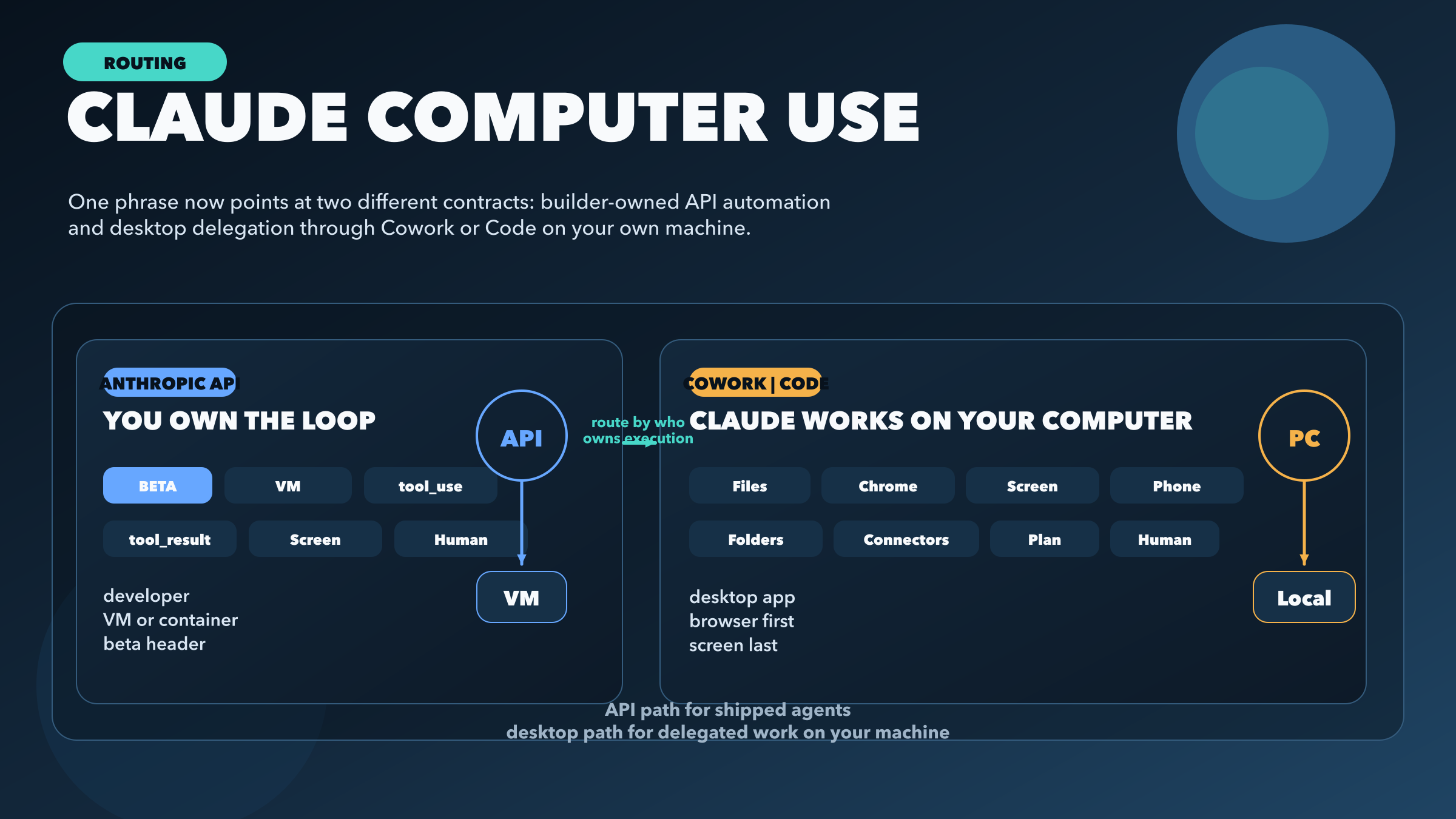
Claude Computer Use is Anthropic's desktop automation feature that gives the Claude AI model the ability to view your screen, move your cursor, click, type, and navigate apps on your behalf. In simple terms, you describe a task in plain English and Claude tries to do it on your actual computer, the same way a remote intern would.
In 2026 the feature is split across two main entry points. Consumer users access it through Claude Cowork on macOS and through Claude Code, which is the terminal based agent platform. Developers and businesses access it through the Anthropic API, where the tool is called computer_use_20251124 in its latest version. The API path supports Windows and Linux through Docker containers, while the consumer app path is currently macOS only.
The big leap in 2026 has been latency and reliability. Earlier versions of Computer Use felt sluggish because the model took a screenshot, planned, acted, then took another screenshot for every single step. The Q1 2026 update introduced a rolling visual context window that roughly cut action latency in half. It also handles unexpected UI states better, so a popup or a moved button no longer derails the entire task.
Claude Computer Use API
For developers, the API is honestly where Claude Computer Use shines the most. Anthropic exposes the feature as a tool inside the standard Messages API. You send a prompt, declare the computer_use tool, and Claude responds with structured tool calls like screenshot, mouse_move, left_click, type, or key. Your local runner executes those actions on the actual machine and feeds the new screenshot back to Claude.
The latest tool version, computer_use_20251124, added zoom actions which let the model focus on small UI elements without losing context. Anthropic also rolled out prompt caching for screenshot heavy sessions, which cuts cost by up to 90 percent on repeated large context calls. Streaming tool use is now supported too, so you can build interfaces that show what Claude is doing in real time.
Pricing on the API is pay as you go based on tokens. A typical Computer Use session burns through tokens fast because each screenshot is roughly 1500 to 2000 tokens, so a 30 step task can easily run into tens of thousands of tokens. Claude Sonnet 4.6 is the recommended default for cost reasons, while Opus 4.6 and Opus 4.7 are reserved for tasks that need stronger reasoning. The Managed Agents API, which uses the managed-agents-2026-04-01 beta header, lets teams run sessions in cloud environments with GitHub repositories mounted directly, which is a big deal for CI/CD work.
Our honest take on the API: setup is not friendly for beginners. You need to understand tool use, sessions, environments, and probably Docker. Once you get past the learning curve though, it is the most flexible computer control API on the market right now.
Claude Computer Use on GitHub
Anthropic maintains a clean open source presence for Computer Use, and that is one of the better parts of the product. The main repository to know is github.com/anthropics/claude-quickstarts, which has a dedicated computer-use project that runs against the macOS desktop. It demonstrates explicit tool definitions, correct image sizing, prompt caching, server side compaction, batched tool calls, a sandboxed shell, and trajectory recording. For anyone building production agents, that quickstart is basically a free education.
There is also a containerized Computer Use Demo that runs in Docker, which is the recommended path for Windows and Linux users since the consumer app does not support those operating systems yet. The container ships with a virtual display, a browser, and a small Python service that handles the action loop. It is not pretty, but it works.
Beyond the official repos, the community has built useful wrappers. Browser automation projects using Playwright are common workarounds, and there are several proxy and bridge projects on GitHub that let developers route Claude Code through alternative providers. We saw a few unofficial Claude API libraries too, though we would recommend sticking to the official SDK for anything serious because the unofficial ones tend to break whenever Anthropic updates authentication.
One nice thing about the GitHub footprint is the documentation quality. The skills repository at github.com/anthropics/skills has structured guides that the model itself can read at runtime, which is a smart way of keeping the system updated.
Claude Computer Use on Windows
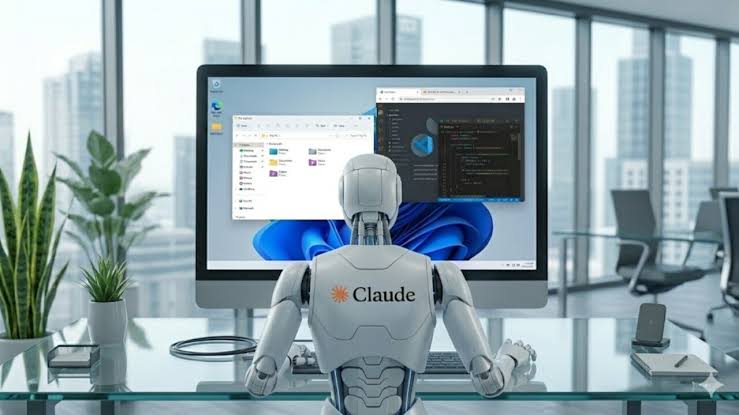
This is the part of the review where we have to be blunt. The consumer Computer Use feature inside Claude Cowork is not available on Windows yet. Cowork itself arrived on Windows on February 10, 2026 with what Anthropic called full feature parity, but Computer Use specifically was held back as a macOS only research preview. Anthropic has not announced a timeline for Windows support on the consumer side, which is frustrating for the majority of desktop users.
That said, Windows users are not completely shut out. There are two practical paths. The first is the API path, where you run the official Docker container or your own Windows runner that executes the actions Claude sends through the tool use protocol. The Claude Code CLI installs natively on Windows 10 build 1809 and newer, through WinGet, PowerShell, or WSL2, so you can use Claude Code with all of its agent features on Windows. The second path is community workarounds using open source projects like Node.js plus Playwright that mimic the computer use loop on a Windows desktop.
Our verdict on Windows: doable for developers, painful for everyone else. If you are a regular Windows user hoping to install Cowork and have Claude run your spreadsheets, you are out of luck for now. That gap is one of the main reasons we gave the overall rating a 3.0 instead of something higher.
Claude Computer Use on Linux
Linux is in roughly the same boat as Windows when it comes to the consumer Cowork app, but with a twist. The Claude Code terminal tool has full native Linux support across Ubuntu 20.04 and newer, Debian 10 and newer, and Alpine Linux 3.19 and newer. So if you live in the terminal, you are well served. The agent features, the MCP tools, the skills, and the GitHub integrations all work on Linux.
Where Linux users feel left out is the desktop GUI side. Cowork is not officially available on Linux, and Computer Use as a polished consumer feature does not run on Linux either. The community has done what it usually does and built unofficial Claude Desktop packages for Debian, Fedora, RHEL, Arch, and NixOS. There is an active project at github.com/aaddrick/claude-desktop-debian that repackages the Windows build for Linux, complete with close to tray support and XDG Autostart fixes. It is impressive work, but it is not officially supported by Anthropic.
For Linux power users, the cleanest path is the API plus a Docker container. The official Computer Use Demo container runs perfectly on any Linux host, and you can pipe it into your own GUI or headless workflow. We tested this on Ubuntu 24.04 and it ran without major hiccups, though setup takes about 30 minutes if you have never touched Docker before.
User Experience
This is where we have to balance the cool factor against the rough edges. When Claude Computer Use works, it feels like magic. We watched it open a browser, search for flight prices across three sites, paste the cheapest option into a spreadsheet, save the file, and post a Slack message about the result, all from a single voice command. That is the dream and Anthropic is closer to delivering it than anyone else right now.
When it does not work, it can be frustrating. Common failure modes include misreading visually busy interfaces, clicking the wrong button when two icons look similar, getting stuck in confirmation popups, and occasionally giving up on a task without explaining why. Tasks that involve drag and drop, complex form fields, or apps with non standard UI frameworks have a noticeably higher failure rate.
Speed is another mixed bag. Simple tasks finish in under a minute, but complex multi step workflows can take 10 to 20 minutes, and you can watch the cursor move around your screen the whole time. For Pro users, there is a 5 hour rolling usage window that can be exhausted during heavy sessions, which is one of the most common complaints we found in user forums and review sites. Max plan users at $100 to $200 per month get much higher limits, but that is a serious commitment.
The Dispatch feature, which lets you send tasks from your iPhone to your Mac, is genuinely one of the better consumer AI experiences we have tested in 2026. You assign a job from your phone, your Mac processes it in the background, and you come back to finished work. It works best for low stakes repetitive tasks like inbox triage or report generation. Just remember your Mac has to be awake and Claude Desktop has to be open.
Safety wise, Anthropic has been thoughtful. There are permission prompts before sensitive actions, prompt injection detection, and VM isolation inside Cowork. Anthropic explicitly recommends against using the feature with sensitive financial or medical data during the research preview, and we agree with that caution. We would not point this thing at a banking site yet.
Pros and Cons
Pros
First major AI tool that actually controls a real desktop, not just a browser tab
Bundled into Claude Pro at $20 per month, which undercuts competitors by roughly 10x
Excellent GitHub presence with working open source quickstarts and a clean API
Dispatch from iPhone to Mac feels like a glimpse of the future of personal AI
Latency and reliability improvements in 2026 are real and noticeable
Strong safety guardrails including permission gating and prompt injection detection
Cons
Consumer app is still macOS only, leaving Windows and Linux users with workarounds
Research preview label means rough edges, failed tasks, and occasional crashes
5 hour rolling usage window on Pro can be exhausted quickly during heavy sessions
API setup is not beginner friendly and requires Docker plus tool use knowledge
Token costs add up fast because of screenshot heavy sessions
Anthropic itself advises against using the feature with sensitive data
Tasks needing real human judgment or live communication still need a person
Pricing
Claude Computer Use is not sold as a standalone product. It is bundled into existing Claude subscriptions, which makes it one of the cheapest entry points to real desktop AI automation in 2026.
Claude Free: No access to Computer Use
Claude Pro: $17 to $20 per month, includes Computer Use research preview, 5x the free tier usage cap
Claude Max: $100 to $200 per month, includes Computer Use with significantly higher limits, ideal for heavy users
Claude API: Pay as you go based on token consumption, plus the managed agents beta for cloud sessions
Claude Enterprise: Approximately $20 per user per month base, plus token usage, often $60 to $250 per user in practice
For the average professional curious about AI automation, the Pro plan at $20 per month is the natural entry point. If you find yourself bumping into usage limits in your first week, the Max plan is the next step up.
Frequently Asked Questions about Claude Computer Use
1. Is Claude Computer Use available on Windows in 2026?
Not as a consumer feature inside Cowork. Cowork itself runs on Windows since February 2026, but the Computer Use research preview is still macOS only. Windows users can access Computer Use through the Anthropic API or the official Docker container, and the Claude Code CLI runs natively on Windows.
2. Does Claude Computer Use work on Linux?
Claude Code, the terminal agent platform, has full native support on Ubuntu 20.04 and newer, Debian 10 and newer, and Alpine 3.19 and newer. The Cowork desktop app and the consumer Computer Use preview are not officially supported on Linux. The community maintains unofficial repackaged builds, and the Docker based API path works on any Linux distribution.
3. How much does Claude Computer Use cost?
There is no separate price tag. Computer Use is bundled into Claude Pro at $20 per month and Claude Max at $100 to $200 per month. API users pay per token based on usage, and Enterprise customers pay roughly $20 per user as a base fee plus token consumption, which often pushes the real cost to $60 to $250 per user per month.
4. Where do I find Claude Computer Use on GitHub?
The main official repository is github.com/anthropics/claude-quickstarts, which includes a dedicated computer-use project with the latest tool version, computer_use_20251124, and best practices like prompt caching and trajectory recording. The Anthropic skills repository at github.com/anthropics/skills is also worth a look for structured guides.
5. Is Claude Computer Use safe to use with my data?
Anthropic has built permission gating, prompt injection detection, and VM isolation into the feature, but they explicitly recommend against using Computer Use with sensitive financial or medical data during the research preview. We agree with that caution. Stick to low stakes tasks until the feature graduates out of preview.
6. What is the difference between Claude Computer Use and Claude Code?
Claude Code is the terminal based developer agent that runs in your command line and helps with coding tasks. Claude Computer Use is the broader desktop control feature that includes browser navigation, file management, and app control. They overlap because Claude Code now includes Computer Use capabilities for GUI interaction, but Claude Code is primarily for developers while Computer Use inside Cowork is aimed at everyday productivity users.
7. How is Claude Computer Use different from OpenAI Operator and Google Project Mariner?
Operator and Mariner are browser focused. They control web pages but not native desktop apps. Claude Computer Use operates at the operating system level on macOS, so it can interact with menu bars, system preferences, file dialogs, and any installed application. Operator launched at around $200 per month, which makes Claude Pro at $20 roughly 10 times cheaper. The trade off is that Operator and Mariner work on more operating systems while Claude Computer Use is macOS only on the consumer side.
8. Why is Claude Computer Use still labeled a research preview?
Anthropic uses the research preview label to signal that a feature is functional but not finished. There are still rough edges like failed tasks, occasional misclicks, and limited operating system support. Anthropic is gathering user feedback before a full launch, and no general availability timeline has been announced.
9. Can I use Claude Computer Use without a subscription?
Not really. The consumer feature requires Claude Pro or Claude Max. The free Claude.ai plan does not include Computer Use. The API path requires an Anthropic Console account with billing set up, so even pay as you go usage requires a paid account.
10. What is Dispatch and how does it relate to Computer Use?
Dispatch is the companion feature that lets you assign tasks to Claude from your iPhone and have them execute on your Mac in the background. It works inside both Cowork and Claude Code, and it is one of the most useful real world implementations of Computer Use. The catch is that your Mac has to be awake and Claude Desktop has to be open for Dispatch to function.