|
BRAND PROFILE |
GStack |
|---|---|
|
Product Name |
GStack (gstack) |
|
Founder / Creator |
Garry Tan, President and CEO of Y Combinator |
|
Category |
Open-source AI coding framework / Claude Code skill pack |
|
Launch Date |
Mid-March 2026 |
|
License |
MIT (open-source, free) |
|
Repository |
github.com/garrytan/gstack |
|
GitHub Stars |
Over 71,000 (as of April 2026) |
|
Compatible Tools |
Claude Code (primary), Codex, Cursor, Windsurf, Gemini CLI |
|
Core Roles |
CEO, Designer, Engineering Manager, Release Manager, Doc Engineer, QA, Security Reviewer |
|
Number of Skills |
23 opinionated tools / 8 to 9 core slash commands |
|
Cost to Use |
Free, but requires a paid Claude Code or Codex subscription |
|
Best Suited For |
Solo founders, indie hackers, small product teams shipping SaaS |
|
ICON POLLS Rating |
2.9 / 5.0 |
What is GStack and Why Did It Blow Up in 2026?
GStack, sometimes written as gstack, is an open-source skill pack and workflow framework built on top of Claude Code. It was created by Garry Tan, the President and CEO of Y Combinator, and released publicly in mid-March 2026. Within 48 hours of going live the repository crossed 10,000 stars on GitHub. By the time we wrote this review it had passed 71,000 stars, which makes it one of the fastest growing developer tools of the year.
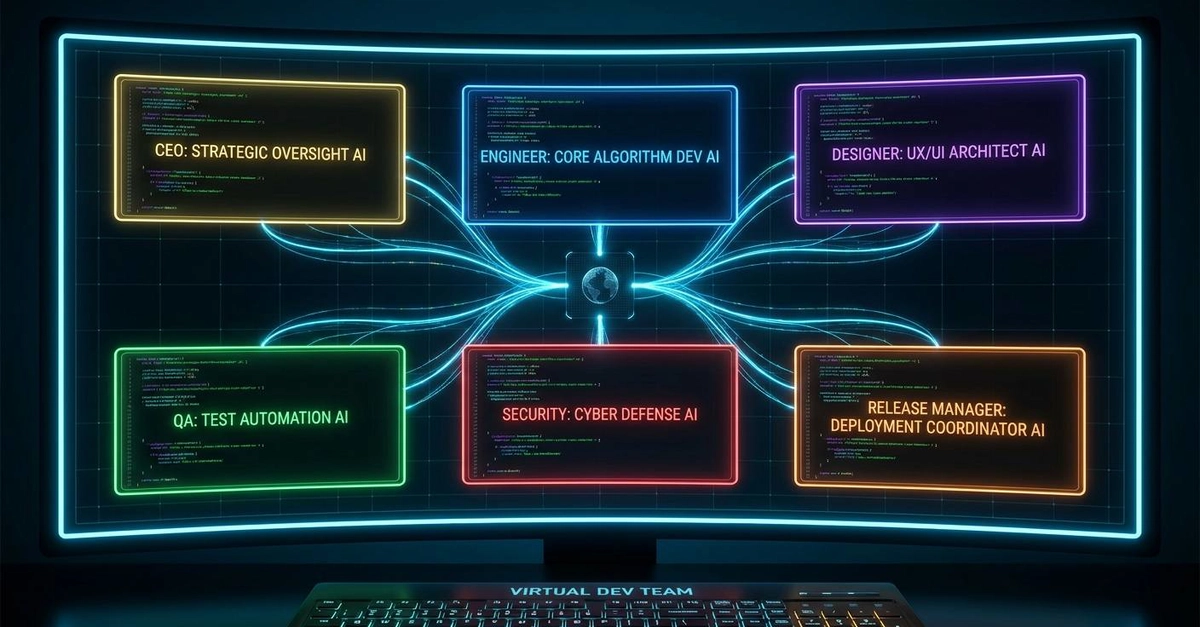
The pitch is simple but ambitious. Instead of treating Claude Code as one general purpose assistant that does a bit of everything, GStack splits it into roles. You get a CEO mode that rethinks the product idea, an engineering manager mode that locks down architecture, a designer mode that hunts for AI slop in your UI, a paranoid security reviewer, a QA lead that opens a real browser and clicks around your app, a release manager that handles git workflows, and a few more. Each role lives in its own SKILL.md file, and you call them with slash commands like /office-hours, /plan-ceo-review, /plan-eng-review, /review, /qa, /ship, and /retro.
The whole thing is built on what Garry calls a thin harness, fat skills philosophy. The framework itself is light. The intelligence sits inside heavily opinionated markdown instructions that override the generic personality of the AI. When you run /review, you do not get a polite assistant. You get something that behaves like a tired senior engineer who is one PR away from quitting, hunting for SQL injection and race conditions in your diff.
GStack and AI: How Smart Is It Really?
Here is where things get interesting. GStack itself is not an AI model. It is a wrapper, a way of structuring prompts. The actual intelligence still comes from Claude or Codex underneath. So the obvious question is whether wrapping an AI in role prompts genuinely improves output, or whether this is just clever marketing for what is fundamentally a folder of text files.
Based on our testing, the answer is somewhere in between. The role separation does deliver measurable gains for certain tasks. When we ran the same feature spec through plain Claude Code and through GStack with /plan-ceo-review followed by /plan-eng-review, the GStack version caught two edge cases the plain run missed and pushed back on a feature scope choice that frankly needed pushing back on. Several developers we spoke to reported similar experiences, with one mentioning that just using the engineer plus QA pairing cut his bug rate noticeably.
That said, there is a ceiling. GStack does not make the AI smarter. It just gets more out of what is already there. If the underlying model cannot handle your codebase, no amount of role prompting will fix that. We also noticed that for very small tasks, like a quick utility function or a one off script, GStack adds friction without much payoff. The structure helps when stakes are high. It gets in the way when they are not.
The GStack Skill System Explained
The skill system is the heart of the product. Each skill is a markdown file with detailed instructions, decision rules, and checklists that the AI follows step by step. Here is what you actually get out of the box:
/office-hours, which runs six forcing questions to challenge whether your idea is even worth building before you write any code.
/plan-ceo-review, which rethinks the request from a product strategy angle and tries to find what the team calls the ten star version hiding inside it.
/plan-eng-review, which locks in architecture, maps data flow, lists edge cases, and writes the test plan.
/plan-design-review, which rates UI ideas on a one to ten scale and explains what a ten would actually look like.
/review, which acts as a paranoid code reviewer hunting for production risks, security holes, and silent failures.
/design-review and /devex-review, which open a real browser, screenshot your live app, find AI slop in copy, and commit fixes.
/qa, which clicks through user flows in a long lived headless Chromium browser to test for regressions.
/ship, which handles the boring git workflow including branching, commits, push, and pull request creation.
/retro, which writes a team aware weekly retrospective with shipping streaks and growth opportunities.
There are about 23 tools in total when you count the smaller helpers, browser utilities, and learning management commands. The skills also feed into each other. The design doc from /office-hours becomes input for /plan-ceo-review, which feeds /plan-eng-review, and so on. That chained structure is honestly the most clever part of the whole framework.
GStack with Claude Code: The Native Pairing
GStack was built first and foremost for Claude Code, and it shows. The integration feels native because, in a real sense, it is. The skills live inside ~/.claude/skills/gstack/ and are loaded as proper Claude Code skills. Setup takes about thirty seconds with a single git clone command, and once installed the slash commands appear directly in your Claude Code session.
In practice, working with Claude Code plus GStack feels different from working with Claude Code alone. The conversation is more structured and less chatty. The AI stops trying to be helpful in vague ways and starts behaving like it has a job description. For people who already pay for Claude Code, GStack is a no brainer to at least try, since it is free and adds capability without removing anything.
The downside is that you are tightly bound to the Claude ecosystem. If Anthropic changes how skills work, or if Claude Code pricing shifts, GStack users feel it directly. We also ran into a few bugs where skills failed to invoke cleanly inside plan mode, which the maintainers are still working through based on open issues.
GStack with Codex and Other Coding Agents
Although Claude Code is the home turf, GStack has been ported to work with several other coding agents including Codex, Cursor, Windsurf, and Gemini CLI. The community has done most of this work, and the experience varies depending on which platform you use.
On Codex specifically, GStack runs but feels less polished. The slash command behaviour is approximated rather than native, and some skills that depend on the live browser daemon need extra setup. Cursor and Windsurf work reasonably well because they have their own skill systems that GStack can hook into. Gemini CLI is the newest port and is still rough around the edges.
Our honest view is that if you are already invested in a non Claude tool, GStack is worth trying, but you should expect to spend some time tweaking. If you are choosing where to start, Claude Code is still the smoothest path.
GStack Performance Review
We rated GStack across the categories that matter most for a tool like this. Here is the breakdown.
Setup and onboarding: 3.2 out of 5. Installation is genuinely fast, but the documentation assumes you already understand Claude Code skills and project conventions, which trips up beginners.
Output quality with Claude Code: 3.4 out of 5. Real gains on planning and code review, less impressive on simple tasks.
Documentation and learning curve: 2.5 out of 5. The README is dense, the philosophy is buried in long blog posts, and tutorials are mostly community made.
Cross platform compatibility: 2.6 out of 5. Strong on Claude Code, hit or miss on everything else.
Stability and bug rate: 2.8 out of 5. The project moves fast and breaks things. Several open issues affect plan mode and skill invocation.
Value for money: 3.5 out of 5. It is free, so the only cost is the underlying AI subscription.
Real productivity uplift in our tests: 2.7 out of 5. Genuine improvements on bigger tasks. Marginal on smaller ones.
Overall ICON POLLS Rating: 2.9 out of 5.0
GStack is a real tool with real merits, but the marketing has run far ahead of the actual experience. The core idea is sound. The execution is uneven. For a project barely six weeks old it deserves credit, and we expect this rating to climb as the rough edges get sanded down. Right now though, our score reflects the gap between what GStack promises and what most users will actually experience in their first week with it.
GStack on X (Twitter): What People Are Actually Saying
On X, the conversation around GStack has been polarised since launch day. The supporters are loud and the critics are louder. Here is the honest split based on the most engaged threads we reviewed.
The fans, many of whom are YC alumni or active indie developers, point to the structured workflow as a genuine breakthrough in agentic coding. They share screenshots of long shipping streaks, and credit GStack for forcing them to think before coding. The most viral posts tend to come from users who have integrated it into a daily workflow and are genuinely shipping more.
The critics push back hard on the productivity claims. The 100 pull requests in 7 days metric that Garry Tan cited has been picked apart by engineers who argue it lacks context on PR size, complexity, or post merge bug rate. A YouTube video by Mo Bitar titled in a way we will paraphrase as a critique of CEO delusion accumulated 800,000 views in 48 hours and crystallised the skeptic position. The deeper concern is that when one human plus one AI claims the output of a five person team, accountability for quality becomes blurry.
Our read is that both sides have a point. GStack genuinely improves output in the hands of an experienced developer. It does not magically turn anyone into a ten engineer team. The truth sits in the boring middle, which is why our rating is where it is.
GStack User Experience: The Real Day to Day
Now we get to the part of the review that matters most for readers actually deciding whether to install GStack tomorrow. What is it like to use, day in and day out?
The first hour
The install is genuinely fast. A single clone command, a setup script, and a CLAUDE.md edit and you are running. Where things slow down is the first time you try /office-hours or /plan-ceo-review. The skill takes its time, asks pointed questions, and frankly the experience can feel like being interviewed by a venture capitalist when you just wanted to write a quick feature. Some people love this. Others find it exhausting.
The first week
After about four or five sessions, GStack starts to feel less like an interrogation and more like a workflow. The compounding learning system, where the framework saves notes about your codebase and preferences across sessions, makes a real difference by the second week. Bug catches improve. Code review feels sharper. The pull request descriptions get cleaner.
The friction points
The most common complaints we ran into during testing and in the GitHub issues:
Skill invocation occasionally fails inside plan mode, requiring a restart.
The live browser daemon can hang on slow networks, blocking /design-review and /qa.
Some skills produce verbose output that is hard to skim during a busy day.
There is no proper team mode yet for collaborating across multiple developers, although it is on the roadmap.
Updating between versions sometimes breaks vendored copies, and the migration path is not obvious.
Who it is great for and who it is not
GStack is genuinely great for solo founders, side project builders, and small product teams shipping SaaS where the planning and review steps add real value. It is less great for backend infrastructure work where the role overhead does not match the task, for very junior developers who do not yet have the context to push back on AI suggestions, and for teams already invested in a different agent framework.
Frequently Asked Questions about GStack
1. Is GStack free to use?
Yes, GStack itself is free and open source under the MIT license. You can clone the repository, install it, and use every skill at no cost. The catch is that you still need a paid subscription to whichever AI coding tool you use it with. Most users pair it with Claude Code, which has its own pricing tier from Anthropic.
2. Who created GStack and why should I trust it?
GStack was created by Garry Tan, the President and CEO of Y Combinator. Before YC he was an early engineer, designer, and product person at Palantir, cofounded Posterous which sold to Twitter, and built Bookface which is the internal social network used by YC companies. He has roughly two decades of product building experience and has personally advised thousands of startups, which gives the framework an unusual amount of opinionated structure baked into it.
3. Does GStack work with Codex, Cursor, or Gemini CLI, or only Claude Code?
GStack was built primarily for Claude Code and the experience is smoothest there. Community ports exist for Codex, Cursor, Windsurf, and Gemini CLI, and they work reasonably well, but expect to do some manual configuration. If you have not yet picked a coding agent, Claude Code is the path of least resistance for using GStack as intended.
4. How long does it take to set up GStack?
The install itself takes around thirty seconds with the official setup script. Getting comfortable with the skills takes longer, usually three to five sessions before the workflow stops feeling foreign. We suggest starting with a small side project rather than dropping it into your main codebase on day one.
5. Is the 100 pull requests in 7 days claim by Garry Tan realistic?
It is real for him in his specific context, but it is not a normal benchmark to expect for yourself. Garry Tan has decades of experience, a deep familiarity with his own codebases, and runs the framework in a finely tuned setup. Most developers we spoke to saw productivity gains in the range of one and a half to three times their previous output, not ten times. Treat the headline numbers as marketing and judge the tool on whether it improves your own workflow.
6. Is GStack safe to use in production codebases?
With caveats, yes. The skills include a security review role and a paranoid code reviewer that catches common production risks like SQL injection, race conditions, and silent failures. There is also a local ML classifier that scans tool output for prompt injections before the AI sees them. That said, no AI workflow should run autopilot on a production codebase. Always review the changes GStack proposes, especially for anything touching auth, payments, or user data.
7. What is the difference between GStack and other agent frameworks like Superpowers or GSD?
All three frameworks try to fix the ways AI coding agents fall apart on real projects, but they take different approaches. Superpowers focuses on enforcing test driven development. GSD prevents context loss across long sessions. GStack adds role based governance with a 23 person virtual team model. If your projects have product dimensions and benefit from product thinking, GStack is the strongest fit. For pure infrastructure work, the other two may be lighter weight options.
8. Does GStack store any of my code or data on external servers?
GStack itself runs locally on your machine. The skills are markdown files, the configuration lives in your home directory, and the browser daemon runs locally. Your code and prompts do still travel through whichever AI provider you are using, so the privacy posture is essentially the same as your underlying tool. If you use Claude Code, your data is governed by Anthropic terms. GStack does not add any extra telemetry.
9. Will GStack make me a better engineer or just faster?
This is the question with the most interesting answer. Several developers told us GStack made them more thoughtful, not just more productive, because the planning skills force you to articulate decisions you would otherwise make on instinct. Others said the opposite, that leaning on GStack reduced their own deep engagement with the code. Our take is that GStack rewards engaged users and lets disengaged ones coast. You get out what you put in.
10. Should I use GStack if I am a beginner?
Not yet, in our opinion. GStack assumes you can read its critiques and push back when they are wrong. Beginners often accept whatever the AI says, and that is exactly the failure mode the framework cannot rescue you from. Spend a few months with plain Claude Code or Cursor first, build instincts about when the AI is bluffing, and then revisit GStack once you are ready to argue with it productively.