Quick Verdict
Guidde has built something that genuinely solves a real and persistent problem in modern workplaces: the endless cycle of writing documentation that nobody reads, answering the same support question for the hundredth time, and watching new hires struggle through onboarding materials that would have been clearer as a two-minute video. The Chrome extension captures your workflow in real time, the AI generates a step-by-step voiceover guide automatically, and the whole thing is shareable in minutes without any video editing skill required. Organizations using it report cutting documentation creation time by up to 90 percent and seeing measurable drops in support ticket volume. The G2 rating of 4.7 out of 5, the SOC 2 Type II certification, the trust from companies like IKEA and HP, and the active product development trajectory all add up to a product that is delivering on its core promise. The rating does not hit 4.5 or higher because of two real friction points: the Business plan's hard cap at 5 creators before you are pushed into custom Enterprise pricing, and the fact that several genuinely important features like desktop recording, analytics, AI voiceover, and PII redaction are locked behind paid tiers in ways that create pricing surprises for teams mid-evaluation. The product is excellent for its core audience. Know what you are getting before committing to a tier. We rate Guidde 4.2 out of 5 for 2026.
At a Glance: Icon Polls Ratings
Here is how Guidde scored across the areas we evaluated in our 2026 research:
|
Category |
Stars |
Score |
|
AI Documentation Speed and Quality |
★★★★★ |
4.5/5 |
|
Chrome Extension Experience |
★★★★★ |
4.5/5 |
|
AI Voiceover and Multilingual |
★★★★★ |
4.5/5 |
|
Ease of Use for Non-Technical Teams |
★★★★★ |
4.5/5 |
|
Free Plan Value |
★★★★☆ |
3.5/5 |
|
Pricing Transparency |
★★★★☆ |
3.5/5 |
|
Integrations and Sharing |
★★★★☆ |
4/5 |
|
Overall |
★★★★☆ |
4.2/5 |
What Is Guidde?
Guidde is an AI-powered video documentation platform that turns screen recordings into professional how-to guides, training materials, SOPs, and product walkthroughs in a fraction of the time it would take to create them manually. The product launched in 2021 as a purposeful response to the documentation problem that every growing company eventually hits: institutional knowledge is trapped in people's heads, training materials fall behind reality the moment they are published, support teams answer the same questions repeatedly, and new hires are handed written guides nobody has time to keep updated.
The founding insight was that video is the format people actually want to consume this kind of content, but the reason companies use text instead is that video production takes time and skill that most organizations do not have in abundance. Guidde's answer was to strip out the production work entirely. You record your workflow once using the Chrome extension. Guidde's AI generates the step-by-step guide structure, writes contextual descriptions for each step, adds professional voiceover narration, and assembles the whole thing into a shareable video guide. No editing. No scripting before you record. No waiting for a video editor to make it look professional.
By 2024, Guidde had added enterprise-grade features including SSO integration, analytics, PII automatic redaction, and a desktop app for recording non-browser workflows. In 2025 and 2026, the platform introduced 400-plus AI voice options across 50-plus languages, 13 dynamic step transitions, background music options, interactive elements, custom AI avatars at the Enterprise tier, and the Broadcast feature for delivering contextual guidance inside your tools. The product has evolved from a Chrome extension novelty into a genuine enterprise documentation platform that companies like IKEA and HP trust with their training content.
The user base spans customer success teams building help centers, HR departments managing onboarding, product teams documenting feature releases, IT operations creating SOP libraries, and sales enablement teams producing training content. The common thread is that every one of these teams needs to produce clear visual documentation faster than traditional methods allow, and Guidde delivers on that specific requirement better than most alternatives.
The Guidde App: Download and Access
Guidde's primary interface is the web application at guidde.com, where you manage your library of guides, edit completed recordings, set up your brand kit, manage team access, and view analytics. There is no standalone desktop app for browsing or managing your Guidde library on Windows or Mac in the traditional sense, though a desktop recording application is available for capturing non-browser workflows on the Business and Enterprise plans.
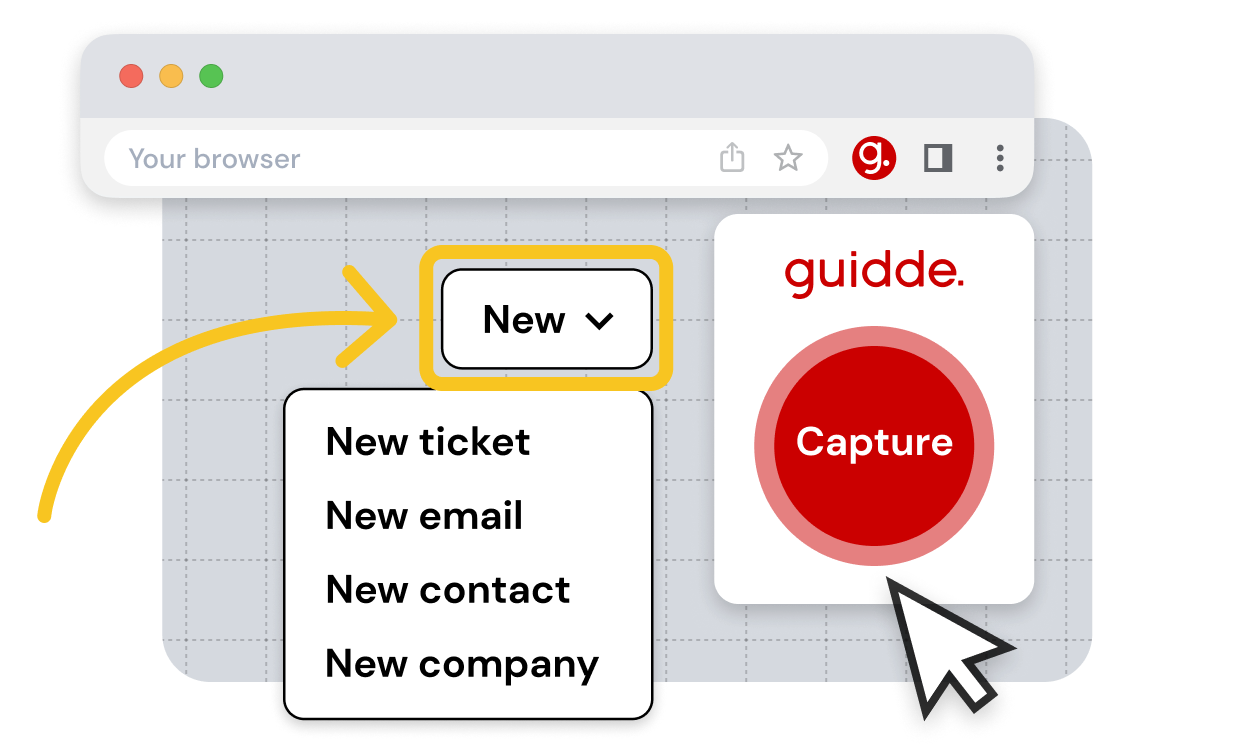
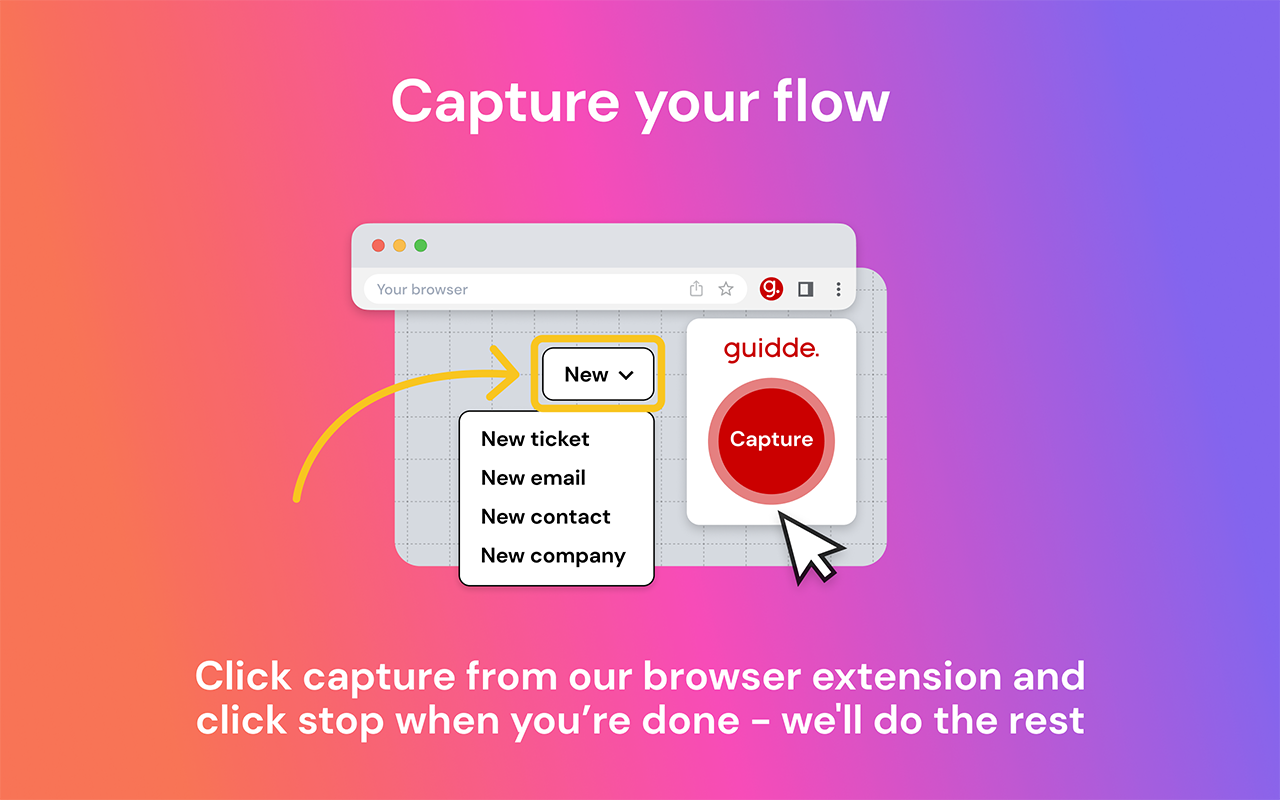
For everyday guide creation, no download is required at all. You install the Chrome extension from the Chrome Web Store, and from that point forward the extension handles the recording. The Guidde extension sits in your Chrome toolbar. When you want to document a workflow, you click the extension, start your task in the browser, and Guidde captures each step automatically as you click through the interface. There is nothing to configure before each recording. The capture happens as you work.
Once recording is complete, Guidde processes the capture and within a short time presents you with a complete storyboard of your workflow: numbered steps with screenshots of each action, AI-generated descriptive text for each step, and the option to add or replace the narration with an AI voiceover. The editor lets you adjust the script, swap any AI voice from the library, update design elements, add branding, or insert interactive elements like clickable CTAs. When you are satisfied, you share the guide via a public link, embed code, or export as MP4, GIF, or PDF depending on your plan.
The desktop recording app, available on Business and Enterprise tiers, extends the same workflow to applications outside the browser. This is meaningful for companies documenting native desktop software, enterprise applications that do not run in Chrome, or any workflow that touches files and folders outside the browser environment. For teams whose entire workflow happens in web applications, the browser extension alone covers the full use case.
Login and Account Setup
Creating a Guidde account is done at guidde.com with an email address and password or through Google account sign-in. The signup process is quick and the free plan is accessible immediately without a credit card. For teams being added to an existing workspace, an admin sends an invitation by email and the team member creates their account through the invitation link.
First-time users who install the Chrome extension are guided through a brief onboarding flow that explains the core recording workflow before their first capture. This onboarding is practical rather than lengthy and most users describe being ready to record their first guide within minutes of account creation. The Guidde help center and dedicated customer support team provide additional guidance when users want to go deeper on specific features.
For Enterprise customers, SSO integration with providers including Okta, Microsoft, and OneLogin simplifies access management and allows IT departments to manage Guidde access through the same identity provider they use for other enterprise tools. SCIM provisioning enables automated user management, meaning new employees are added to Guidde and former employees are removed automatically through the organization's existing HR systems.
The main login-related complaint that surfaces in reviews concerns the Business plan's cap of 5 creators. Teams that grow beyond that number find themselves pushed into custom Enterprise pricing negotiations rather than being able to simply add seats at a known per-user rate. For rapidly growing teams, this pricing structure creates planning friction that a simpler per-seat unlimited model would avoid.
The AI Layer: What Makes Guidde Different
The AI in Guidde is not a feature bolted onto a screen recorder. It is the core of the product and the reason why the platform can credibly claim to make documentation 11 times faster than traditional methods. Understanding what the AI actually does at each stage of the workflow explains why this claim has practical basis.
Magic Capture and Auto Storyline
When you record a workflow in Guidde, the system does not just capture a raw screen video. It captures the logical structure of what you are doing: which elements you click, what changes in the interface as a result, and what the meaningful steps in the process are. From this structural capture, Guidde's AI automatically generates a storyline, breaking the workflow into numbered steps and writing descriptive text for each one. The descriptions are context-aware: instead of writing click the button, the AI produces descriptions like navigate to the Settings menu and select User Management.
The automatic step generation is where most of the time saving happens. In a traditional documentation workflow, the writer watches their recording and transcribes what they did at each step. With Guidde, that transcription happens automatically and arrives pre-formatted. The writer's job shifts from creating the structure to reviewing and refining it, which is a fundamentally faster process.
AI Voiceover With 400-Plus Voices and 50-Plus Languages
Once the step structure is generated, Guidde offers two narration paths. You can speak your narration during the recording, in which case Guidde's AI transcribes your speech, cleans it up, and converts it into a professional voiceover. Or you can skip speaking entirely and have the AI generate a voiceover from the written step descriptions using any of the 400-plus available voices across 50-plus languages.
The voice library covers a wide range of accents, genders, and tones. For enterprise teams serving global audiences, the ability to generate a Spanish-language guide for Latin American customers or a German guide for a European team from the same base recording, without any additional recording sessions, is a meaningful operational advantage. A G2 reviewer at Siemens Energy specifically described using this capability to meet a company requirement for training materials in both German and English, describing it as easy to implement with Guidde's multilingual capabilities.
Voice cloning is available for teams that want the AI to narrate in a voice that sounds like a specific team member, creating a more personalized experience for recipients without requiring that person to record every guide themselves. This feature is particularly useful for companies building customer-facing tutorial libraries where a consistent, recognizable narrator voice strengthens brand trust.
Magic Mic and Audio Cleanup
For users who do choose to speak their narration during recording, the Magic Mic feature handles audio cleanup automatically. Background noise is reduced, verbal mistakes are cleaned up, and the final voiceover sounds considerably more professional than the raw recording would. For teams that want the authenticity of a human voice without the production setup, Magic Mic bridges the gap between a messy real recording and a polished finished product.
PII Redaction and Privacy-Safe Capture
In regulated industries and any environment handling personal data, the automatic PII redaction feature is particularly valuable. Guidde's AI detects personally identifiable information in captured screenshots, including names, email addresses, phone numbers, and other identifiable details, and blurs them automatically before the guide is published. This removes the error-prone manual step of reviewing every frame of a recorded guide for accidental data exposure. PII redaction is included in the Business and Enterprise plans. The platform also commits explicitly to not using customer content for AI training, a policy that is legally binding in its terms of service, which matters significantly for enterprise buyers concerned about where their proprietary workflows go after recording.
The Guidde Free Plan: Honest Assessment
The free plan at Guidde gives individuals and small teams enough to genuinely evaluate whether the platform works for their use case before committing to a paid tier. It includes up to 25 how-to video guides (an increase from the earlier limit of 3 per month, reflecting Guidde's move to a total video cap rather than a monthly cap), motion effects and background music to add visual polish, the ability to record voiceovers during capture, and public sharing links so recipients can view guides without a Guidde account.
The limitations that push teams toward paid plans are meaningful and are worth knowing upfront rather than discovering mid-project. Free plan guides include the Guidde watermark on all outputs, which makes them inappropriate for professional external sharing or client-facing documentation. The free plan does not include the Brand Kit for adding custom logos, colors, and fonts. Video export as MP4 or GIF requires at least the Pro plan. AI voiceover narration, one of the platform's most compelling features, is not included on the free tier. Analytics to understand which guides users are engaging with and where they drop off are not available. And desktop recording for non-browser workflows requires the Business plan.
For someone using Guidde to document personal workflows, test the product for a purchase decision, or share occasional how-to guides internally with no external audience, the free plan delivers real value. For any professional use case where the watermark is unacceptable, AI voiceover is central to the workflow, or guide volume will quickly exceed 25, a paid plan is the appropriate starting point. The 25-guide cap does not reset monthly. Once you have created 25 guides on the free plan, additional guide creation requires upgrading.
Guidde Pricing in 2026: Plans and What to Know
Guidde's pricing is divided into two product categories: Create, for building guides and documentation, and Broadcast, for delivering contextual guidance inside your tools. Most teams start with the Create track. Here is the current Create pricing:
|
Plan |
Price |
What You Get |
|
Free |
$0/creator/month |
Up to 25 guides total. Guidde watermark on all outputs. Record voiceovers manually. Motion effects and music. Public sharing links. No AI voiceover, no brand kit, no video export. |
|
Pro |
$23/creator/month (annual ~$18) |
Unlimited guides. Watermark removal. Brand Kit with custom logo, colors, and fonts. Export as MP4, GIF, or PPT. Blur sensitive data manually. Support through web form and help center. |
|
Business |
$50/creator/month (annual ~$39), max 5 creators |
Everything in Pro plus AI text-to-voice voiceover, desktop app for non-browser recording, advanced analytics, interactive elements, up to 5 creators. 7-day free trial available. |
|
Enterprise |
Custom pricing |
Everything in Business plus SSO and SCIM provisioning, PII Magic Redaction, 400-plus studio voices, auto-translation to 100-plus languages, SCORM export for LMS, custom AI avatars, content approval workflows, Broadcast feature, dedicated Customer Success Manager. |
Annual billing saves approximately 20-25% versus monthly rates shown. A 7-day free trial is available on the Business plan. The Broadcast product category (for in-app contextual guidance delivery) has separate Business and Enterprise pricing negotiated on contact. Pricing verified April 2026 from official sources including guidde.com/pricing.
The Pricing Friction Points
The Business plan's hard cap at 5 creators is the most significant structural complaint in independent pricing analyses of Guidde. A team that starts on Business at $50 per creator per month, grows to 6 or 7 people, and wants to add seats cannot simply upgrade within the Business plan. They are redirected to custom Enterprise pricing negotiations, which takes time and typically results in a higher per-seat cost than Business. For growing startups and mid-size teams trying to scale documentation programs, this forced escalation is a planning disruption that per-seat unlimited Business pricing would avoid.
Feature gating between plans is also tighter than some users expect. AI voiceover, which is genuinely the core differentiating feature of the platform, sits behind the Business plan rather than being available on Pro. A team that upgrades from Free to Pro to get professional outputs will discover that the AI narration they saw in Guidde's marketing materials requires a further upgrade to Business. This creates a three-tier evaluation path that can feel like a bait and switch for users who reasonably assumed AI voiceover was included in the paid product.
On the positive side, Guidde does not charge per-guide usage fees or metered AI credits on paid plans. Once you are on a paid tier, you can create as many guides as you need and use the AI features as extensively as your work requires. The predictable flat monthly cost is a meaningful advantage over platforms that charge per generation or per minute of processed video, particularly for teams with variable documentation volume.
The Chrome Extension: The Product's Core Delivery Mechanism
The Guidde Chrome extension is the reason the product works as simply as it does. Available on the Chrome Web Store with a 4.5-star average, the extension is the recording engine that makes one-click capture possible. You install it once, grant it permission to observe browser activity during recording sessions, and it is ready to work with no further configuration.
When you initiate a recording from the extension, a subtle recording indicator appears and you proceed with your normal workflow. Click through a settings configuration. Navigate through a registration process. Demonstrate a software feature step by step. The extension captures each significant action, records the interface state at each step, and tracks what changed between clicks. When you stop the recording, the extension hands everything to Guidde's AI for processing.
G2 reviewers consistently describe the extension's fast performance and seamless browser integration as standout qualities. One reviewer from a healthcare-adjacent team described loving how Guidde is well integrated in the browser, making it an excellent tool for seamless operation within their existing digital environment. Another reviewer specifically praised the fact that the output is published in seconds, with the AI transforming a raw recording into a structured guide without the user needing to do any editing before sharing.
The extension's practical limitation is that it records browser-based workflows only. If your documentation need involves a native desktop application, a file management workflow in Windows Explorer or Finder, or any process outside Chrome, the extension cannot capture it. The desktop recording app available on Business and Enterprise plans addresses this gap for teams that need it, but it is a separate download rather than an extension of the browser tool.
One notable privacy aspect of the extension worth knowing: recording permissions are scoped to active recording sessions only. The extension does not continuously monitor your browsing activity. It captures only when you explicitly initiate a recording, and the SOC 2 Type II certification, AES-256 encryption at rest, and TLS 1.2+ in transit apply to all captured content. Guidde also confirms explicitly in its terms that captured content is not used for training AI models.
User Experience: Real Workflows, Real Results
The user experience of Guidde splits along a clear line: teams that needed video documentation but did not have the time or skill to produce it professionally, versus teams that have existing video production workflows and are evaluating whether Guidde fits alongside them.
For the first group, the experience is consistently described as transformative. A customer success team that was previously writing long text documentation for common questions discovers they can answer the same question with a two-minute guided video that shows exactly where to click. A product manager who spent an afternoon writing a feature release guide discovers they can create a professional video walkthrough in 15 minutes. A support lead who was copy-pasting answers to repeated questions discovers they can build a visual FAQ library that resolves tickets before they are even submitted. Product Hunt reviewers describe using Guidde for all their how-to instructions with the simplicity never ceasing to amaze them, and being able to create professional-quality video documentation with audio narration, a storyboard, and voiceover in a matter of mouse clicks.
The drop in support ticket volume is one of the most cited business outcomes from Guidde users. One company reviewed on guidde.com described using the platform to create a tutorial video library for clients, and seeing increasing video views alongside decreasing support tickets as a direct result. This is the business case Guidde is built around: the cost of creating visual guides that prevent support tickets is lower than the ongoing cost of answering those tickets manually.
For the second group, teams with existing video production capability and high standards for visual quality, Guidde's outputs can feel basic. G2 and Product Hunt reviews occasionally describe the customization options as limited compared to traditional video editors, the AI narration quality as inconsistent for languages outside English, and the avatar options as still lacking realistic movement. One G2 reviewer described the avatar as static when added as a speaker element, which reduced the visual engagement compared to what they had hoped for. These are real limitations for teams with high creative standards, but they represent a different use case from the core documentation efficiency scenario Guidde is optimized for.
Audio sync issues are a documented but relatively minor complaint across reviews. Some users describe slight mismatches between the on-screen timing and the AI narration in complex multi-step guides. The platform's ability to edit the script and re-generate the audio without re-recording addresses this when it occurs, though it adds a step to the workflow that the platform's marketing implies is unnecessary.
Integrations and Sharing: Getting Guides Where They Need to Go
Guidde's integration surface covers the tools where teams actually need documentation to live. For customer support, native integrations with Salesforce, Zendesk, and Intercom allow support agents to send Guidde guides directly within a ticket response rather than writing text answers. The visual guide appears in the same channel the customer is already using, without requiring them to visit a separate help center.
For internal knowledge management, Notion and Confluence integrations let teams embed Guidde guides directly into their wikis and documentation pages. A process SOP in Confluence becomes a live embedded video guide rather than a static text document with screenshots. When the software UI changes, the guide is updated in Guidde and the embedded version in Confluence automatically reflects the change, solving the notorious problem of documentation that falls out of date.
Slack integration enables sharing and commenting on guides directly within workspace conversations. For remote teams where documentation requests come through Slack, the ability to respond with a Guidde link that auto-previews in the thread is a practical quality-of-life improvement for support and customer success workflows.
For teams using learning management systems, SCORM export at the Enterprise tier enables Guidde guides to be imported into LMS platforms that organizations like universities and corporate training programs use to deliver and track course completion. This turns Guidde from a standalone documentation tool into a component of a broader formal learning delivery system.
Public sharing links work for anyone, without requiring the recipient to have a Guidde account or log in. For external customer documentation, this frictionless access is essential. Internal guides can be restricted to workspace members. The Broadcast feature at Enterprise tier goes further, enabling contextual delivery of guides directly inside users' web applications, which moves from reactive documentation lookup to proactive guidance that appears at the moment it is relevant.
Pros and Cons
What Guidde Gets Right
One-click Chrome extension capture turns any browser workflow into a professional step-by-step guide automatically, with no recording preparation or manual editing required
AI auto-generates the guide structure, step descriptions, and voiceover narration from a single recording, reducing documentation creation time by up to 90 percent compared to manual processes
400-plus AI voices across 50-plus languages enable global documentation from a single recording without additional recording sessions for each language variant
Editing without re-recording: if the software UI changes or a verbal mistake was made, the script and audio can be updated without going back to capture the workflow again
Organizations report measurable drops in support ticket volume after deploying Guidde video guides, reflecting the practical business impact of visual documentation
SOC 2 Type II certification, GDPR and CCPA compliance, AES-256 encryption at rest and in transit, and a firm commitment to not using customer content for AI training build appropriate enterprise trust
Customer support quality is consistently praised across G2 and Capterra as responsive and invested, with one reviewer specifically describing their support experience as great
Integrations with Salesforce, Zendesk, Intercom, Notion, Confluence, and Slack deliver guides inside the tools teams already use rather than requiring a context switch
A 2026 study from the Association for Talent Development found 23 percent faster employee onboarding and 31 percent higher knowledge retention from AI-powered video documentation versus text-based alternatives
Trusted by enterprise organizations including IKEA and HP, validating the platform's readiness for large-scale documentation programs
Where Guidde Has Limitations
The Business plan's hard cap at 5 creators forces growing teams into custom Enterprise pricing negotiations rather than allowing unlimited seat additions at a known per-seat rate
AI voiceover, the platform's most compelling feature, is locked behind the Business plan rather than included in Pro, creating pricing expectations that the Pro plan does not meet
Free plan is limited to 25 total guides with no reset, which means evaluation users exhaust the free tier relatively quickly and face a paid commitment before completing a thorough test
Desktop recording for non-browser workflows requires the Business plan, meaning Pro users documenting native application workflows cannot use the full platform
Advanced analytics to understand guide engagement, completion rates, and drop-off points are not available on Pro, reducing the ability to optimize documentation effectiveness without upgrading
AI voice quality varies by language, with English narration consistently praised and some non-English languages described as less natural by reviewers
Avatar options currently produce static visuals when a speaker is added to a step, which is less engaging than animated or lifelike presenters some users hope for
Audio sync issues between AI narration and on-screen timing are occasionally reported in multi-step guides, requiring manual script and audio adjustment
No dedicated mobile app for browsing or managing guides from a phone, which is a gap for managers who want to review their team's documentation library on mobile
How Guidde Compares to Alternatives
Guidde vs Loom: Loom is the dominant async video messaging tool and the most commonly cited alternative. The key distinction is purpose: Loom records face-cam and screen together for real-time communication, enabling you to send a personal video message as an alternative to an email or meeting. Guidde records structured workflows and transforms them into professional guides, optimized for documentation and knowledge sharing rather than communication. Loom does not auto-generate step descriptions, voiceover, or a structured storyline from your recording. For teams that want to replace documentation with walkthrough videos rather than replace emails with video messages, Guidde is the more appropriate tool.
Guidde vs Scribe: Scribe is the closest direct competitor and the most frequently mentioned alternative in documentation-focused evaluations. Scribe automatically captures workflows and generates step-by-step guides, but its output is primarily text and screenshots rather than video. Scribe's Pro Team plan at $15 per seat per month is cheaper than Guidde Business at $50 per creator per month for teams of 5 or more. Guidde's advantage is in the video output, voiceover generation, and the resulting engagement and retention that video documentation delivers over static screenshot guides. Teams that need primarily text-and-image guides and are managing cost closely may find Scribe more economical. Teams that want video as the primary format will find Guidde's output quality worth the price difference.
Guidde vs Tango: Tango is another workflow documentation tool that produces step-by-step screenshot guides automatically. Like Scribe, it focuses on static guides rather than video. Tango has been particularly popular among product teams for quick process documentation. Guidde offers more customization for professional outputs and the video format advantage. For teams specifically building video training libraries, Guidde is the stronger choice. For teams that need quick internal process documentation in text format, Tango and Scribe are both efficient and typically more affordable.
Guidde vs Camtasia: Camtasia is a full-featured screen recording and video editing tool used by professional training content creators. It produces higher customization and production quality than Guidde but requires significantly more time and editing skill. Camtasia is the right tool for teams producing formal e-learning courses or video content where every second of the production is deliberately crafted. Guidde is the right tool for teams that need professional-enough output at a fraction of the time investment. The two serve different points on the speed-versus-polish spectrum.
Frequently Asked Questions About Guidde (2026)
1. What is Guidde and what does it actually do?
Guidde is an AI-powered video documentation platform that turns screen recordings into professional how-to guides, training videos, SOPs, and product walkthroughs automatically. You install the Chrome extension, click to start recording, and work through whatever process you want to document. Guidde's AI captures your workflow, breaks it into numbered steps, writes contextual descriptions for each step, and offers to narrate the whole thing with a professional AI voiceover in the voice and language of your choice. The finished guide is shareable via link, embeddable in help centers and wikis, or exportable as MP4, GIF, or PDF depending on your plan. The platform is used by customer success teams, HR departments, product managers, IT operations, and sales enablement teams who need to create clear visual documentation fast without video editing skills. Guidde claims its platform reduces documentation creation time by up to 90 percent compared to traditional methods.
2. Is Guidde free to use?
Yes, Guidde has a permanent free plan that does not require a credit card. The free plan allows up to 25 how-to guides total (not per month), motion effects and background music, manual voiceover recording during capture, and public sharing links. The limitations are significant for professional use: all free guides display the Guidde watermark, the Brand Kit for custom branding is not included, AI voiceover narration is not available, video export as MP4 or GIF is not available, and analytics are not included. The free plan is genuinely useful for evaluating whether Guidde fits your workflow, creating occasional personal process guides, or sharing internal documentation where the watermark is acceptable. For any external or client-facing use, removing the watermark requires at minimum the Pro plan at $23 per creator per month on annual billing.
3. How do I download and install Guidde?
Getting started with Guidde does not require downloading traditional software. The main tool is the Chrome browser extension, available at the Chrome Web Store by searching for Guidde. Install it with one click. Once installed, the Guidde icon appears in your Chrome toolbar and you are ready to start recording. The web app at guidde.com serves as your guide library, editor, and team workspace, accessible through any modern browser without installation. For Business and Enterprise users who need to record non-browser workflows, a separate desktop recording app is available for download through your Guidde account settings. There is no native mobile app for creating or managing guides on a phone.
4. How do I log in to Guidde?
Log in to Guidde at guidde.com using your email and password, or through Google account sign-in. For Enterprise users whose organizations have configured SSO integration with Okta, Microsoft, or OneLogin, you log in through your organization's identity provider rather than directly through Guidde credentials. The Chrome extension uses the same credentials as the web app and stays logged in between browser sessions, so you do not need to re-authenticate every time you want to record. If you are joining a team workspace, look for the invitation email sent by your admin and create your account through the link in that email rather than signing up independently, to ensure you are connected to the correct workspace from the start.
5. How much does Guidde cost in 2026?
Guidde has four pricing tiers. Free is $0 per creator per month with 25 total guides and significant limitations. Pro is $23 per creator per month (approximately $18 per month on annual billing) and adds unlimited guides, watermark removal, Brand Kit, and video export. Business is $50 per creator per month (approximately $39 annually) and adds AI voiceover, desktop recording, analytics, and interactive elements, with a hard cap at 5 creators. Enterprise has custom pricing and includes SSO, PII redaction, 400-plus studio voices, auto-translation, SCORM export, custom AI avatars, and a dedicated Customer Success Manager. Important to know: the AI voiceover narration, which is one of the most heavily featured capabilities in Guidde's marketing, requires the Business plan, not Pro. Teams that subscribe to Pro expecting AI narration will need to upgrade further. A 7-day free trial is available on the Business plan.
6. What is the Guidde Chrome extension and how does it work?
The Guidde Chrome extension is the recording tool that makes one-click workflow capture possible. You install it from the Chrome Web Store, then whenever you want to document a workflow, click the Guidde icon in your toolbar and select Start Recording. A recording indicator appears and you proceed through your workflow normally, clicking through the process you want to document. The extension automatically captures each significant action, takes screenshots at each step, and records what changed in the interface between clicks. When you click Stop Recording, the extension sends your capture to Guidde's AI, which processes it into a structured guide with numbered steps, written descriptions, and the option to add AI voiceover. The extension only records during active recording sessions. It does not continuously monitor your browsing. Permissions can be reviewed and revoked at any time through Chrome's extension management settings.
7. What AI features does Guidde include?
Guidde's AI capabilities span several areas across the documentation workflow. Auto Storyline Generation automatically breaks your recording into numbered steps and writes contextual descriptions for each action, removing the manual transcription step from documentation creation. AI Voiceover generates professional narration from your step descriptions in 400-plus voice options across 50-plus languages without any recording required. Voice Cloning creates narration that sounds like a specific team member for personalized guides. Magic Mic cleans up audio from spoken narrations recorded during capture, reducing background noise and verbal mistakes. Auto-Translation converts guide content into over 100 languages at the Enterprise tier. Magic Redaction automatically detects and blurs personally identifiable information in screenshots at the Enterprise tier. Analytics tracks which guides users engage with and where they drop off, enabling optimization of documentation effectiveness. Interactive elements allow clickable CTAs, buttons, and quiz-style interactions to be embedded in guides at the Business tier.
8. Is Guidde secure and safe for sensitive business content?
Guidde holds SOC 2 Type II certification, validated by independent security audits, which is the standard enterprise security credential for SaaS tools handling business-sensitive data. The platform is GDPR and CCPA compliant. Data is encrypted at rest using AES-256 and in transit using TLS 1.2 or higher. The platform is hosted on Google Cloud Platform. Guidde commits explicitly and legally in its terms of service to not using customer-captured content to train AI models, which is a meaningful data protection assurance for enterprises concerned about proprietary workflow information. Guide access defaults to private, visible only to the creator and designated workspace members, until explicitly shared. Enterprise customers get role-based access controls, audit logs, and SSO integration for centralized access management. The Business tier includes manual blur for sensitive information in recordings. The Enterprise tier adds Magic Redaction for automatic PII detection and blurring, which is important for teams in regulated industries working with personal data.
9. How does Guidde compare to Loom?
Guidde and Loom serve genuinely different purposes and the comparison depends on what you need to create. Loom is an async video messaging tool where you record your screen and face together to send a personal video as an alternative to writing an email or scheduling a meeting. It is communication-first: you see the presenter, you hear their voice, and the recording is typically watched once in real time and not referenced again as documentation. Guidde is documentation-first: it captures structured workflows and transforms them into professional step-by-step guides designed to be referenced repeatedly, shared with customers, embedded in help centers, and updated without re-recording. Loom does not automatically generate step descriptions, voiceover from a text script, or a structured storyboard from your recording. Guidde does not produce the personal, face-cam presence that makes Loom effective for async communication. Many teams use both: Loom for quick team communication and Guidde for formal documentation and customer-facing knowledge bases.
10. What types of teams and companies use Guidde?
Guidde's user base spans several consistent team types across industries. Customer success teams use it to build visual help centers and tutorial libraries that let customers self-serve answers without submitting tickets, reducing support volume while improving satisfaction. HR and people operations teams use it for employee onboarding, ensuring new hires receive consistent, accurate, and engaging training materials regardless of who is doing the onboarding. Product teams use it to document feature releases, internal tools, and software training for cross-functional teams who need to adopt new capabilities quickly. IT operations use it for SOP libraries and process documentation that stays accurate even as software interfaces change, because guides can be updated without full re-recording. Sales enablement teams use it to create product demo libraries and training content for sales reps. The platform is trusted by enterprises including IKEA and HP as well as smaller SaaS companies, agencies, and fast-growing startups who need professional documentation faster than traditional methods allow. Industries with particularly strong Guidde adoption include SaaS, financial services, healthcare-adjacent organizations (leveraging the HIPAA-aligned PII redaction), and education and training providers.
Icon polls Verdict
Guidde earns a 4.2 out of 5 from Icon Polls in 2026. The core product does exactly what it promises and delivers it in a way that genuinely changes how teams think about documentation. The Chrome extension plus AI pipeline turns a workflow recording into a professional shareable guide faster than any alternative process, and the multilingual voiceover capability means global teams can scale their documentation reach from a single recording. The business outcomes users report, specifically the drop in support tickets and the improvement in onboarding speed, reflect a product that is solving a real operational problem rather than adding a marginal convenience.
The 4.2 rather than a higher score reflects two structural product decisions that create friction for specific user segments. The Business plan's 5-creator cap, which forces growing teams into Enterprise pricing negotiations rather than allowing unlimited per-seat expansion, is the most consistent pain point in independent analyses of the platform. And the placement of AI voiceover, the feature most central to Guidde's value proposition, behind the Business plan rather than Pro creates a pricing experience that does not fully match what the marketing implies. These are fixable decisions rather than fundamental product limitations, and if Guidde addresses the creator cap and reconsiders the feature gating structure, the product genuinely merits a higher rating.
For teams evaluating Guidde in 2026: start with the free plan and create five to ten guides covering your most common documentation needs. If the output quality and creation speed match what you see in the product demo, upgrade based on which features your actual workflow requires. If AI voiceover is central to your use case, budget for Business rather than Pro from the start. If your team is larger than 5 creators and you want to avoid Enterprise pricing conversations, factor that into your evaluation timeline. And if you handle regulated data or sensitive workflows, the Business tier's blur functionality and the Enterprise tier's Magic Redaction and SOC 2 certification make Guidde an appropriate choice even for compliance-sensitive environments.