
|
Profile item |
Details |
|
Product name |
Higgsfield Vibe-Motion |
|
Category |
AI motion-design and video-creation workspace |
|
Main use |
Create animated text, logo motion, infographics, presentations and social visuals |
|
Access |
Cloud-based Higgsfield workspace, used in a web browser |
|
Key controls |
Chat prompt, editable canvas, text, color, font, position, timing and motion settings |
|
Download |
No separate Vibe-Motion desktop download is required for the main workflow |
|
APK |
No verified official Vibe-Motion APK should be assumed |
|
Pricing model |
Credit and plan-based access. Prices and included usage can change |
|
Best for |
Creators, marketers and small teams who need fast motion assets |
|
ICON POLLS rating |
3.6 out of 5 |
Higgsfield Vibe-Motion Review in 2026
Higgsfield Vibe-Motion is aimed at people who want motion graphics without beginning inside a traditional timeline editor. You describe the idea, add assets if needed, let the system build a draft, then adjust the parts that matter. The useful part is not simply that it generates animation. It is that the result remains editable after generation.
For this review, ICON POLLS looked at the core workflow, available controls, pricing model, download questions and the kind of user the product is most likely to help. Vibe-Motion makes a strong first impression when turning a simple brief into animated typography, a branded logo reveal or a quick infographic. The harder part is learning how much control to give the tool and how much time to spend refining it.
ICON POLLS Rating: 3.6 out of 5
ICON POLLS gives Higgsfield Vibe-Motion a 3.6 out of 5 rating for 2026. The score recognizes a fresh idea, useful control options and a faster route to good-looking motion content. It loses points because the product can feel busy for new users, and credit-based AI tools require people to watch their usage carefully while they experiment.
This is a better fit for people who need regular social, pitch or marketing visuals than for someone making one short clip a year. It is capable, but it is not entirely effortless.
What Higgsfield Vibe-Motion Does
Vibe-Motion sits between an AI video generator and a motion-design tool. It can start from a written request, then work with images, video, logos, SVG files and other brand assets. Common use cases include kinetic text, product announcements, logo animation, presentations and data-led visuals.
The important distinction is structure. Instead of only receiving a finished clip, users can go back into the composition and revise it. That makes it more practical for work where a name, number, color or deadline changes at the last minute.
Higgsfield Vibe-Motion Tutorial: How to Get Started
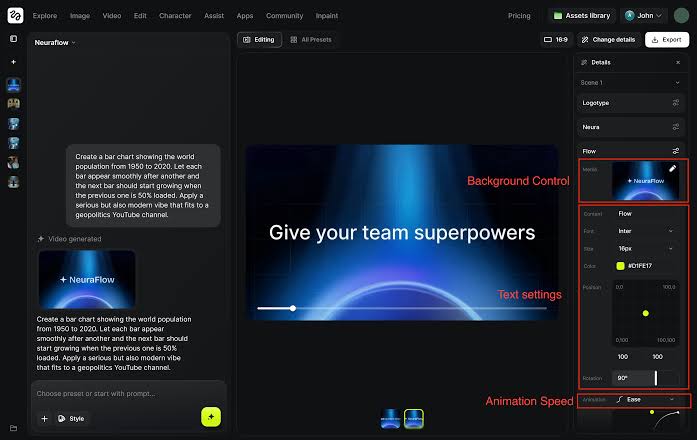
A simple first project is the best way to understand Vibe-Motion. Start by choosing a clear job, such as a 10 to 15 second launch post or a short animated title. Describe the audience, message, format and tone in normal language. Upload a logo, product image or brand color reference if the project needs to look specific.
Next, review the draft before rushing to export. Use a template or motion preset if you want a reliable starting point. Then click into the visible elements and fix the wording, colors and layout. Finally, adjust speed, delay and the general feel of the animation. Rendering comes last, after the text is checked carefully. This order reduces wasted generations and makes the tool feel less random.
Higgsfield Vibe-Motion Control and Editing
Control is Vibe-Motion’s best feature. The visual editor lets users change text, font family, size, color and background details. Elements can be positioned more precisely, which helps when a video must fit a vertical social format or avoid covering important content with platform buttons.
Motion controls are also more meaningful than a single regenerate button. Users can adjust duration, delay, timing and movement feel. This does not replace the depth of a specialist professional editor, but it gives non-specialists enough room to make a result feel intentional rather than generic.
Higgsfield Vibe-Motion Price in 2026
Higgsfield uses plan and credit-based access across its creative suite. The exact price, credits and feature limits can change, especially as new models and tools are added. That makes it sensible to check the current plan page before paying, rather than relying on an old price quoted in a video or social post.
The value question is straightforward. If Vibe-Motion saves you from outsourcing frequent animated posts, the cost can make sense. If you only need one basic logo animation, a subscription or a large credit pack may feel expensive. Test a small project first and note how many revisions it takes to get a usable result.
Higgsfield Vibe-Motion Download and APK
Vibe-Motion is primarily a browser-based part of the Higgsfield creative workspace, so most users do not need a separate desktop installer. Sign in through the official platform and work in a current web browser. This approach also means projects and rendering happen in the cloud rather than depending on a powerful local computer.
Searches for a Vibe-Motion APK need extra care. Do not assume that an Android listing or APK with a similar name is an official Higgsfield product. Unverified APK files can create account, billing and security problems. For the Vibe-Motion workflow, the safest route is the official browser experience.
Higgsfield Vibe-Motion User Experience
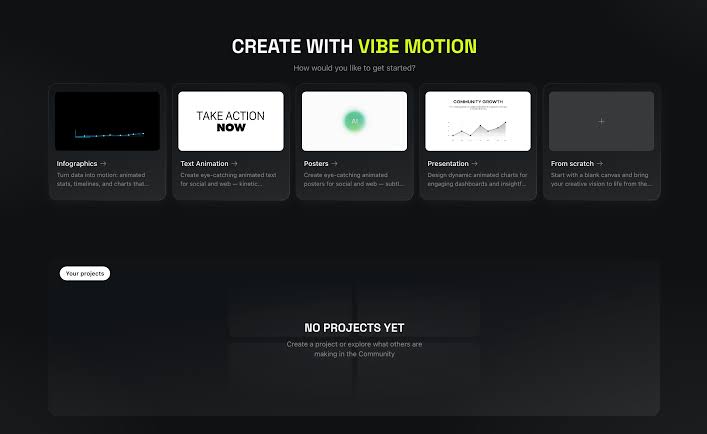
The experience feels exciting once the project begins to take shape. Templates and chat reduce the blank-page problem, while editable controls make it possible to correct the AI instead of starting over completely. That combination is genuinely useful for a creator who knows the desired look but does not want to animate every keyframe manually.
The downside is choice overload. Higgsfield has a broad creative ecosystem, and beginners may not instantly know when to use Vibe-Motion instead of another video or effects tool. The interface rewards curiosity, but it can also reward aimless clicking. A short tutorial and one real project are usually enough to make the workflow clearer.
Pros and Cons
Pros
Editable motion projects instead of one locked generated clip
Useful controls for text, color, placement, timing and speed
Good fit for social posts, presentations and brand assets
Templates and chat help users start faster
Cloud workflow reduces the need for a high-end computer
Cons
Credit and plan value depends on how often you create
Broad tool selection can feel overwhelming at first
AI drafts still need human checking for text, spacing and brand accuracy
Not a full replacement for deep professional motion-design workflows
Exact access and prices can change as the platform evolves
Final Verdict
Higgsfield Vibe-Motion is a promising option for people who want more control than a basic AI video generator gives them. It is especially useful for teams making repeatable branded assets, animated explainers and short social content. The editable canvas is the reason to try it.
At 3.6 out of 5, it is not a perfect fit for everybody. Beginners should keep their first project small, use templates and watch credit use. More experienced designers may enjoy the speed, but they should see it as a fast creative layer rather than a total replacement for every professional tool.
Frequently Asked Questions About Higgsfield Vibe-Motion
1. What is Higgsfield Vibe-Motion?
It is an AI-powered motion-design workflow for creating and editing animated graphics, text, presentations and brand visuals.
2. Is Higgsfield Vibe-Motion free?
Access may include limited introductory or plan-based options, but the platform uses credits and paid plans for broader use. Check current access details before starting a large project.
3. How do I use Higgsfield Vibe-Motion?
Describe the animation in chat, upload assets if needed, generate a draft, edit the visible elements, adjust motion controls and render the final video.
4. Can I download Higgsfield Vibe-Motion?
The main Vibe-Motion experience is browser-based, so a separate desktop download is generally not required.
5. Is there an official Higgsfield Vibe-Motion APK?
Do not assume that an APK using the name is official. Use the official browser platform rather than downloading unverified APK files.
6. Can Vibe-Motion animate a logo?
Yes. It is designed to work with logos and brand assets for animations that can be reused across different formats.
7. What controls does Vibe-Motion offer?
Users can adjust text, fonts, colors, positioning, timing, delay, duration and the feel of the motion.
8. Can I use Vibe-Motion for commercial content?
Commercial use can depend on the platform terms and your plan. Check the current terms and plan conditions before using results for client or paid campaigns.
9. Does Higgsfield Vibe-Motion replace After Effects?
No. It can speed up common motion tasks but does not provide every deep, manual feature of a specialist professional editor.
10. Who is Higgsfield Vibe-Motion best for?
It is best for creators, marketers, founders and small teams that need polished motion content quickly without building every animation from scratch.