|
Product Name |
Koidex |
|
Parent Company |
Koi Security |
|
Founded |
2024 (Koidex publicly launched February 2026) |
|
Headquarters |
Tel Aviv, Israel |
|
Founders |
Amit Assaraf (CEO), Idan Dardikman (CTO), Itay Kruk (CPO) |
|
Category |
Software Supply Chain Security, Developer Tooling |
|
Core Use Case |
Scanning packages, IDE extensions, and AI models before installation |
|
Supported Platforms |
VS Code, JetBrains, Cursor, Windsurf, npm, Hugging Face, Open VSX, Chrome Web Store |
|
Pricing |
Free public version with rate limits, paid Koi platform for enterprises |
|
Funding Raised |
38 million dollar Series A (late 2025) |
|
Key Investors |
Team8, Battery Ventures, NFX, Picture |
|
Official Website |
dex.koi.security |
|
ICON POLLS Rating |
3.8 out of 5 |
Koidex Review in 2026: Security
This is where Koidex earns most of its keep. Behind the simple interface sits a risk engine that looks at several layers at once. It checks publisher reputation, version history, code behavior in a sandbox, communication patterns, and known vulnerabilities. The output is a readable risk summary, not a wall of CVE codes that you need a PhD to decode.
What impressed us most is that Koidex catches things traditional scanners miss. The team behind it is the same group that discovered GlassWorm, the first self propagating worm to spread through VS Code extensions, which infected more than 35,000 systems before it was caught. That same threat intelligence flows directly into Koidex. When we tested a few suspicious looking lookalike extensions, Koidex flagged them within seconds, including ones that had not yet been pulled from the marketplace.
It is not perfect though. The free public scanner has rate limits, currently sitting at around 200 scans per day and 500 per month for the IDE extension. For a hobbyist or a solo developer that is plenty. For a busy team that audits hundreds of dependencies a week, you will hit the ceiling fast and probably need to look at the paid Koi platform.
Koidex Review in 2026: AI
AI is where things get genuinely interesting. Koidex was built with the rise of Cursor, Windsurf, and other AI assisted coding tools in mind. Those tools love recommending new packages and extensions, and most developers click install without a second thought. Koidex puts a guardrail right there in your workflow.
The behavioral scoring is the part that feels new. Instead of just checking what an extension claims to do, Koidex looks at what the code actually does once it runs. That matters in 2026 because attackers now hide payloads using invisible Unicode characters, fake AI assistant extensions, and packages that only activate after a delay. Static scanners will not catch any of that. Koidex usually does.
Koidex also scans Hugging Face models, which is a small detail with big consequences. Developers are downloading and running AI models on their laptops daily, and almost nobody is checking them for embedded malicious code or quiet data exfiltration. Having a single tool that covers code packages, IDE extensions, and AI models in one place is a real time saver.
Koidex Review in 2026: Career
We get asked often whether tools like Koidex are useful for developers thinking about their careers. The honest answer is yes, more than you would expect.
Security awareness is one of the most valuable soft skills a developer can show on a CV right now. Companies have lost serious money to supply chain attacks, and hiring managers are actively asking junior and mid level engineers what they do to vet third party dependencies. Being able to say you run every new package through Koidex before adding it to a production build is a small thing that signals you take security seriously without trying too hard.
For the Koi Security company itself, the careers picture also looks healthy. They closed a 38 million dollar Series A in late 2025, are hiring across engineering, research, and go to market roles, and have a remote friendly culture for several positions. If you are a security engineer or a developer with an interest in supply chain research, they are worth a look on LinkedIn.
Koidex Review in 2026: Company
The story of Koi Security is half the reason people trust Koidex in the first place. The company was founded in 2024 by Amit Assaraf, Idan Dardikman, and Itay Kruk. All three are alumni of the IDF 8200 intelligence unit, and they had previously built and exited security companies, including roles at Sygnia and Zscaler.
The famous origin story goes like this. The founders spent exactly 30 minutes building a fake VS Code theme called Darcula Official, uploaded it to the marketplace, and watched it quietly infect more than 300 organizations within a week. Some of those organizations were billion dollar enterprises with serious security teams. That experiment was the spark that became Koi Security, and eventually Koidex.
Backers include Team8, Battery Ventures, NFX, and Picture. The company is based in Israel, with a growing presence in the US. They are known in the security community for actually doing the research, not just reselling threat feeds, and their public posts on GlassWorm, ShadyPanda, PhantomRaven, and MaliciousCorgi are widely cited in industry reports.
Koidex Review in 2026: User Experience
We will not sugarcoat it. The user experience of Koidex is good, not great, and that is part of why our rating is not higher.
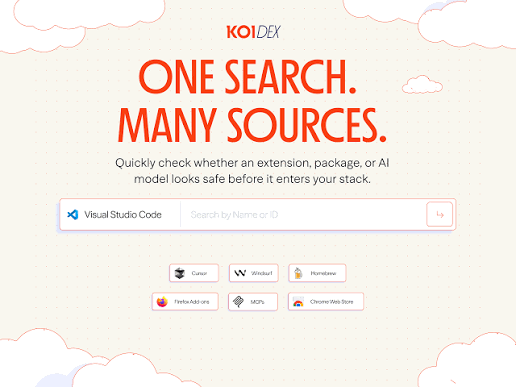
The website itself is clean and almost too minimalist. You land on a single search bar, type your query, and the report shows up. Most users will find that refreshing. A few testers in our group wanted more context on the home page, like trending threats or featured packages, but the team seems to have made a deliberate choice to keep it simple and out of the way.
The IDE extension is where the experience can be a little uneven. Installation is straightforward, and once it is running it flags risky extensions before they install. However, the rate limits sometimes interrupt heavier workflows, and the in editor notifications can feel chatty if you are doing a lot of dependency exploration in one session. The recent move from API key authentication to Koidex login was a step forward, but the login flow itself is still not as smooth as it could be.
For occasional use, the experience is honestly delightful. For power users with a constant flow of new packages, the friction starts to show.
Our Final Verdict on Koidex
Final Rating: 3.8 out of 5
Koidex is one of the most useful free tools to land in front of developers in 2026. It does one thing very well, which is telling you whether a package, extension, or AI model is safe to install. The research credibility behind it is genuine, the coverage across npm, VS Code, JetBrains, and Hugging Face is broad, and the free pricing makes it almost a no brainer to at least try.
It loses a few points on the rate limits, the slightly bare bones interface, and the fact that heavier teams will still need to upgrade to the full Koi Supply Chain Gateway product for full coverage. But for the average developer, the freelancer, and even most small teams, Koidex earns its spot in the toolbox.
If you write code in 2026 and you are not running new dependencies through some kind of safety check, you are taking a gamble that the industry has already shown is a bad bet.
Frequently Asked Questions About Koidex in 2026
1. Is Koidex free to use?
Yes. The web version at dex.koi.security is completely free and requires no account to run basic searches. The IDE extension is also free, although it comes with rate limits of around 200 scans per day and 500 per month. Larger teams that need higher limits and broader enterprise features can upgrade to the paid Koi platform built by the same company.
2. Who created Koidex?
Koidex is built by Koi Security, an Israeli cybersecurity startup founded in 2024 by Amit Assaraf, Idan Dardikman, and Itay Kruk. The same team is known in the security community for discovering several major supply chain threats in 2025 and 2026, including GlassWorm, PhantomRaven, ShadyPanda, and MaliciousCorgi.
3. What does Koidex actually scan?
Koidex scans software packages, IDE extensions, browser extensions, and AI models. It covers major sources such as the VS Code Marketplace, JetBrains Plugins, npm, Hugging Face, Open VSX, and the Chrome Web Store. The risk engine looks at publisher reputation, code behavior, version history, requested permissions, and known vulnerabilities to score each asset.
4. Is Koidex safe to install on my machine?
Yes, Koidex itself is safe. The IDE extension is published on the official VS Code Marketplace and Open VSX registry by the verified Koi Security team. The web tool runs in your browser and does not require special permissions. Like with any tool, you should always download it from the official Koidex marketplace listing or the dex.koi.security site to avoid copycats.
5. Does Koidex work inside Cursor and Windsurf?
Yes. The Koidex IDE extension supports VS Code, Cursor, and Windsurf out of the box. It runs quietly in the background and flags risky extensions before they install. This was a deliberate design choice by the team to keep up with the rise of AI powered code editors, which often encourage users to install more tools at a faster rate than traditional editors.
6. How is Koidex different from npm audit or GitHub Dependabot?
Tools like npm audit and Dependabot mostly check known vulnerability databases, which means they catch issues that have already been publicly reported. Koidex adds behavioral analysis, publisher reputation signals, and proprietary threat intelligence from the Koi Security research team. In plain terms, Koidex is more likely to catch a brand new malicious package before it ends up in a CVE list.
7. Can I use Koidex without creating an account?
The web search at dex.koi.security can be used without signing in for basic queries. The IDE extension now uses a Koidex login instead of an API key for authentication, so you do need to create a free account to use that side of the product. Account creation is straightforward and does not require payment information.
8. Does Koidex collect or share my data?
Koidex needs to send the package, extension, or model name to its servers in order to analyze it. According to Koi Security, it does not upload your source code or full project files. If you are working in a sensitive environment or a regulated industry, you should still review the privacy policy on the official site before deploying it across a team.
9. Is Koidex worth using in 2026?
For most developers, yes. Supply chain attacks have become one of the most common ways attackers reach inside organizations, and the cost of running Koidex is essentially zero. Even if you only use it for the packages and extensions you are unsure about, it adds a layer of protection that most developers currently do not have.