Quick Verdict
Monday.com continues to be one of the most polished and adaptable project management platforms available in 2026. Whether you are a small marketing team trying to keep campaigns on track or a large operations department managing dozens of concurrent projects, the platform has enough flexibility to grow with you. That said, it is not perfect. Seat-based pricing can pinch smaller teams, some advanced features still sit behind the Pro tier, and if you are not intentional about how you set up your boards, things can get messy fast. Our hands-on research gives it a solid 4.0 out of 5.
At a Glance: Our Ratings
Here is how Monday.com scored across the key categories we evaluated during our review:
|
Category |
Rating |
Score |
|
Ease of Use |
★★★★★ |
4.5/5 |
|
Features |
★★★★☆ |
4/5 |
|
Pricing & Value |
★★★★☆ |
3.5/5 |
|
Mobile App |
★★★★☆ |
3.5/5 |
|
Integrations |
★★★★★ |
4.5/5 |
|
Customer Support |
★★★★☆ |
4/5 |
|
Automation |
★★★★☆ |
4/5 |
|
Overall |
★★★★☆ |
4/5 |
What Is Monday.com?
Monday.com launched in 2012 out of Tel Aviv and spent its early years as a simple team collaboration board. By 2026, it has grown into something much bigger. The company now operates what it calls a Work OS, a single platform where teams can manage tasks, run CRM pipelines, handle customer service tickets, and coordinate software development sprints, all without switching tools.
As of early 2026, Monday.com serves over 225,000 customers across more than 200 countries. That is not a small feat, and it reflects how genuinely useful the product has become for a wide variety of teams. We spent several weeks testing the platform across multiple use cases including marketing campaign tracking, operations workflows, and client project management before putting this review together.
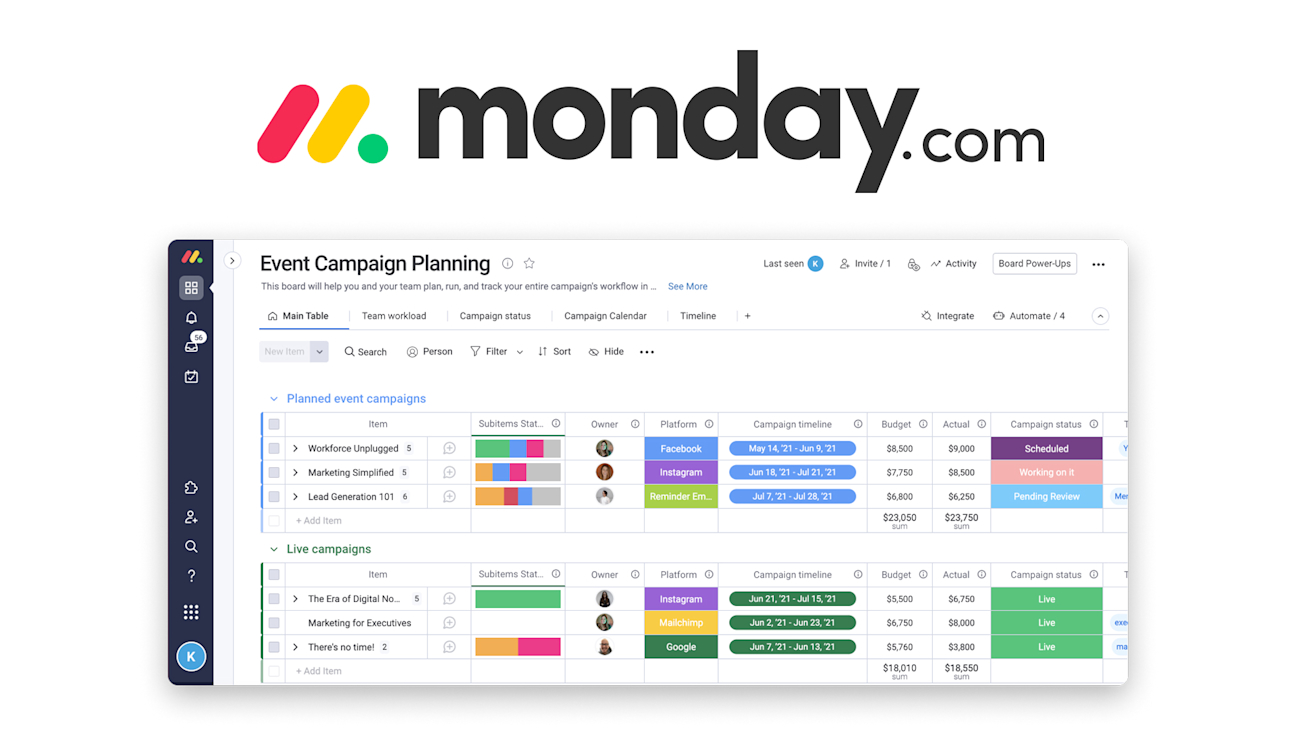
The product is built around customizable boards where rows represent units of work and columns represent the information you want to track about each item. The simplicity of that core idea is part of why it works so well across industries.
The Monday.com App: What You Actually Get
Desktop and Web Experience
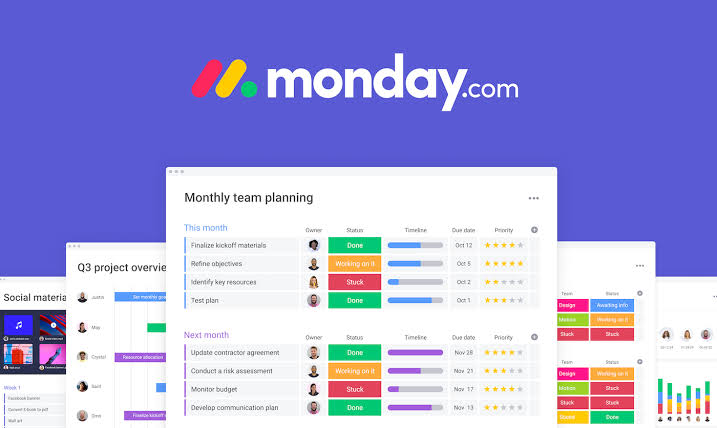
The web application is where Monday.com truly shines. The interface is clean, the color-coded boards are genuinely easier to scan than a wall of text in a spreadsheet, and the drag-and-drop functionality works smoothly. During our testing, we found that getting a new board up and running took a matter of minutes, especially when starting from one of the 200-plus templates the platform provides.
The platform presents data in several formats: Table, Kanban, Timeline, Gantt, Calendar, Chart, and Map views are all options. While not every view is included in every plan, the Standard tier provides access to Timeline and Calendar, which should suffice for most small and medium-sized teams. We found the Timeline view especially helpful for visualizing dependencies and identifying scheduling conflicts before they became problematic.
One feature worth calling out is the dashboard builder. You can pull data from multiple boards into a single dashboard and use widgets to track progress, workload distribution, deadlines, and more. Once set up, it becomes a surprisingly powerful reporting tool without requiring any technical knowledge.
Mobile App Experience
The iOS and Android apps are functional but noticeably behind the web version in terms of features and reliability. During our testing on both platforms, we ran into occasional sync delays when adding items on mobile, with changes taking a few seconds to appear on the desktop app. Some users on Capterra have reported similar experiences, noting that the mobile version does not always reflect updates in real time.
That said, for checking in on task statuses, updating progress, and communicating with team members through the built-in updates panel, the mobile app does the job. You are not going to build complex automations from your phone, but for day-to-day task oversight on the go, it is usable and reasonably well-designed.
The mobile app earns a 3.5 out of 5 from us. It has improved meaningfully over the past year, but teams that rely heavily on mobile will notice the gaps.
Automations and Integrations
Monday.com's automation builder is one of its strongest selling points. The interface follows a simple if-this-then-that logic that does not require any coding knowledge. You can set up automations to notify team members when a task status changes, create new items based on form submissions, move tasks between boards when conditions are met, or generate recurring tasks on a schedule.
The platform integrates natively with over 200 third-party tools including Slack, Google Drive, Salesforce, Jira, Zoom, GitHub, and Mailchimp. Setting up most integrations takes under ten minutes. The catch is that automation and integration actions are capped based on your plan. The Standard plan gives you 250 actions per month, which sounds like a lot until you have a team of ten people each with multiple automations running. Heavy automation users will find themselves upgrading to Pro.
AI Features in 2026
Artificial intelligence has become a more prominent part of the platform this year. Monday.com has built an AI assistant that can help draft project summaries, suggest automation recipes, summarize board updates, and generate task descriptions from a brief prompt. It also introduced an AI-powered board preview feature that gives teams a faster overview of what is happening across projects.
The AI tools are included in all paid plans with a monthly credit allowance, and they are genuinely useful for reducing the amount of manual writing involved in project management. That said, the AI capabilities are still maturing. They work best for straightforward requests and occasionally produce generic output that needs editing before it is usable.
Monday.com Pricing in 2026
Monday.com offers five pricing tiers, and the structure has been updated in 2026 with a few notable changes. Here is what you need to know before committing to a plan.
|
Plan |
Price and Key Details |
|
Free |
Up to 2 users, 3 boards, basic features. No automations. |
|
Basic |
$9/seat/month (billed annually). Unlimited boards, unlimited viewers, 5GB storage. |
|
Standard |
$12/seat/month (billed annually). Adds Timeline, Calendar view, 250 automations/month, guest access. |
|
Pro |
$19/seat/month (billed annually). Private boards, time tracking, chart view, 25,000 automations/month. |
|
Enterprise |
Custom pricing. Full security controls, advanced analytics, premium support, unlimited automations. |
All prices are per seat, billed annually. Monthly billing carries an 18% premium. Minimum 3 seats on all paid plans.
A few things to be aware of before you sign up. First, all paid plans require a minimum of three seats, even if your team has only one or two people. This is one of the more frustrating aspects of Monday's pricing structure and a genuine disadvantage for solo users or very small teams. Second, seats are sold in increments of five beyond the minimum, so a team of four still pays for five seats and a team of eleven pays for fifteen. These gaps can add up fast if your team size does not land cleanly on those increments.
The Standard plan at $12 per seat per month is the sweet spot for most small to mid-sized teams. It covers the core features that make Monday.com genuinely useful: timeline views, basic automations, guest access, and calendar integration. The jump to Pro at $19 is worth it if your team relies on time tracking, private boards, or runs a high volume of automated workflows.
One thing that changed in early 2026 is that Monday's service product, the customer support and ticketing module, received an 18% price increase effective February 10, 2026. This only affects teams using that specific add-on and does not impact the core Work Management pricing.
User Experience:
If you ask the average person who has never used a project management tool to sit down with Monday.com for the first time, they will probably get the basics within an hour. The board structure is intuitive, the color-coded status columns are easy to understand, and the template library takes a lot of the guesswork out of setting things up.
Where the learning curve steepens is in the more advanced features. Building multi-board dashboards, connecting integrations, configuring automations, and managing permissions across workspaces all require more intentional setup. Several users in our research, including reviews on G2 and Capterra, noted that they needed outside help or a dedicated internal champion to configure the platform properly before their teams could use it effectively.
That said, once teams get past the initial setup, the experience tends to be positive. Monday.com consistently scores well on user-friendliness in third-party review platforms. The platform updates its board preview automatically, comments stay attached to the specific task they belong to, and @mentions make it easy to pull in the right person without opening a separate messaging app.
Performance can occasionally be an issue. With large boards containing hundreds of items, some users have reported slow loading times and occasional lag. This is an area where Monday.com still has room to improve, particularly for organizations scaling the platform across large teams and complex workflows.
What Users Are Saying
Across Capterra, G2, and Gartner Peer Insights, Monday.com holds strong ratings with recurring praise for its visual interface, flexibility, and collaboration tools. The most common concerns include pricing (especially for smaller teams), the complexity of advanced features, and occasional performance issues under heavy use.
One pattern that came up repeatedly in user reviews: teams that invest time upfront in structuring their boards and workflows tend to love the platform. Teams that dive in without a clear setup strategy often find their boards becoming cluttered and hard to navigate. Monday.com rewards intentionality.
Pros and Cons
What We Liked
Visually clean and intuitive interface that most team members can learn without training
Exceptional flexibility for adapting to almost any workflow or industry
Strong integration library covering over 200 tools including Slack, Google Drive, and Salesforce
Automation builder is powerful and genuinely accessible without technical skills
Multi-view functionality (Table, Kanban, Timeline, Gantt, Calendar, Chart) covers most team needs
AI assistant in 2026 adds real utility for summarizing updates and generating task descriptions
Dashboard builder provides solid reporting visibility once configured
Reliable 24/7 customer support with a comprehensive help center
What Could Be Better
Three-seat minimum on all paid plans is a genuine obstacle for individuals and very small teams
Bucket pricing in multiples of five means many teams pay for seats they do not actually use
Automation limits on the Standard plan are restrictive for active, fast-moving teams
Mobile app lags behind the web version in features and reliability
Advanced features like time tracking and private boards are gated behind the Pro tier
Performance can slow down noticeably on large, data-heavy boards
Some users report occasional bugs, particularly around integrations and real-time syncing
Who Is Monday.com Best For in 2026?
Based on our testing and research, Monday.com is most valuable for the following types of teams and organizations:
Marketing and creative teams managing campaigns, content calendars, and multi-channel workflows
Mid-sized companies (25 to 500 employees) running cross-functional projects
Agencies that need to manage client work, track deliverables, and share progress with external stakeholders
Operations teams that want to standardize processes without having to code custom solutions
Sales teams looking for a lightweight CRM module alongside project management
Monday.com is less ideal for solo users and very small teams where the three-seat minimum pricing does not make sense, development-heavy teams that need deep sprint and bug tracking features (Jira serves this better), or organizations whose primary need is document collaboration rather than task and project tracking.
How Monday.com Compares to the Competition
The project management space is competitive, and Monday.com has meaningful rivals. Here is a quick honest comparison based on our research in 2026:
Monday.com vs Asana: Asana enforces a clearer task hierarchy and is generally better suited for teams that want a defined, structured methodology. Monday gives you more visual flexibility but requires more deliberate setup to keep boards organized. If your team wants guardrails, Asana has an edge. If your team values freedom and customization, Monday wins.
Monday.com vs ClickUp: ClickUp packs more features at a lower price point, but the learning curve is significantly steeper. Monday is easier to get running quickly. For teams that want to be productive in the first week, Monday is the faster path. ClickUp rewards patience.
Monday.com vs Trello: Trello is simpler and cheaper, starting at $5 per seat. It works well for very basic Kanban-style task tracking, but it does not scale into the kind of multi-view, automation-heavy workflows that Monday handles comfortably. Once a team outgrows Trello, Monday is a natural step up.
Frequently Asked Questions About Monday.com (2026)
1. Is Monday.com free to use?
Yes, there is a free plan, but it comes with significant limitations. The free tier supports a maximum of two users, restricts you to three boards, and does not include automations or integrations. It is fine for an individual testing the platform or a two-person team doing basic task tracking, but any growing team will outgrow it quickly. Monday.com also offers a 14-day free trial of the Pro plan when you first sign up, which gives you a much better sense of what the full platform can do.
2. How much does Monday.com cost in 2026?
Monday.com's paid plans start at $9 per seat per month on the Basic plan, billed annually. The Standard plan costs $12 per seat per month, Pro is $19, and Enterprise is custom-quoted. All paid plans have a minimum of three seats, and paying monthly instead of annually adds approximately 18 percent to the cost. The Work Management, CRM, Dev, and Service modules are each priced separately if you need them in addition to the core platform.
3. What is the difference between Monday.com plans?
The Free plan gives you two users and three boards with no automations. The Basic plan adds unlimited boards and unlimited viewer seats. The Standard plan is the most popular choice and adds Timeline view, Calendar view, guest access, and 250 automation actions per month. The Pro plan adds private boards, chart view, time tracking, formula columns, and 25,000 automation actions monthly. Enterprise adds advanced security, compliance features, dedicated support, and enterprise-grade analytics.
4. Is Monday.com good for small businesses?
It depends on your team size and budget. Small teams of five to fifteen people generally get solid value from the Standard plan. The platform's flexibility and template library make it easy to get started without a technical setup, and it grows with you as the business expands. The main frustration for very small teams is the three-seat minimum, which means a two-person team still pays for three seats. If you are budget-sensitive and only need basic task management, ClickUp or Trello may offer better value at the entry level.
5. Does Monday.com have a good mobile app?
The mobile app is functional but not as fully featured as the desktop and web versions. It works well for checking task statuses, leaving updates, and viewing boards on the go. However, some users report occasional sync delays and missing functionality compared to the browser version. The app is available for both iOS and Android and has improved over the past year, but if mobile access is a critical part of your workflow, it is worth testing during your free trial before committing to a plan.
6. How does Monday.com handle automation?
Monday.com uses an if-this-then-that automation builder that does not require any coding knowledge. You can automate status updates, task assignments, deadline reminders, recurring task creation, and cross-board actions. The number of automation actions available depends on your plan. Standard gives you 250 actions per month, Pro gives you 25,000, and Enterprise offers unlimited actions. Teams running multiple automations across large boards will want to check their usage carefully on the Standard plan, as it is easy to exceed the monthly limit.
7. Is Monday.com secure enough for business use?
Monday.com holds SOC 2 Type II certification as of early 2026, which means it undergoes annual security audits and maintains documented controls over how it handles customer data. The platform offers single sign-on, two-factor authentication, and role-based permissions on paid plans. Enterprise customers get additional options including advanced audit logs, IP restrictions, and data residency choices for EU-based organizations. For most small and mid-sized businesses, the security posture is more than adequate. Larger organizations with strict compliance requirements should review the Enterprise plan features and request a dedicated security briefing from the sales team.
8. What integrations does Monday.com support?
The platform integrates with over 200 tools natively. The most commonly used integrations include Slack, Microsoft Teams, Google Drive, Gmail, Zoom, Salesforce, Jira, GitHub, Hubspot, Mailchimp, Dropbox, and Zapier. Most integrations are straightforward to set up through the platform's integration center and do not require any developer involvement. The Standard plan includes up to 250 integration actions per month, while Pro offers 25,000. For teams that rely on Zapier or Make to connect to less common tools, those connections count against the same monthly action quota.
9. Can Monday.com replace tools like Jira or Salesforce?
For some teams, yes. Monday.com's Dev module offers sprint management, bug tracking, and roadmap features that cover the basics of what Jira does. Its CRM module handles lead tracking, pipeline management, and contact management that overlaps with entry-level Salesforce functionality. However, for development teams that live in Jira and need deep git integration, velocity charts, and granular sprint controls, Monday Dev is not a full replacement. Similarly, for sales organizations with complex CRM needs, Salesforce still offers more depth. Monday.com works best as a unified platform for teams that want good coverage across multiple functions without managing multiple specialized tools.
10. Is Monday.com worth it in 2026?
For most teams in the ten to two hundred person range that manage projects, campaigns, or cross-functional workflows, yes. The combination of a clean interface, genuine flexibility, strong integrations, and a growing set of AI tools makes it one of the most versatile platforms in its category. The pricing is not the cheapest on the market, but the value is there if you actually use what the platform offers. Teams that try to use Monday.com as a simple to-do list are underusing it and overpaying for it. Teams that build proper workflows, connect their tools, and use automations tend to find it genuinely transforms how they work.
Icon polls Verdict
Monday.com earns its 4.0 out of 5 rating in our 2026 review. It is a genuinely well-built platform that has continued to improve over the years, adding meaningful AI capabilities, refining the interface, and expanding the product suite beyond basic project management.
The things holding it back from a higher score are real, not hypothetical. The three-seat minimum pricing structure is genuinely frustrating for small teams. The mobile app still lags behind what you would expect from a platform of this scale. And the Standard plan's automation limit is tight enough that mid-sized teams often find themselves forced to upgrade to Pro earlier than they planned.
If you are evaluating Monday.com for your team, we recommend starting with the free trial of the Pro plan, running one or two real workflows through it, and making your decision based on actual usage rather than a feature checklist. The platform rewards teams who invest time in setting it up properly, and when that investment is made, it tends to stick.