|
App Name |
Monologue |
|
Developer |
Every Media Inc. |
|
General Manager |
Naveen Naidu |
|
Category |
Productivity / Voice Dictation |
|
Platforms |
Mac, iOS, Apple Watch |
|
iOS Launch Date |
February 2026 |
|
Mac Launch Date |
September 2025 |
|
Pricing |
Free (1,000 words) then $10 to $15/month or $144/year |
|
App Store Rating |
4.9 out of 5 (172+ ratings) |
|
Icon Polls Rating |
4.0 out of 5 |
|
Languages Supported |
100+ languages |
|
Key Feature |
DeepContext screen-aware formatting |
|
Website |
monologue.to |
|
Windows Support |
Not available |
What Is Monologue?
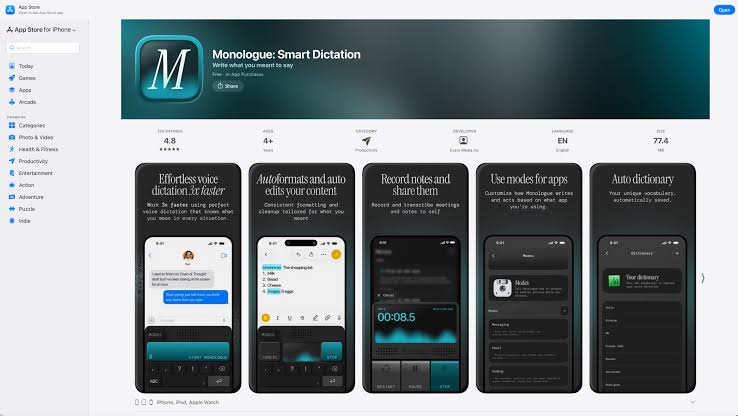
We have been hearing a lot about Monologue over the past year, and after spending several weeks testing it out on both Mac and iOS, we figured it was time to give our honest take on it. If you are not familiar with the app, Monologue is a voice dictation tool built by Every Media Inc. It was created by Naveen Naidu, who developed it as an Entrepreneur in Residence at Every. The idea is simple but powerful: you speak, and Monologue turns your words into clean, polished text. Not just raw transcription, but actual writing that sounds like you sat down and typed it out carefully.
The Mac version launched in September 2025, and the iOS version followed in February 2026. Since then, it has picked up serious traction, with thousands of daily active users and over a million words being transcribed every week. The app holds a 4.9 out of 5 rating on the Mac App Store from over 170 reviews, and it has a perfect 5.0 on Product Hunt. After our own testing, Icon Polls is giving Monologue for iOS a rating of 4.0 out of 5. It is a genuinely impressive app, but there are a few things holding it back from a perfect score, and we will get into all of that below.
How to Download Monologue for iOS
Getting Monologue on your iPhone is straightforward. You can download it directly from the Apple App Store by searching for Monologue. The app is free to download, and you get a one time allowance of 1,000 words and 10 notes to try it out before you need to subscribe. Once you install it, you create an account or sign in, grant microphone and keyboard permissions, and you are good to go.
One thing worth mentioning is that Monologue works as a custom keyboard on iOS. That means you can use it inside just about any app on your phone. Whether you are writing a text message, drafting an email, jotting something down in Notes, or even typing a prompt into an AI tool like Claude, Monologue sits right there ready to go.
Is Monologue Free?
Technically, yes. But only barely. The free tier gives you 1,000 words total and 10 notes. That is not 1,000 words per month or per week. That is 1,000 words ever. Most people will burn through that in a single session if they are actually testing the app properly. After that, you need to subscribe.
The pricing as of mid 2026 works like this: the Pro plan costs $15 per month at full price, though there is an early bird rate of $10 per month that some users still have access to. There is also an annual plan at $144 per year. If you are already an Every subscriber, Monologue is included in their $30 per month bundle alongside other Every tools. Icon Polls thinks the free tier is too small to give new users a real feel for the app. We would like to see at least 5,000 words free per month so people can actually evaluate it before committing.
Monologue User Experience on iOS
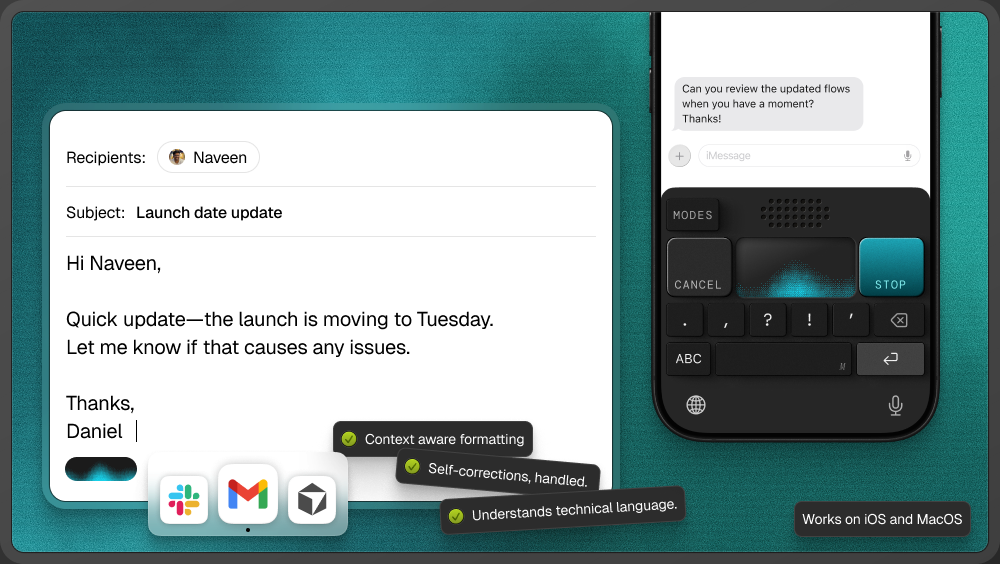
This is where Monologue really shines. The user experience is clean, fast, and surprisingly smooth for a voice dictation app. When you start speaking, Monologue does not just dump a raw transcript onto your screen. It actively removes filler words like um and uh, adds punctuation automatically, and formats the text based on what app you are using. If you are writing an email, it formats like an email. If you are making a list, it structures it as a list. This context awareness comes from a feature called DeepContext, which reads what is on your screen to understand how to format your output.
The speed is good too. There is a slight delay compared to regular typing, maybe half a second to a second, but it is not enough to break your flow. For most people, speaking is still going to be significantly faster than thumb typing on a phone screen. Several users we came across during our research said they work about three times faster with Monologue than they do typing, and that lines up with our own experience.
The interface itself is minimal. There is no clutter, no overwhelming settings page, no complicated menus. You press the microphone, you talk, and the text appears. That simplicity is clearly intentional, and it works.
Monologue on Mac
The Mac version is where Monologue started, and it is the more mature product. On Mac, Monologue runs as an overlay app that works on top of whatever you are doing. You press a keyboard shortcut, start talking, and your text gets inserted wherever your cursor is. It works across text editors, email clients, browsers, coding tools, and pretty much any app that accepts text input.
The Mac version also supports a personal dictionary that learns your specific vocabulary over time. If you use technical terms, brand names, or jargon regularly, Monologue picks up on it and gets better at recognizing those words. It supports over 100 languages and handles multilingual dictation well, which is a nice touch for people who switch between languages throughout the day.
Does Monologue Work on Windows?
No. As of August 2026, Monologue does not have a Windows version. The app is available on Mac, iOS, and Apple Watch only. This is one of the biggest limitations of the product right now. If you work across Apple and Windows devices, you will not be able to use Monologue on your PC. Competitors like Wispr Flow already support Mac, Windows, iOS, and Android, which gives them a clear advantage in terms of platform reach. Icon Polls hopes to see a Windows version from the Monologue team in the future, but there has been no official announcement about it.
Monologue for Scripts and Long Form Writing
A lot of people search for Monologue in the context of writing scripts, and it is worth clarifying what this app does and does not do. Monologue is a dictation tool. It turns your spoken words into written text. It is great for drafting scripts, writing first drafts of articles, dictating meeting notes, brainstorming ideas out loud, or getting thoughts down quickly without typing. However, it is not a screenwriting tool or a script formatter. If you are looking for something like Final Draft or Celtx, Monologue is not that.
That said, if your workflow involves speaking your ideas first and then formatting them later, Monologue is a fantastic fit. A lot of writers and content creators use it exactly this way. You talk through your script or article, Monologue gives you a clean first draft, and then you go in and polish it up. The quality of the output is high enough that you do not need to spend a lot of time editing out filler or fixing punctuation, which saves a real chunk of time.
Examples of How People Use Monologue
During our research at Icon Polls, we came across a wide range of use cases from real Monologue users. Some people use it for writing emails and messages throughout the day. Others use it for brain dumps, where they just speak their thoughts freely and let Monologue organize the text. Content creators use it to draft blog posts and social media captions. Developers have mentioned using it alongside coding tools. One user on Product Hunt said they speak over 5,000 words per day through Monologue, which works out to roughly two hours of typing saved daily.
The gamification aspect is also interesting. Monologue tracks how many words you have spoken, how much time you have saved, how fast you speak, and even ranks you among other users. You can see if you are in the top 2%, 5%, or 10% of all Monologue users, which is a fun little motivator.
What We Like About Monologue for iOS
There is a lot to appreciate here. The accuracy is genuinely impressive, especially for an app that handles over 100 languages. The context aware formatting is a standout feature that most competitors do not offer at this level. The user interface is clean and does not get in the way. The app feels fast and responsive. And the fact that it works as a system wide keyboard on iOS means you do not have to switch between apps to use it. It just lives wherever you are typing.
We also appreciate that the product was built by a small, focused team. Naveen Naidu essentially built this as a solo engineer before it grew into what it is today. That kind of craftsmanship shows in the polish of the product.
What Could Be Better
The free tier is the biggest issue. One thousand words total is not enough for anyone to seriously evaluate the app. Most users will hit that limit within their first session and then have to decide whether to pay without having had enough time to really experience what Monologue can do.
The lack of Windows support is another gap. In a world where many people use both Mac and Windows, being locked into the Apple ecosystem limits who can use the app.
Privacy is worth thinking about too. The DeepContext feature reads your screen to understand formatting context. For most people this is fine, but if you work with sensitive information, you should be aware that your screen content is being processed. Monologue uses cloud based processing by default, though there is an optional local model that requires extra setup.
And finally, the pricing feels a bit steep for what is essentially a dictation tool. At $15 per month or $144 per year, Monologue is more expensive than some competitors that offer broader platform support.
Icon Polls Final Verdict: 4.0 out of 5
Monologue for iOS is a really well built dictation app. The accuracy is top tier, the formatting intelligence is ahead of most competitors, and the user experience is about as smooth as it gets. Icon Polls gives it a 4.0 out of 5 rating. The points it loses come down to the tiny free tier, no Windows support, subscription only pricing with no lifetime option, and the privacy considerations around screen reading. If you are fully in the Apple ecosystem and you do a lot of writing or communication throughout the day, Monologue is absolutely worth trying. It genuinely can change the way you work with text on your phone.
Frequently Asked Questions About Monologue for iOS
1. Is Monologue for iOS free to use?
Monologue offers a free tier, but it is extremely limited. You get 1,000 words total and 10 notes for free. After that, you need to subscribe to the Pro plan, which costs $10 to $15 per month or $144 per year.
2. Does Monologue work on Windows?
No. As of August 2026, Monologue is only available on Mac, iOS, and Apple Watch. There is no Windows or Android version. If you need cross platform support, alternatives like Wispr Flow cover Mac, Windows, iOS, and Android.
3. How accurate is Monologue dictation?
Very accurate. Monologue has a 4.9 out of 5 rating on the Mac App Store from over 170 reviews. It handles accents well, supports 100+ languages, and uses AI to clean up filler words and add proper punctuation automatically.
4. Can I use Monologue for writing scripts?
You can use Monologue to dictate script content, but it is not a dedicated script formatting tool. It works well for getting your ideas down quickly through voice, but you would need to format the output in a proper screenwriting app afterward.
5. What is DeepContext in Monologue?
DeepContext is a feature that reads your active screen to understand what app you are using and how to format your dictation accordingly. For example, if you are in an email app, Monologue formats your speech like an email. If you are making a list in a notes app, it formats as a list.
6. Who made Monologue?
Monologue was built by Naveen Naidu as an Entrepreneur in Residence at Every Media Inc. He developed it initially as a solo engineer, and the app grew from an internal project into a full product with thousands of daily active users.
7. How does Monologue compare to Wispr Flow?
Both are AI powered dictation apps with context aware formatting. Wispr Flow has broader platform support (Mac, Windows, iOS, Android) and has raised significant venture capital. Monologue has stronger personalization features and Apple ecosystem integration. Monologue has no Windows or Android support, while Wispr Flow covers all four major platforms.
8. Is Monologue worth the subscription price?
It depends on how much you type. If you spend a significant portion of your day writing emails, messages, notes, or documents, and you are fully in the Apple ecosystem, the time savings can easily justify the cost. Icon Polls recommends trying the free tier first, keeping in mind that it is only 1,000 words, and then deciding if the speed and quality improvements are worth the monthly fee for your specific workflow.
9. Does Monologue work offline?
Monologue is cloud based by default. There is an optional local model that can be set up for on device processing, but it requires extra configuration. For most users, an internet connection is needed to use the app.
10. What languages does Monologue support?
Monologue supports over 100 languages and handles multilingual dictation. Users have reported good results with various languages and accents, including Indian English and other regional variations.