Quick Verdict
Searching for Owl Browser in 2026 leads you down a path with more than one destination, and the first important thing this review does is tell you which one you are looking for. There are two distinct products sharing the Owl Browser name. One is a stealth enterprise automation engine at owlbrowser.net, built by Olib AI and launched on Product Hunt in February 2026, designed for developers and data teams who need to run hundreds of parallel browser sessions without triggering bot detection systems. The other is an Android mobile browser, available on Google Play, aimed at everyday users who want fast private browsing, an ad blocker, and access to short-form video content. They have nothing to do with each other beyond the name. This review covers both, tells you which one fits your search, and gives each a fair assessment. The enterprise automation product earns its marks for raw technical capability on an authentically difficult problem. The Android consumer app earns its marks for being a genuinely usable free mobile browser with a few rough edges. Combined across both products, we rate the Owl Browser name in 2026 at 3.5 out of 5.
At a Glance: Icon Polls Ratings
Icon Polls evaluated both Owl Browser products that bear this name in 2026. Here is how each scored:
|
Category |
Stars |
Score |
|
Enterprise: Stealth and Anti-Detection |
★★★★★ |
4.5/5 |
|
Enterprise: Automation Tools and SDK |
★★★★☆ |
4/5 |
|
Enterprise: Setup and Documentation |
★★★☆☆ |
3/5 |
|
Enterprise: Pricing Transparency |
★★★☆☆ |
2.5/5 |
|
Android App: Browsing Speed and Privacy |
★★★★☆ |
4/5 |
|
Android App: Ad Blocker Effectiveness |
★★★★☆ |
3.5/5 |
|
Android App: Stability and Updates |
★★★☆☆ |
3/5 |
|
Overall (both products averaged) |
★★★★☆ |
3.5/5 |
Understanding What You Are Searching For: Two Products, One Name
Before this review goes further, it needs to clear up the single most confusing thing about searching for Owl Browser in 2026, which is that the name points to more than one product depending on where you look and what you need.
The enterprise automation product lives at owlbrowser.net and is built by Olib AI, a company that publicly describes itself as being tired of watching automation scripts get blocked by bot detection systems. It launched on Product Hunt on February 7, 2026, and is positioned as a professional browser automation engine for developers, data engineers, and AI teams building scraping pipelines, price monitoring systems, lead generation workflows, and agentic AI applications. It runs on Windows and macOS as a desktop application and is also self-hostable via Docker. It is not for casual users and is not a traditional web browser in the everyday sense.
The Android consumer product is a different story entirely. Several apps under the Owl Browser name have appeared on the Google Play Store over the years, serving everyday mobile users in markets including India and Southeast Asia. These apps offer standard mobile browser features: private browsing, ad blocking, a built-in VPN proxy, video downloading, and in some versions a short-drama streaming library. One version published by MTV Mobile ran from September 2023 until it was unpublished from Google Play in July 2025 with around 21,000 downloads at version 1.1.0. A separate version by another developer, publishing the Owl Browser Drama Info app, continues to be updated as of January 2026 with short-drama content and smart browsing features.
A third variant worth acknowledging appeared in a February 2026 Hacker News thread, where a different team presented an Owl Browser described as an AI-assisted, privacy-focused browser for power users, with AI page summarization, tracker blocking, and developer-friendly tools. This product was in an early showcase stage rather than a fully released product at that point.
This review covers the two most substantive products: the enterprise automation engine that is the primary result for developer-oriented searches, and the Android consumer browser that represents what most general mobile users find when they search the name. Both are real, both have an audience, and both deserve honest assessment.
Owl Browser Enterprise Automation Engine: owlbrowser.net
What It Is and Who Built It
The enterprise Owl Browser was built by Olib AI and launched publicly in February 2026. The team describes the motivation simply: Puppeteer and Playwright work fine in development environments but fail in production at a significant rate when they encounter real websites running Cloudflare, PerimeterX, DataDome, or Akamai bot protection. Independent benchmark comparisons cited on the product's own website claim that Puppeteer fails 56 percent of bot detection tests, while Owl Browser passes all 16 detection categories with a 100 percent pass rate. That claim is the marketing centerpiece and the one that either makes or breaks the value proposition for the target audience.
The team at Olib AI has been deliberately opaque about their specific personnel. The Product Hunt launch was handled by Fakrul H. Sarker and Akram H. Sharkar, who described themselves as being tired of watching automation scripts get blocked and who responded actively to questions during the launch period. The company describes keeping the product private and requiring NDA signatures from all customers and demo participants as a deliberate strategy to protect anti-detection research from being reverse-engineered by bot detection firms. This creates a legitimate transparency tension: the opacity that protects the product's effectiveness also makes the company harder to evaluate from the outside.
The Technical Architecture
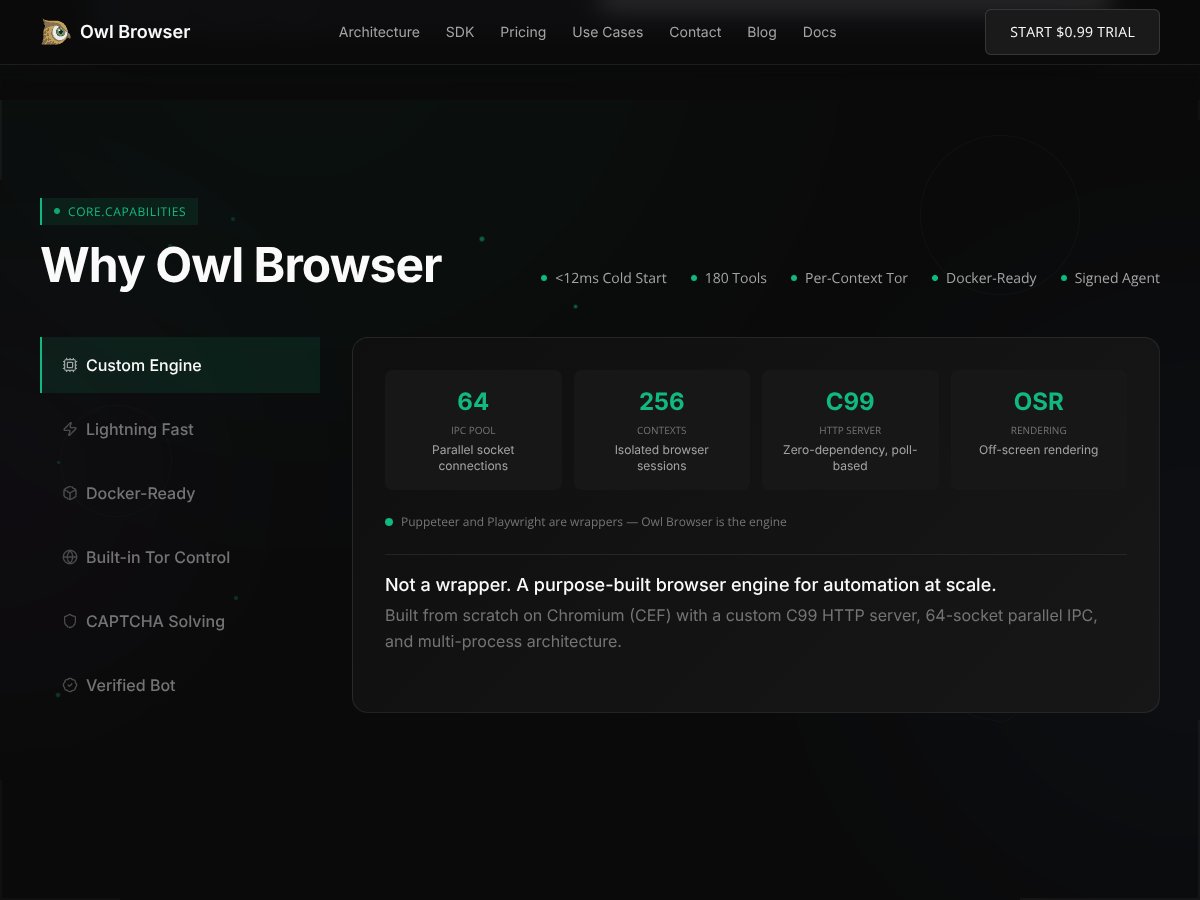
What separates Owl Browser from tools like Puppeteer and Playwright at a technical level is that it is not a wrapper around an existing browser automation API. It is built on a custom Chromium Embedded Framework (CEF) implementation with a C99-based HTTP server, a 64-socket parallel IPC pool, and a multi-process architecture. The fingerprinting spoofing happens at the source level of the browser engine rather than through JavaScript injection, which is why the anti-detection performance differs so substantially from tools that patch fingerprints after the browser is already running.
Stealth techniques cover Canvas fingerprinting, WebGL properties, audio fingerprints, font enumeration, and Navigator object properties, all of which are commonly used by modern bot detection systems to identify automated browsers. Human behavior simulation uses Bezier curves for mouse movement trajectories and variable timing patterns for keystrokes rather than the mechanical precision that flags automated input. Per-context Tor IP isolation means each browser session can run through a different Tor circuit, providing IP-level anonymity independent of external proxy services.
Startup time is claimed at under 12 milliseconds for creating a new browser context, and the system supports up to 256 parallel isolated sessions. Enterprise deployments are designed for 100 or more concurrent sessions. An independent reviewer who tested the tool in April 2026 confirmed that context creation was genuinely fast at the 10 to 12 millisecond range, and that the browser bypassed common detection scripts that immediately flagged Puppeteer and Selenium instances during the same tests.
The AI Layer and Automation Tools
Owl Browser integrates an on-device large language model that enables natural language automation commands. Rather than writing CSS selectors or XPath expressions to identify page elements, you can instruct the browser using plain English: find the cheapest headphones and add to cart, or extract all pricing data from this table and output as JSON. The LLM-based element finding works alongside a Semantic Matcher and a Vision Matcher as three distinct strategies for locating elements on pages with heavy JavaScript rendering or dynamically generated content.
The automation toolset includes between 104 and 157 specialized tools depending on the version and source consulted, covering navigation, form interaction, scrolling, screenshot capture, data extraction, and session management. Output formats for scraped data include Markdown, HTML, and JSON. Built-in CAPTCHA solving handles reCAPTCHA v2, hCaptcha, and Cloudflare Turnstile with claimed success rates of 80 percent, and image-based CAPTCHAs at 94 percent. TypeScript and Python SDKs are available, with the TypeScript SDK described as a drop-in replacement for Puppeteer, and a RESTful HTTP API enables language-agnostic integration for teams not working in JavaScript or Python.
Setup, Documentation, and Real-World Friction
The enterprise Owl Browser has a 14-day free trial that requires no payment method but does require signing an NDA before access is granted. This process involves describing your use case, signing the agreement, and scheduling a personalized demo via video call. For companies with legal departments and procurement processes, this is a normal enterprise software experience. For an individual developer who wants to test a tool before committing, it adds meaningful friction that most open-source or self-serve alternatives do not have.
Installation on macOS involves downloading a DMG from the user dashboard and dragging to the Applications folder, which is standard. Windows uses an installer wizard. The self-hosted Docker deployment packages the entire platform into a single container including the CoreCEF engine, REST API, WebSocket support, a React control panel, Tor service, nginx, and process supervision, eliminating external dependencies for teams that want on-premises control.
Documentation is functional for core workflows but has gaps in specific areas. One independent reviewer who tested the tool noted that multi-context management and proxy configuration documentation felt sparse, and that troubleshooting errors required significant experimentation due to limited community resources. The interface is command-line and API-driven rather than GUI-based, which suits developers but creates a steep initial learning curve for anyone who came from more user-friendly automation tools. The review specifically noted wishing there was a visual dashboard to manage sessions rather than configuring everything through SDK calls.
Enterprise Owl Browser Pricing
Owl Browser's enterprise pricing structure is one of the more unusual in the automation software market. The tiers span from accessible individual pricing to significant one-time enterprise purchases:
|
Plan |
Price |
What It Covers |
|
Free Trial |
Free (NDA required) |
14 days of full access. No payment method required. Sign the NDA, describe your use case, attend a personalized demo, and get access. Best way to evaluate before committing. |
|
Developer |
$49.99/month |
Entry tier for individual developers testing at lower volume. Limited concurrent sessions. Full access to automation tools, TypeScript SDK, and REST API. |
|
Starter |
$1,999/month |
Designed for teams running moderate automation volume. Higher concurrent session limits. Priority support. Suitable for companies with regular scraping or monitoring pipelines. |
|
Business |
$19,999 one-time |
Perpetual license for business-scale deployments. High concurrent sessions. Self-hosted deployment option. Best for organizations running automation continuously. |
|
Enterprise |
$49,999 one-time |
Full enterprise deployment with maximum session limits, dedicated support, custom SLAs, and full self-hosting rights. Contact for custom terms. |
Additional costs to factor: Cloud infrastructure for running concurrent sessions ($100-$2,000+/month depending on scale), proxy and IP rotation services ($100-$1,500/month), and CAPTCHA solving overage costs ($50-$500/month). Pricing last verified April 2026 from SoftwareFinder.
Pricing Assessment
The Developer tier at $49.99 per month is a reasonable entry point for individuals evaluating whether the anti-detection performance justifies the cost. The jump to Starter at $1,999 per month is steep, and the gap between Developer and Starter is where small teams and growing companies feel the most squeeze. The one-time Business pricing at $19,999 makes more economic sense for teams that will run continuous workloads because $1,999 per month across a year is $23,988, which is close to the Business one-time price anyway. The enterprise one-time license at $49,999 is significant but not unusual for specialized infrastructure software at enterprise scale.
The honest additional cost concern is the proxy and infrastructure expenses that stack on top of the browser license. A team running 100 concurrent sessions at enterprise scale is spending meaningfully on compute and residential proxies on top of the Owl Browser fee. The total cost of ownership for a serious deployment is considerably higher than the browser license alone, and this is not always clearly communicated upfront in the product's positioning.
Owl Browser on Android: The Consumer Mobile Experience
The Android version of Owl Browser that most general users encounter is a free mobile browser available through the Google Play Store. The most actively maintained version in 2026 is published under the app ID com.owl.bird.co and is classified as the Owl Browser Drama Info app, updated as recently as January 14, 2026. This is a different product from the enterprise automation engine in every meaningful way, targeting everyday smartphone users rather than developers.
Features and Interface
The Android Owl Browser presents itself with a dual identity: a fast private browser and a short-drama streaming platform. The browser side includes ad blocking, a built-in VPN proxy for unblocking restricted websites, tracking protection, an incognito mode, video downloading with encrypted storage, and standard navigation features. The short-drama side offers an exclusive library of vertical-screen short dramas in genres including CEO romances, werewolf fiction, revenge narratives, and crossover stories, with daily updates and a smart drama recommendation engine.
The browsing experience is described as lightweight and fast, with a small app footprint designed for devices with limited storage. The VPN proxy is integrated directly rather than requiring a separate VPN app, which is a practical convenience for users in markets where certain websites are blocked. The ad blocker functions adequately for most standard advertising formats, with pop-up blocking and tracker protection included. Page rendering speed is promoted as a key feature, with the app using advanced loading technology for faster page display.
The video downloading feature, which encrypts downloaded files so other apps cannot access them without permission, addresses a specific concern in markets where private content storage on shared devices matters. Background downloading keeps transfers running when users navigate away from the download screen. This combination of practical privacy-minded features, ad blocking, VPN proxy, and encrypted downloads explains why versions of this app have maintained moderate download counts across different versions over the years.
Android Version History and Availability
The Android Owl Browser landscape is fragmented in ways worth understanding. The version by MTV Mobile, which ran from September 2023 and reached approximately 21,000 downloads at version 1.1.0 with a 4.33 out of 5 rating based on 130 ratings, was unpublished from Google Play on July 30, 2025. This means users who had downloaded that version still have the app on their devices but cannot update it through the Play Store, and new users cannot install it through official channels. An APK of version 1.0.8.059 from the Night Owl Club developer remains available through third-party APK repositories, providing a download path outside of Google Play for users specifically seeking that version.
The current actively updated version on Google Play as of April 2026 is the Owl Browser Drama Info app, last updated January 2026. This represents the most officially supported Android version currently available through standard channels. Users looking for a strictly private browser without the short-drama content should note that the drama features are an integrated part of this version rather than an optional add-on.
Stability and Support Considerations
The Android app landscape for Owl Browser carries the fragmentation risk that comes with smaller independent browser apps. When the MTV Mobile version was unpublished in July 2025, users had no official migration path or data export option. For a browser that stores browsing history, bookmarks, and downloaded files, an abrupt removal from the Play Store creates a real inconvenience. The current Drama Info version has the same risk profile as any small independent app: continued availability depends on the developer's ongoing commitment to the platform.
Customer support for the Android consumer versions is limited to email contact addresses listed in app store descriptions. There is no dedicated support portal, no live chat, and no community forum for browser-specific issues. For technical problems beyond reinstalling or clearing cache, users have limited official recourse. This is common among small independent browser apps but worth stating clearly for users who prioritize responsive support.
User Experience: Who Each Product Actually Serves
The enterprise Owl Browser serves one primary audience: developers, data engineers, and AI teams who run production-scale browser automation and have been consistently blocked by modern bot detection systems. If you have spent hours building a scraping pipeline in Puppeteer or Playwright, deployed it, and watched it fail immediately against Cloudflare in production, the Owl Browser pitch is directly addressed at your specific frustration. The 14-day free trial with no payment required is a fair evaluation path for exactly this audience, and the technical architecture, purpose-built engine, source-level fingerprinting, Tor-integrated IP isolation, is genuinely differentiated from tools that patch existing browsers post-launch.
The experience friction for this audience is in the onboarding process (NDA requirement, scheduled demo) and the documentation gaps that independent reviewers noted around multi-context management and error handling. This is a specialized tool that rewards investment in setup and understanding, not a plug-and-play solution. One independent tester summarized it as: if your work involves stealth automation or fingerprint spoofing at scale, give Owl a shot. If you are just browsing or need basic privacy, your money is better spent elsewhere.
The Android Owl Browser serves a different and broader audience: mobile users, primarily in markets like India, who want a faster, more private, ad-blocked browsing experience without paying for a premium browser. The dual browser-plus-drama identity is a product direction that will either appeal or seem unnecessary depending on the user. Someone who wants a clean private browser and has no interest in short-drama content will find the drama features take up space in an interface they want to keep minimal. Someone who wants both fast browsing and entertainment content on a single lightweight app will find the combination genuinely practical.
Neither product is particularly beginner-friendly in ways that go beyond their core use case. The enterprise version requires comfort with Docker, SDKs, REST APIs, and browser automation concepts. The Android version requires comfort with independent app installation and an awareness that the app landscape for this product name is fragmented enough that you may find outdated versions or removed apps depending on where you look.
Pros and Cons
Enterprise Owl Browser (owlbrowser.net): What Works
Purpose-built Chromium engine with source-level fingerprint spoofing, not a Puppeteer wrapper, which is why the anti-detection performance differs substantially from competing tools
Claimed 100 percent pass rate across all 16 bot detection categories in benchmark comparisons versus Puppeteer failing 56 percent of the same tests
Natural language automation commands via on-device LLM eliminate the need to write and maintain complex CSS selectors for most common web interaction tasks
Per-context Tor IP isolation provides anonymity at the session level without requiring a separate external proxy service for basic anonymization
TypeScript SDK is a drop-in replacement for Puppeteer, meaning existing Puppeteer scripts require minimal modification to run on Owl Browser
Docker-ready single-container deployment includes everything the platform needs, eliminating external dependencies for self-hosted installations
14-day free trial with no payment method required gives genuine evaluation access before any financial commitment
SOC2 compliance and private cloud options address enterprise security requirements that many automation tools at this price point do not meet
Enterprise Owl Browser: What Creates Friction
NDA requirement before any access, including the free trial, adds legal process overhead that most developer tools at the same category do not require
Documentation gaps around multi-context management, proxy configuration, and error handling require significant experimentation to resolve, particularly for teams used to more fully documented tools
No GUI dashboard for session management. Everything is configured through SDK calls and API commands, which suits developers but increases the learning curve for automation teams with less coding depth
The team and company behind the product maintain opacity about their specific identities and corporate structure, which is a reasonable security decision but creates due diligence difficulty for enterprise procurement teams
Pricing jump from $49.99 per month Developer to $1,999 per month Starter is steep and leaves a gap for mid-scale teams that outgrow the Developer tier before justifying the Starter commitment
Additional infrastructure costs for proxies, CAPTCHA solving, and cloud compute can multiply the effective total cost well beyond the browser license alone
Android Owl Browser: What Works
Free to download and use with no subscription required for core browsing features
Integrated VPN proxy for unblocking restricted websites provides convenience that would otherwise require a separate app
Ad blocking and tracking protection work adequately for standard advertising and tracker scripts
Encrypted local video storage adds a practical layer of privacy for downloaded content
Lightweight app footprint is appropriate for lower-end devices and markets where storage is limited
Android Owl Browser: What Creates Friction
MTV Mobile's version was unpublished from Google Play in July 2025 with no official migration or data export path for existing users
The product landscape is fragmented across multiple unrelated developers, making it unclear which version is the most legitimate current release
Short-drama content is integrated rather than optional in the current actively updated version, which does not suit users who want a pure private browser
Support is limited to email addresses in app store listings with no dedicated help infrastructure
The Hacker News AI-assisted browser version is still in early-stage development and not a fully released product despite sharing the name
How Owl Browser Compares
Enterprise Owl vs Playwright and Puppeteer: Playwright and Puppeteer are the dominant open-source browser automation tools and are free to use. Their limitation is production-scale detection bypass, where they fail the majority of modern bot detection tests without extensive additional configuration. Owl Browser's advantage is specifically in environments where detection is the primary bottleneck rather than automation capability itself. For development and test environments where bot detection is not a concern, the open-source tools are adequate and free.
Enterprise Owl vs Multilogin: Multilogin is the most established enterprise browser automation platform with strong multi-account management and fingerprinting capabilities, and has a longer track record with large enterprises. Owl Browser offers more customization at the engine level and a more competitive price point for comparable stealth capability, according to the independent review that compared the two directly. Multilogin has deeper enterprise integrations and a more established support infrastructure.
Android Owl vs Chrome and Firefox Mobile: Chrome and Firefox are the dominant mobile browsers with fully staffed maintenance teams, extensive ecosystem support, and established security track records. For users who prioritize browser reliability, extension support, and long-term platform stability, either is a safer choice than a smaller independent browser. Owl Browser's advantage on Android is the integrated ad blocking, VPN proxy, and video downloading that mainstream browsers do not include out of the box without third-party extensions.
Frequently Asked Questions About Owl Browser (2026)
1. What exactly is Owl Browser and why are there different versions?
Owl Browser in 2026 refers to at least two distinct and unrelated products that share the same name. The first is an enterprise stealth automation browser at owlbrowser.net, built by Olib AI and launched on Product Hunt in February 2026, designed for developers and data teams who need to run large-scale web automation without triggering bot detection systems. The second is an Android mobile browser aimed at everyday users that has appeared across multiple versions from different developers on Google Play, offering private browsing, ad blocking, VPN proxy, video downloading, and in the current active version, a short-drama streaming library. A third early-stage AI-assisted browser for power users was presented on Hacker News in February 2026 but is not yet a fully released product. The name overlap is coincidental and the products have no relationship. This fragmentation is the main source of confusion for anyone who searches for Owl Browser expecting a single unified product.
2. How do I download Owl Browser on Android?
The most reliably available Android version in 2026 is the Owl Browser Drama Info app, searchable on the Google Play Store by name and last updated January 14, 2026. This version includes web browsing, ad blocking, a VPN proxy, and a short-drama streaming library. The earlier version published by MTV Mobile under the package name com.owl.browser was unpublished from Google Play in July 2025, meaning it is no longer available for new installations through the official store, though APK files from that version remain available through third-party APK repositories for users who specifically want that older build. For installing APKs outside the Play Store, standard Android sideloading applies: enable unknown sources in your device settings, download the APK file, and run the installer. Exercise caution with third-party APK sources and verify file integrity before installing.
3. What version of Owl Browser should I download?
The answer depends entirely on which Owl Browser you need. For the enterprise automation product, your version is assigned when you sign the NDA and receive dashboard access from Olib AI directly through owlbrowser.net. Downloads happen through your account dashboard rather than a public repository. For the Android consumer browser, the current actively supported version is the Drama Info app on Google Play, last updated January 2026. If you want the older MTV Mobile version that was removed from the Play Store, that was version 1.1.0 and only available through third-party APK hosts at this point. For the AI-assisted power user browser that appeared on Hacker News, that product does not have a stable public release as of April 2026. The bottom line is that the version you should use depends on whether you are a developer building automation pipelines, a mobile user wanting private browsing, or a power user looking for AI-augmented browsing.
4. Is Owl Browser free?
It depends entirely on which product you are asking about. The Android consumer browser is free to download and use from the Google Play Store with no subscription or in-app purchase required for core features. Some short-drama content may require separate engagement but the browser itself costs nothing. The enterprise automation engine at owlbrowser.net has a 14-day free trial that requires no payment method, only an NDA signature and a demo call. After the trial, the lowest paid tier is $49.99 per month for the Developer plan. The Starter, Business, and Enterprise tiers run from $1,999 per month up to $49,999 as a one-time payment. So the enterprise product is free to try but not free to continue using at any meaningful scale.
5. Does Owl Browser work on Android in 2026?
Yes, there is an Android version of Owl Browser actively available in 2026. The Owl Browser Drama Info app is available on Google Play and was last updated January 14, 2026, which makes it the most currently maintained Android version. It runs on standard Android devices and provides web browsing, an ad blocker, a VPN proxy for unblocking restricted content, and a short-drama library. The older MTV Mobile version of Owl Browser on Android was removed from the Play Store in July 2025 and is no longer officially available. The enterprise automation browser at owlbrowser.net does not have an Android version and runs only on macOS and Windows desktops, plus self-hosted Docker environments. If you are looking for the automation tool on Android, there is no supported version.
6. What is the enterprise Owl Browser used for?
The enterprise Owl Browser at owlbrowser.net is used for large-scale web automation tasks that require bypassing bot detection systems. Specific documented use cases include e-commerce price monitoring across major platforms like Amazon and Walmart where standard automation tools are immediately blocked, lead generation through scraping business directories and professional networks, social media intelligence gathering by tracking trends across Twitter, TikTok, and Instagram, quality assurance testing that simulates real user behavior rather than automated testing patterns, search engine indexing infrastructure, and AI agent workflows where the browser needs to perform complex multi-step web interactions on behalf of an AI system. Real-world testimonials on the product's website include a transportation logistics company that automated invoice processing and driver billing across multiple portals, and a retail marketplace that automated its entire order processing and inventory update cycle. These are industrial-scale automation use cases, not personal productivity tools.
7. How does Owl Browser avoid bot detection?
The enterprise Owl Browser uses source-level fingerprint spoofing rather than JavaScript injection patches, which is the fundamental technical difference from tools like Puppeteer. Traditional browser automation wrappers run in a browser that was not designed for stealth, then apply patches after launch that bot detection systems have learned to identify. Owl Browser's custom Chromium Embedded Framework engine applies spoofing at the point where fingerprint data is generated, before it is ever exposed to the page. Specifically, it spoofs Canvas rendering fingerprints, WebGL properties, audio context fingerprints, font enumeration results, and Navigator object properties, all of which are standard signals that modern bot detection uses to identify automated browsers. Human behavior simulation uses Bezier curve mouse movement paths and variable keystroke timing rather than mechanical precision. Per-context Tor integration provides a different IP for each session. The combined effect is that the browser presents a profile that is genuinely indistinguishable from a human user on detection tests, rather than simply hiding its automation status.
8. What is the Owl Browser NDA requirement?
The enterprise Owl Browser at owlbrowser.net requires all customers and demo participants to sign a Non-Disclosure Agreement before receiving access to the product, including during the free trial period. The NDA covers three main areas: the existence and specific capabilities of the browser, the technical implementation details of the anti-detection system, and any documentation or materials provided during the evaluation. The company explains this policy as protecting years of anti-detection research from being exposed to bot detection companies who could use it to update their systems, preventing misuse by vetting customers before granting access, and maintaining the effectiveness of the stealth technology through limited distribution. In practice, this means you contact the company, describe your use case, receive the NDA by email, sign it, and then schedule a demo call where the product is demonstrated tailored to your specific automation scenario. For enterprise procurement teams, this is a familiar process. For individual developers who prefer immediate self-serve access, it is a friction point that most competing tools do not have.
9. Is the enterprise Owl Browser legitimate and safe to use?
The enterprise Owl Browser is a legitimate commercial software product with SOC2 compliance, documented customer use cases across transportation, retail, and data infrastructure companies, and a public Product Hunt launch in February 2026 where the founders engaged with questions from the developer community. The product serves genuine business automation needs that are legal in most jurisdictions when applied to publicly accessible web data. The opacity around the team's identities is unusual and worth noting for due diligence purposes, and the NDA requirement does limit the ability to independently verify all capability claims. Independent testing documented in an April 2026 review confirmed that context creation speed and basic anti-detection performance matched what the product claimed for the tested scenarios. The legal and ethical appropriateness of using any browser automation tool depends on the specific websites you are accessing, their terms of service, and the applicable laws in your jurisdiction. Using automation to access data that websites have explicitly prohibited in their terms, or to facilitate fraud or harassment, is not covered by the product's legitimacy as a tool.
10. What are the best alternatives to Owl Browser?
The right alternative depends on which Owl Browser product you are replacing. For enterprise automation: Playwright and Puppeteer are the free open-source alternatives that work well in development but struggle in production against modern bot detection. Multilogin is the most established enterprise browser automation platform with strong multi-account management and fingerprinting, at generally higher pricing than Owl. Browserbase, which appeared on Product Hunt around the same time as Owl with a strong 5.0 rating, offers browser infrastructure for AI agents with a similar stealth focus. Browser Use is another developer-focused tool in the same Product Hunt category. Bright Data's Scraping Browser provides browser automation with residential proxy integration as an alternative approach to the detection problem. For Android consumer browsing: Brave Browser is a strong privacy-first alternative with better long-term support, a larger development team, and integrated ad and tracker blocking without the short-drama content. Firefox Focus offers minimalist private browsing. DuckDuckGo Browser prioritizes privacy with tracker blocking and automatic cookie clearing. All of these are more established products with stronger organizational backing than any independent Owl Browser Android version.
Final Verdict
Owl Browser earns a 3.5 out of 5 from Icon Polls in 2026, and that score reflects the reality of reviewing two products that share a name but serve completely different people with completely different needs.
The enterprise automation engine at owlbrowser.net is doing something technically impressive that a specific segment of the developer community genuinely needed. Browser automation at production scale has a real detection problem, and purpose-built source-level fingerprint spoofing is the right architectural response to it. The AI natural language command layer, the Tor integration, and the Docker-ready deployment show a team thinking seriously about what developers actually need rather than what looks good in a feature list. The product deserves the 4.5 on stealth capability that our ratings table reflects. It loses ground on transparency, documentation depth, pricing complexity, and the NDA access friction, all of which are real costs to evaluate alongside the technical benefits.
The Android consumer browser is a more modest but honest product. It does what a free private mobile browser should do: blocks ads, offers a VPN proxy, keeps browsing private, and downloads videos. The short-drama integration is either a feature or a drawback depending entirely on what you want from a mobile browser. The fragmentation of the product across multiple unrelated developers and the July 2025 removal of one version from the Play Store are the main concerns that keep the Android product from a higher score.
The practical guidance is straightforward: if you are a developer who needs stealth browser automation at scale, request the enterprise trial. The NDA is annoying but the product is worth evaluating. If you are an Android user looking for a free private browser, the current Google Play version works for basic needs but Brave or Firefox Focus offer more stable long-term support from more established teams. And if you found this review because you were not sure which Owl Browser you were looking at, we hope the distinction is now clear.