Quick Verdict
Refrens is a well-rounded business software platform for freelancers, consultants, agencies, shops, and small companies that want more than a basic invoice maker. Its strongest feature is the way invoices, quotations, clients, payments, expenses, inventory, and accounting tools can sit inside one connected workspace. The invoice generator is quick to understand, quotations can be turned into invoices without retyping the same information, and finished documents can be downloaded as PDFs or shared directly. The free allowance is useful for light users, while paid plans make more sense for businesses creating documents regularly. Our 4.0 rating reflects a platform that is practical, flexible, and easy to grow into, although the number of features can make the dashboard feel busy and pricing varies by plan and location.
At a Glance: Icon Polls Ratings
Here is how Refrens scored across the areas we evaluated in 2026:
|
Category |
Stars |
Score |
|
Ease of Use |
★★★★☆ |
4.2/5 |
|
Invoice Generator |
★★★★☆ |
4.4/5 |
|
Quotation Tools |
★★★★☆ |
4.3/5 |
|
Login and Account Access |
★★★★☆ |
4.0/5 |
|
Pricing Value |
★★★★☆ |
3.8/5 |
|
Download and Sharing |
★★★★☆ |
4.1/5 |
|
Software Features |
★★★★☆ |
4.0/5 |
|
Overall |
★★★★☆ |
4.0/5 |
What Is Refrens?
Refrens is a cloud-based business management platform built around invoicing, quotations, accounting, sales, inventory, expense tracking, and customer management. A new user can begin with a simple document generator, then move into the wider software as the business grows. This makes it useful for people who do not want to change platforms every time they need another feature. It supports professional invoices, estimates, proforma invoices, purchase orders, delivery notes, receipts, credit notes, and other business documents. Refrens is available through a web browser, and mobile apps are also offered for users who prefer to work from a phone.
Refrens Login and Account Access
The Refrens login process is straightforward. Users sign in with the email address or account method used during registration and then enter the main dashboard. From there, they can reach invoices, quotations, expenses, payments, clients, products, reports, and other tools from the side menu. First-time users may need a few minutes to understand where everything sits because Refrens covers several parts of business administration. Once the business profile, tax settings, logo, payment details, and document preferences are saved, daily work becomes much faster. For security, users should choose a strong password, avoid sharing login details, and sign out when using a public device.
Refrens Invoice Generator
The Refrens invoice generator is the main reason many users discover the platform. It allows a business to add its name, address, logo, tax details, client information, invoice number, dates, products or services, quantity, rates, discounts, extra charges, taxes, terms, notes, signatures, and payment instructions. Totals are calculated automatically, which reduces common spreadsheet mistakes. Users can change the template, fonts, colours, and document fields before sharing or downloading the invoice. Refrens also helps users track whether invoices are unpaid, partly paid, or settled. Recurring invoices and payment reminders are useful for businesses that bill the same clients regularly. The overall process feels professional without demanding accounting knowledge.
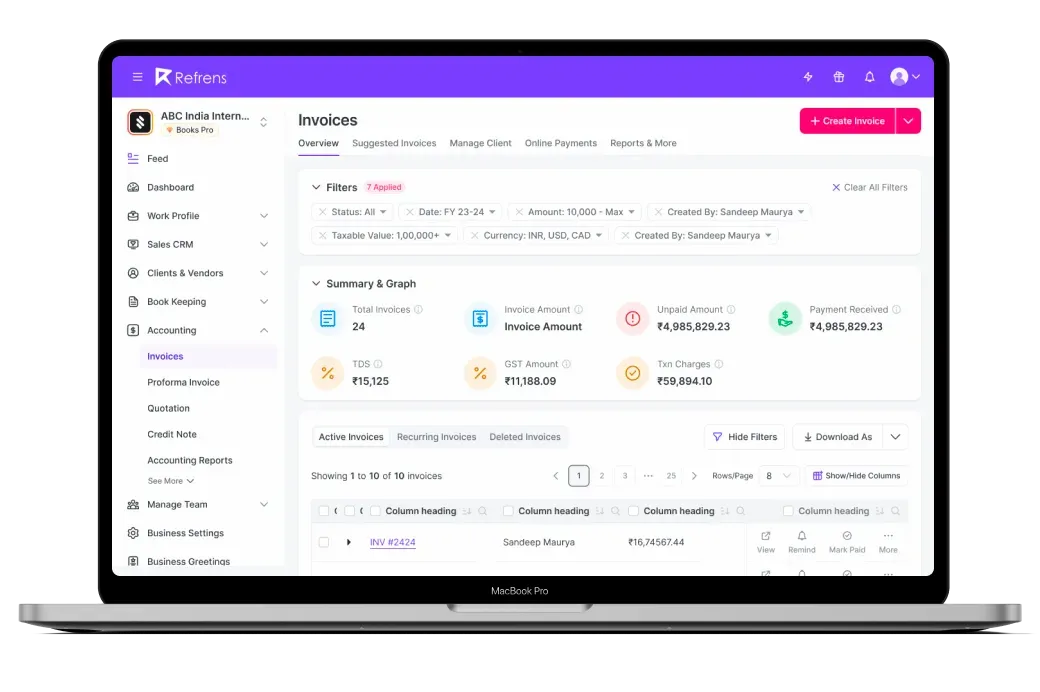
Refrens Quotation Feature
Refrens handles quotations in almost the same way as invoices, which keeps the learning curve low. A user can prepare a detailed offer, include item-level pricing, describe the scope of work, add taxes and discounts, set a validity period, and include payment or delivery terms. The quotation can be downloaded as a PDF, sent by email, shared through a link, or passed to a client through messaging apps. One of the most useful features is document conversion. After a client accepts a quotation, it can be converted into an invoice or another related document without entering the details again. For freelancers and agencies, this saves time and keeps the agreed price connected to the final bill.
Refrens Pricing in 2026
Refrens uses a free and paid plan structure. The free level is best for new businesses or occasional users who create only a small number of documents. Refrens states that free users can create a limited number of invoices, quotations, and related documents each year. Paid plans increase document limits and unlock features such as deeper accounting, inventory, reporting, customisation, multiple users, workflow controls, and broader sales tools. Prices can differ by country, currency, selected modules, and billing period, so the correct figure is the one shown inside the official pricing page or account dashboard at the time of purchase. The value is strongest when a business uses several connected tools rather than paying only for a basic PDF invoice maker.
|
Plan Type |
Best For |
What to Expect |
|
Free Access |
Occasional users and new businesses |
Limited yearly documents and basic generators |
|
Accounting Plans |
Freelancers and active small businesses |
Higher limits, bookkeeping, reports and customisation |
|
CRM or Business Tools |
Teams managing sales and operations |
Pipelines, permissions, inventory and connected workflows |
Refrens Download Options
Refrens does not require a large desktop installation for normal use because the main software runs in a browser. Invoices, quotations, receipts, and other documents can be downloaded as PDF files for printing, record keeping, email, or WhatsApp sharing. Mobile users can also use the Refrens app where it is available through an official app store. The browser version remains useful when working with long item lists, reports, and account settings because a larger screen gives more room. Users should avoid unofficial download websites and only install the app from a verified store listing. For most businesses, the important download is the finished PDF document rather than a desktop program.
Refrens Software Features
Refrens has grown beyond invoice creation into a broader set of connected business tools. Features include quotations, recurring invoices, payment tracking, automated reminders, expenses, purchases, bookkeeping, financial reports, sales CRM, inventory, product records, vendor management, client profiles, and document conversion. Businesses can create sales and purchase documents without repeatedly entering the same data. Tax and compliance options depend on the country selected in the account. Refrens also provides integrations and invoice APIs for businesses that want documents created from another website or application. Small teams may appreciate having sales and finance records in one place, while larger companies should test permissions, reporting depth, and approval workflows before moving all operations to the platform.
Refrens User Experience
Refrens feels easiest when used for a clear task such as creating an invoice or quotation. The forms follow a sensible order, automatic calculations work in the background, and saved customer or item details reduce repeated typing. Previewing the document before sending it is simple, and the templates look professional without much design work. The experience becomes more crowded when accounting, inventory, CRM, and expense features are enabled at the same time. New users may need to learn the menu structure and decide which modules they actually need. Performance is generally suited to everyday small-business work, but a stable internet connection is important because the platform is cloud based. Overall, the convenience of connected records outweighs the initial learning period.
Pros and Cons
What Works Well
Fast invoice and quotation creation with automatic calculations
Quotations can be converted into invoices and other documents
Professional templates can be customised with business branding
PDF download, email, link, and messaging-based sharing options
Client, product, payment, and expense records stay connected
Useful free access for light users and newly started businesses
Wider tools for accounting, inventory, sales, and reporting
Browser and mobile access support work from different devices
What Needs Improvement
The dashboard can feel crowded when many modules are active
Pricing is harder to compare because plans and regional rates vary
Free document limits may be too low for active businesses
Advanced features require more setup than the basic generators
Some users may not need the full accounting and CRM toolset
Cloud-based work depends on a reliable internet connection
Frequently Asked Questions About Refrens (2026)
Refrens is used to create invoices, quotations, estimates, proforma invoices, receipts, purchase orders, and other business documents. It also includes tools for accounting, expenses, payments, inventory, customer management, and sales.
2. How do I log in to Refrens?Open the official Refrens website or app, select the login option, and use the email address or account method connected to your profile. Use the password recovery option when you cannot remember your details.
3. Is the Refrens invoice generator free?Refrens offers free access with a limited yearly document allowance. This can suit occasional users, but businesses creating invoices regularly may need a paid plan for higher limits and additional features.
4. Can I create quotations with Refrens?Yes. Refrens allows users to create customised quotations with item descriptions, rates, taxes, discounts, terms, validity dates, branding, and client details. A quotation can later be converted into an invoice.
5. How do I download an invoice from Refrens?After completing the invoice, preview the document and select the download or PDF option. The saved PDF can be printed, emailed, uploaded to cloud storage, or shared with the client.
6. Does Refrens have a mobile app?Yes. Refrens provides mobile app access in supported app stores. Users can also open the web version from a mobile browser, although detailed editing is usually more comfortable on a larger screen.
7. Can Refrens convert a quotation into an invoice?Yes. Document conversion is one of its strongest time-saving features. The quotation details can be carried into a new invoice without typing the client, items, rates, and terms again.
8. Is Refrens suitable for small businesses?Yes. It is especially useful for freelancers, consultants, agencies, contractors, shops, startups, and small teams that want invoicing and business records in one connected platform.
9. Can I add my logo and payment details?Yes. Users can add business branding, contact information, bank or payment details, terms, notes, signatures, and other custom fields to invoices and quotations.
10. Does Refrens support taxes and discounts?Yes. Tax rates, discounts, additional charges, and totals can be included in documents. Users remain responsible for choosing the correct tax treatment for their country and business.
11. Is Refrens accounting software?Refrens includes accounting and bookkeeping features in addition to invoicing. The exact tools available depend on the selected plan and region, so businesses should confirm that reports and compliance features match their needs.
12. Is Refrens safe for business information?Refrens states that it uses security and privacy controls for customer data. Users should still protect account credentials, enable available security options, limit staff access, and review privacy terms before storing sensitive records.
Icon polls Verdict
Refrens earns 4.0 out of 5 in the ICON POLLS 2026 review. It does the basic jobs well, but its real value comes from connecting invoices and quotations with payments, expenses, customers, inventory, accounting, and sales records. The invoice generator is simple enough for a first-time user, while document conversion saves time for businesses that regularly move from quotation to final billing.
The rating is not higher because the platform can feel busy once several modules are enabled. The free document allowance will not cover an active business for long, and paid plan comparisons can require careful checking because features and prices vary by location. Some small users may also find that they are paying for a wider system when all they need is a basic invoice generator.
Our practical recommendation is to begin with the free level, create a real quotation and invoice, test PDF sharing, and check whether the client, payment, and reporting workflow matches your business. Refrens is a strong choice for freelancers and small companies that want professional documents today and room to add more business tools later.