|
Category |
Details |
|
Company |
RingCentral Inc. |
|
Founded |
1999 |
|
Headquarters |
Belmont, California, USA |
|
Product Type |
Cloud-Based Unified Communications |
|
Global Users |
Over 3 Million |
|
Overall Rating |
2.8/5 |
Introduction
RingCentral's been making waves in the unified communications space for over two decades now. As we're well into 2026, companies around the globe are still deciding whether it's the right fit for their communication needs. We've spent considerable time digging into what RingCentral actually offers compared to what organizations really expect from a platform like this.
We've looked at everything from how people log in to how the mobile app performs in the real world. Our team at ICON POLLS wanted to give you the honest breakdown of RingCentral's strengths and where it falls a bit short. Whether you're thinking about switching or you're already using it, this review should help you understand what you're actually getting.
RingCentral 2026: Login and Access
Let's be honest, the login experience is usually the first time you interact with any platform. It matters because it sets the tone for everything else. RingCentral gives you several ways to get in, depending on what works best for you and your security needs.
Standard Login Process
You can simply open any web browser, head to the RingCentral login page, and enter your credentials. Nothing fancy, but it works
If you're part of a bigger enterprise, there's single sign-on (SSO) available. It supports SAML 2.0 and other standard protocols, so your IT team can manage everything through your existing system
Two-factor authentication (2FA) is there for extra peace of mind, especially if you handle sensitive stuff. It adds a layer of security that matters
Once you're logged in, you stay logged in. The system keeps your session active without constantly asking you to log back in
Challenges Observed
Some users tell us they get logged out randomly, especially when they're jumping between desktop and mobile. It can be frustrating when you're in the middle of something
The password reset flow isn't always obvious. New users sometimes need to reach out to support or dig through documentation just to reset their password
Admin Dashboard and Management
How you manage users and system settings can make or break your experience with a platform like this. RingCentral's admin console has come a long way, but it's definitely a mixed bag depending on what you're trying to do.
Administrator Features
You can add, modify, and remove users in bulk, which saves time when you're managing a large team. The system handles it pretty smoothly
The analytics dashboard gives you solid insight into how people are using the system. You can see call logs, usage patterns, and metrics that actually tell you something useful
Role-based access control means you don't have to give everyone admin privileges. You can delegate management tasks to specific people
Billing and licensing are handled in the admin dashboard, so you can track costs and manage subscriptions without juggling multiple tools
Want to connect third-party apps? There's an integration section where you can hook up other services to RingCentral
Admin Experience Issues
The interface has a lot going on. If you're new to RingCentral, the learning curve can feel steep because there's just so much you can do
When you're doing bulk operations, the filtering options sometimes aren't granular enough. You might find yourself needing to manually edit things when a more targeted filter would have helped
Pulling together reports takes more steps than you'd think. For admins who need to generate reports regularly, this can get old fast
RingCentral Mobile App Performance
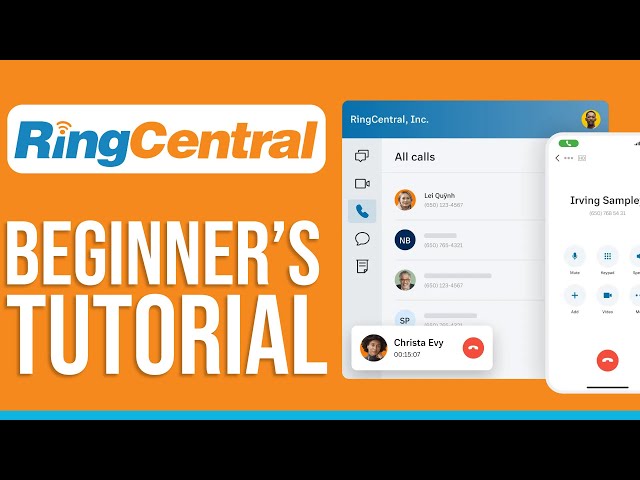
Remote work isn't going anywhere, so the mobile app is pretty important. RingCentral's available on both iOS and Android, and we wanted to see how it actually holds up in real usage.
Mobile App Strengths
The design feels familiar whether you're on the web or mobile. You're not relearning everything when you switch between devices
You get real-time alerts for calls and messages, so you don't miss anything even when the app's in the background
You can draft messages without internet and they'll send when you reconnect. That's genuinely useful for people on the go
Video conferencing is built right in, so you can jump from a call to a meeting without switching apps
Your contacts sync across all your devices, so your phone book stays current no matter what you're using
App Performance Concerns
If you're on a long video call, your battery will take a hit. It's something to keep in mind for extended conversations
On slower connections, the app sometimes struggles to keep up. If your internet's spotty, you might notice lag or dropped calls
Android users have reported occasional crashes, though it's usually linked to specific OS versions
RingCentral 2026: India Market Analysis
India's a huge market for RingCentral, with lots of tech companies, startups, and growing enterprises using it. The platform's been localized to fit Indian requirements and preferences.
India-Specific Features
RingCentral follows TRAI (Telecom Regulatory Authority of India) rules, so you don't have to worry about compliance issues
You can get local Indian phone numbers for major cities, which matters if you want to look local to your customers
If your data needs to stay in India, they've got server options right there in the country
The support team understands local needs and can speak Hindi and other regional languages, which is genuinely helpful
Pricing's tailored for the Indian market with payment options that make sense locally
Market Challenges
Internet reliability isn't consistent across all regions in India. The platform works, but it needs a decent connection to shine
There are Indian competitors out there who understand the market even better and offer services tailored specifically for local businesses
Most of the documentation is in English, so if you're not comfortable reading in English, you might hit some walls
Extension Management and Configuration
Extensions are basically the backbone of how you organize your team's communications. RingCentral gives you tons of flexibility, but that power comes with some complexity.
Extension Capabilities
You can create as many extensions as you need and name them however makes sense for your organization
Set up call forwarding rules that automatically route calls based on schedules or conditions. Morning calls go to one place, evening calls to another
Organize people into departments or call groups so calls reach the right team
Voicemail gets transcribed automatically, making it easier to scan through messages without listening to everything
Extensions work with desk phones and softphone apps, so you're not locked into one way of working
Configuration Challenges
With all these options comes complexity. Setting up advanced call routing can feel like programming if you're not tech-savvy
The documentation for some of the advanced stuff could be clearer and more thorough
If you need to move extensions to a different organization, you'll have to set them up manually. There's no automated migration tool
Dialer Features and Functionality
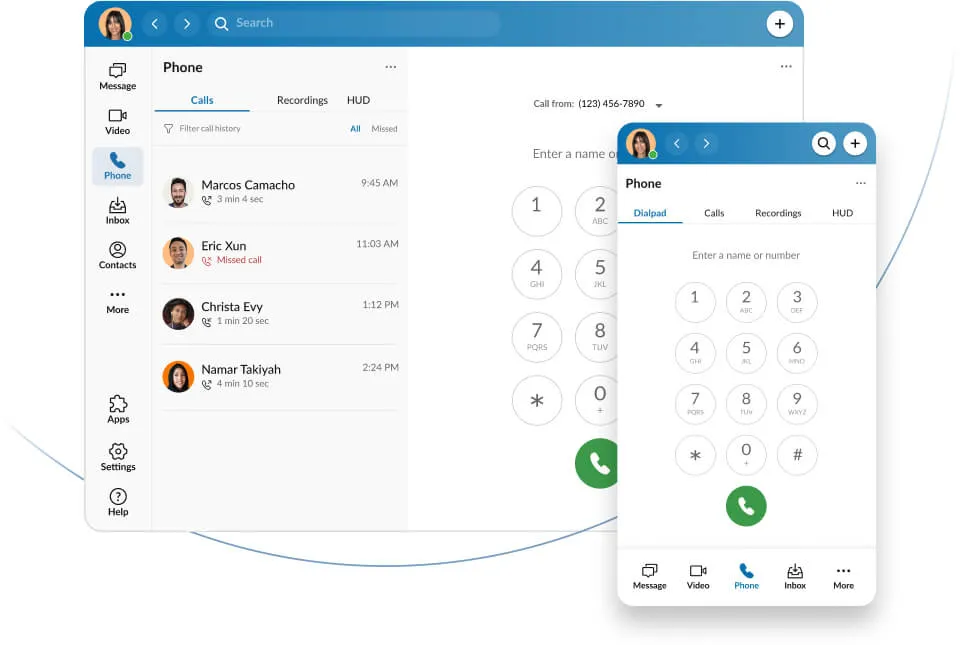
The dialer's where you actually make calls, so it's important that it works smoothly. RingCentral's added some smart features to make calling more efficient.
Dialer Strengths
You can set up quick dial buttons for numbers you call all the time, saving you keystrokes
Click-to-call works with CRM systems, so when you're looking at a contact, you can call them instantly
Calls are recorded automatically if you want, and the transcripts are generated so you can search or review conversations
You can transfer calls, set up conference calls, and even share your screen during conversations
Call history is logged in detail so you can look back on conversations, which is useful for compliance and auditing
Dialer Limitations
Customizing the dialer takes some technical knowledge. It's not as simple as dragging and dropping
Call quality can dip in certain network situations, which isn't ideal when you're trying to have an important conversation
The recording storage and retention settings don't give you as much control as you might want
Overall User Experience Assessment
The real test of any platform is how it feels when you're actually using it every day. RingCentral's experience is honest, straightforward, and sometimes a little rough around the edges.
Positive Aspects
Basic stuff like calling and messaging just works. You don't need a training session to send a message or make a call
When you need help, the support team is responsive. You can chat, call, or email and someone gets back to you
The platform gets updated regularly with new features and security patches that actually matter
There's a wealth of documentation and community forums where other users share tips and solutions
The platform's been around and is built on solid infrastructure. You can count on it being available when you need it
Areas Needing Improvement
The more advanced features aren't intuitive. You'll probably need training or to bring in consultants to get the best out of the platform
The documentation sometimes feels like it was organized by someone who knows the platform inside and out. New users can struggle to find what they're looking for
The pricing isn't transparent. You get what seems like a decent quote, then hit unexpected costs once implementation starts
When lots of people are using it at once, things can slow down. It's not a dealbreaker, but it's noticeable
Frequently Asked Questions
1. How much does RingCentral cost in 2026?
RingCentral offers different plans depending on what you need. In 2026, you're looking at around $25 per user per month for the basic plan. If you want more features, plans go up to $35 to $50+ per person monthly. Big companies can negotiate custom pricing depending on what they need. But here's the thing: those prices are just the starting point. Add-ons like extra storage for recordings, fancy analytics tools, and integrations cost more. Request a detailed quote from their sales team to understand the real total cost. Don't be surprised if the final number is higher than the initial quote.
2. Is RingCentral available in India with local compliance?
Yes, RingCentral definitely operates in India and has made it a priority to comply with local rules. You can get local Indian phone numbers, they follow TRAI regulations, and you can store data on servers based in India if that matters to you. Every business in India has different compliance needs depending on your industry and size, so make sure to talk with their sales team about your specific requirements. Their India-based support team can help you navigate the compliance stuff if needed.
3. What should I know about RingCentral login security?
Security matters when it comes to communications, and RingCentral takes it seriously. You get two-factor authentication, which means someone can't just log in with your password. They also support single sign-on if you want to manage credentials through your company's directory system. Our advice: turn on two-factor authentication, use a password manager to create strong unique passwords, and don't share your login details. Sessions time out automatically, which is good for security but can be annoying if you're stepping away briefly. If your company needs extra security features, talk to their enterprise team about what's possible.
4. How does RingCentral admin console compare to competitors?
RingCentral's admin dashboard gives you tools to manage users, view analytics, and handle integrations. But let's be real: it's not the simplest interface. If you're new to RingCentral or cloud communications in general, you'll need time to get comfortable with it. Bulk operations are possible, but the filtering could be more intuitive. Pulling reports takes more steps than you'd think. If you're comparing it to competitors, RingCentral has more power and flexibility, but that comes at the cost of complexity. Budget time for training your admin team or consider getting professional help with setup and training.
5. Does the RingCentral app work reliably for remote teams?
For the most part, yes. The mobile app does well with features like offline messaging, notifications, and built-in video. But here's the catch: it really depends on your internet. If you're in an area with bad connectivity or unstable service, the app will struggle. We've heard from Android users about occasional crashes on certain OS versions. If you're planning to roll this out to a remote team, do a test run first to see how it actually performs in your environment. Ideally, users should have at least 2.5 Mbps for video calls. The app's the same on iOS and Android in terms of features, so you're not missing out either way.
6. What are the limitations of RingCentral extensions?
Extensions are unlimited and customizable, which is great. The problem is that complex call routing scenarios need careful planning and probably some tech knowledge. If you've got unusual requirements, the setup can get complicated. Moving extensions between accounts isn't automatic, so you'll be doing manual work. Standard use cases work great, but if you need something really specialized, you might need to hire someone to help you figure it out. Make sure to document your extension setup as you go so you can troubleshoot issues later.
7. How is call quality on the RingCentral dialer?
Under normal conditions, call quality is pretty good. The audio is clear, connections are stable, and the system adapts to different internet speeds. But if your bandwidth is tight or your network is congested, you'll hear it. Call quality drops, especially on conference calls with multiple people. If you've got spotty internet, you might get cut off or hear lag. Make sure you've got enough bandwidth available. For important calls, stick to a wired connection if possible. Recording quality matches the call quality, so if the call's clear, the recording will be too.
8. What is the rating and would you recommend RingCentral in 2026?
We rated RingCentral 2.8 out of 5, and here's what that means: it's a platform that does the basics well and has solid infrastructure, but it's not without its frustrations. If your company needs straightforward unified communications and you've got the resources to train people on it, RingCentral works. Mid-size to large companies tend to get more out of it than small businesses. It's not the cutting-edge choice if you're looking for the latest innovations, and it might not be the cheapest option either. We'd recommend asking for a trial, testing it with your actual use cases, and maybe talking to current users in your industry. That'll tell you way more than our rating whether it's right for you.
Icon Polls Verdict
RingCentral's been around for decades and it shows. They've built a platform that works well for a lot of companies. It's not flashy or groundbreaking, but it gets the job done. Our 2.8 out of 5 rating reflects what we see: solid fundamentals with some real limitations that might affect your decision.
The bottom line is this: RingCentral is worth considering if you've got straightforward communication needs and the bandwidth to get everyone trained up. If you're looking for something that's plug-and-play simple or cutting-edge innovative, you might want to look elsewhere. For mid-to-large organizations with established IT support, it tends to work out well.
Don't just take our word for it though. Get a trial, put it through your actual workflows, and talk to companies like yours who are already using it. That's the best way to know if RingCentral's the right fit for what you're trying to do.
Want more information? Head over to RingCentral's website or reach out to their sales team. They can walk you through what they offer and figure out a solution that matches your needs.