|
Attribute |
Details |
|
Product Name |
Stitch by Google |
|
Parent Company |
Google (Google Labs) |
|
Category |
AI-Powered UI Design Tool |
|
Originated From |
Acquired Galileo AI (rebranded as Stitch in 2025) |
|
Launched |
Announced May 20, 2025 at Google I/O 2025 |
|
Latest Version |
Stitch 2.0 (released March 17, 2026) |
|
Powered By |
Gemini 3.0 Pro and Gemini 3.0 Flash models |
|
Official Website |
stitch.withgoogle.com |
|
Pricing |
Free (350 standard + 200 experimental generations per month) |
|
Platform |
Browser-based (no download required) |
|
Login Method |
Google Account |
|
Export Options |
Figma, HTML/CSS, Tailwind, MCP, Jules, .zip |
|
Status |
Beta (Google Labs Experiment) |
|
ICON POLLS Rating |
2.9 / 5 |
What Exactly Is Stitch by Google?
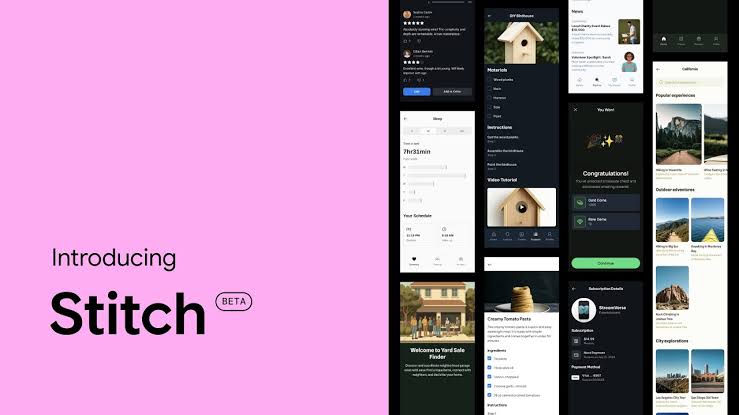
Stitch is Google's AI-powered UI design tool, sitting inside the Google Labs ecosystem. The pitch is simple. You describe what you want in plain English, drop in a sketch or screenshot if you have one, and Stitch generates high-fidelity UI screens along with clean, exportable code. The tool was originally announced at Google I/O 2025 after Google scooped up Galileo AI, the well-funded startup that had pioneered prompt-to-UI generation. The Galileo team's training data and product foundation became the engine that powers Stitch today.
In March 2026, Google rolled out Stitch 2.0, which is essentially a fresh product wrapped in the same name. The update introduced an AI-native infinite canvas, multi-screen generation, voice input, four AI modes, a design system file format called DESIGN.md, and a Model Context Protocol (MCP) server that connects Stitch directly to coding agents and IDEs. The tool now runs on Gemini 3.0 Pro and Gemini 3.0 Flash.
The Stitch by Google Logo
The Stitch logo follows Google's familiar minimalist design language. It uses the recognisable Google color palette in a stitched ribbon style, often appearing as a soft pastel gradient that ties the product visually to Google Labs and the Gemini family. You will see the logo most prominently at the top of stitch.withgoogle.com, on Google's developer blog announcements, and in the Google Labs project gallery. There is no separate downloadable brand kit released to the public yet, which is something we hope Google addresses in future updates for press, partners, and educators.
Stitch by Google Download: Is There an App?
This one trips up a lot of new users, so let us settle it. There is no Stitch app to download. No installer, no Mac DMG, no Windows EXE, no iOS or Android version. Stitch is a fully browser-based product, accessed only at stitch.withgoogle.com. You sign in with a Google account and start designing. That is it.
In a way this is a strength. Stitch loads on any modern browser, on any operating system, with zero setup overhead. But if you were hoping for an offline desktop experience or a mobile companion app for design-on-the-go, that is not part of the offering as of 2026. We tested the web app on Chrome, Edge, and Safari, and performance was consistent, though Chrome remains the smoothest.
Stitch by Google Documentation
Documentation for Stitch is split across a few official destinations. The main hub is the Google Developers Blog, where the launch post and Stitch 2.0 announcement live. The Google AI Developers Forum hosts the official Stitch Prompt Guide, which walks users through the high-level versus detailed prompting approach Google recommends. The forum is also where the team replies to user questions about modes, credits, and known bugs.
For developers, the Model Context Protocol documentation explains how to connect Stitch to coding agents like Cursor, Blackbox, and other compatible IDEs. There is also growing third-party tutorial content from Codecademy, LogRocket, and UX Planet that fills in the practical gaps Google's official docs leave behind.
Our honest take. The documentation is functional but feels lean for a product of this ambition. Beginners will likely lean on YouTube tutorials and blog walkthroughs more than Google's own resources, especially for advanced topics like DESIGN.md syntax, MCP setup, and Figma export edge cases.
Is Stitch by Google Really Free?
Yes, Stitch is free. There is no credit card requirement, no trial timer, and no paid tier as of mid-2026. That said, free does not mean unlimited. Google enforces monthly generation caps that reset each month.
350 standard generations per month using Gemini 3.0 Flash
200 experimental or thinking-mode generations per month using Gemini 3.0 Pro
No top-up option if you exhaust your quota mid-month
No paid plan to upgrade to, even for power users
For a solo founder, indie developer, or small product team, these limits are surprisingly generous. For a busy design agency burning through dozens of client iterations daily, the cap can feel restrictive within a week or two. The lack of a paid tier is unusual for a product this polished, and it is one of the reasons our final score is what it is. Reliability and predictable scaling matter for professional workflows.
Stitch by Google Examples
To put Stitch through its paces, our editorial team ran a handful of real prompts and tracked the results. Here are the examples we tested.
Example 1: SaaS Landing Page
Prompt: A landing page for an AI writing assistant called InkFlow. Hero section with headline, subheadline, and CTA button. Features section with three cards. Social proof section with customer logos. Pricing section with two tiers. Footer with links.
Result. Stitch generated three landing page variants in roughly 90 seconds. The hero typography was clean, the feature cards had consistent spacing, and the pricing tier alignment was professional. The CTA contrast needed manual tweaking after export, but the bones were solid.
Example 2: Mobile Crypto Dashboard
Prompt: Design a mobile dashboard screen for a cryptocurrency tracking app called CryptoTrack. Include a top navigation bar, portfolio summary card, trending crypto slider, and a bottom navigation menu. Use a dark theme with rounded cards.
Result. The dark theme rendered well, the portfolio summary card was the standout component, and the trending slider had decent visual hierarchy. The pie chart placeholder was generic and required a follow-up prompt to refine.
Example 3: E-Commerce Homepage from Image Upload
Prompt plus image. We uploaded a t-shirt product photo and asked for a clean, warm e-commerce homepage for a clothing brand called Skatee, including a hero, featured products, and newsletter banner.
Result. Experimental Mode handled the image input gracefully and produced a layout that visually matched the uploaded reference. However, the design did not have a Figma export option in Experimental Mode, which forced a workflow detour.
Example 4: Multi-Screen App Flow
Prompt: A five-screen checkout flow including cart, shipping form, payment screen, confirmation page, and order tracking view.
Result. This is where Stitch 2.0 shines. All five screens shared consistent typography, color palette, and component styles. The auto-prototype linking feature wired the screens together with a single click. This was easily the most impressive demo of the tool's modern capabilities.
User Experience: Our Honest Take
Stitch has personality. The infinite canvas feels alive, the agent log shows you what the AI is thinking step by step, and the four AI modes (Ideate, Flash, Standard, and Thinking) give you real control over speed versus polish. The voice canvas, while still rough around the edges, is genuinely fun to use during early ideation.
That said, the experience has rough patches. Experimental Mode can be slow and inconsistent, especially during peak hours. The lack of real-time team collaboration, which is table stakes for tools like Figma in 2026, makes Stitch feel solo-first. There is no design system management beyond DESIGN.md, brand token enforcement is shaky without manual prompt engineering, and there is no support for animations or advanced micro-interactions.
Geographic availability is also a sore point. Users in parts of the Balkans, Ukraine, the UAE, Andorra, and Spain have reported access issues during the beta phase. For a tool marketed as a global Google Labs experiment, this is a stumble.
Pros and Cons at a Glance
What We Liked
Completely free with a meaningful monthly quota
Multi-screen consistency is genuinely impressive
Clean code export that you can actually use as a starting point
Infinite canvas keeps every iteration visible side by side
MCP integration opens up real developer workflows
Voice canvas adds a fresh way to ideate
What Held It Back
Still in beta and that shows in reliability
No paid plan to scale beyond monthly caps
No real-time collaboration features
Geographic restrictions for several countries
Documentation feels lean for a Google product
Output often needs designer refinement before production use
No animation or micro-interaction support
Experimental Mode does not support Figma export
The ICON POLLS Verdict: 2.9 out of 5
Stitch by Google is a fascinating, free, and genuinely promising tool that pushes the boundaries of what AI-driven design can do. The Gemini 3.0 engine is powerful, the canvas redesign is thoughtful, and the multi-screen consistency is unlike anything else on the market right now. There are flashes of brilliance here.
But brilliance is not the same as reliability. For our final rating of 2.9 out of 5, we weighed the experimental beta status, the lack of a paid scaling option, the missing collaboration features, the patchy global availability, and the simple fact that most production teams will still need to refine the output heavily before shipping. Stitch is exciting. It is just not finished.
Our recommendation. Use it as an ideation accelerator, a prototyping shortcut, or a way to get out of the blank canvas problem fast. Do not rely on it as your only design workflow. Not yet.
Frequently Asked Questions About Stitch by Google
1. Is Stitch by Google free to use in 2026?
Yes, Stitch is completely free in 2026 as part of Google Labs. There is no credit card required and no paid tier. Users get 350 standard generations and 200 experimental generations every month, which reset on a monthly cycle. Once the quota is used up, you have to wait until the next reset because Google does not offer a top-up or upgrade option.
2. Do I need to download Stitch by Google to use it?
No. Stitch is entirely browser-based. You access it at stitch.withgoogle.com, sign in with a Google account, and start designing immediately. There is no desktop installer, no mobile app, and no Chrome extension to download. This works in your favor because it runs the same way on any operating system with a modern browser.
3. What is the difference between Stitch and Galileo AI?
Galileo AI was an independent prompt-to-UI design startup founded before Stitch existed. In May 2025, Google acquired Galileo AI and rebranded the technology as Stitch under the Google Labs umbrella. Galileo's training data and core product gave Stitch a head start of roughly 18 months of machine learning on real design prompts and user behavior, which is part of why the output feels so polished.
4. Can Stitch by Google export to Figma?
Yes, Stitch supports a Paste to Figma feature in Standard Mode that exports your design with editable layers and Auto Layout intact. The catch is that Experimental Mode, which lets you upload images and reference visuals, does not support Figma export. So you have to choose between richer image-based input or smoother Figma handoff depending on which mode you use.
5. What kind of code does Stitch generate?
Stitch generates clean, responsive HTML and Tailwind CSS by default. As of 2026, the export dialog also includes options for Figma handoff, MCP integration with IDEs like Cursor and Blackbox, Jules (Google's AI coding agent), a .zip download of all assets, and Instant Prototypes. Direct React, Vue, and SwiftUI exports are not available yet, though the HTML and Tailwind output can be converted manually or with help from another AI tool.
6. Is Stitch by Google good for professional designers?
It depends on the use case. For early-stage ideation, rapid prototyping, and exploring multiple design directions quickly, yes, Stitch saves real hours. For professional production work that requires pixel-perfect consistency, brand token enforcement, real-time team collaboration, and a deep plugin ecosystem, professional designers will likely still rely on Figma or similar mature platforms. Most pros use Stitch as an ideation layer rather than a full replacement.
7. Where can I find Stitch by Google documentation and tutorials?
Official documentation lives across the Google Developers Blog and the Google AI Developers Forum, where the Stitch Prompt Guide is hosted. Google also publishes updates on the main Google Blog under the Google Labs section. For tutorials, third-party resources from Codecademy, LogRocket, NxCode, and UX Planet are often more practical and beginner-friendly than the official Google docs, especially for advanced features like DESIGN.md and MCP setup.
8. Is Stitch by Google available worldwide?
Stitch is meant to be globally available, but during its beta phase in 2026, several users have reported access issues in specific regions. Affected areas include parts of the Balkans (North Macedonia, Serbia, Bosnia and Herzegovina), Ukraine, the UAE, Andorra, and Spain. Google has not published an official supported-countries list, so availability can shift. If the site does not load in your region, a stable VPN often resolves the issue, but this is not officially endorsed by Google.
9. What makes Stitch 2.0 different from the original Stitch?
Stitch 2.0, released in March 2026, is essentially a redesigned product. The biggest changes are the AI-native infinite canvas that replaces the older single-screen layout, multi-screen generation that produces up to five connected screens at once with consistent design language, voice input for hands-free design, four AI modes instead of two, the introduction of the DESIGN.md design system file, and full Gemini 3.0 model integration. It is a meaningful jump in capability, not just a refresh.
10. Will Stitch by Google replace Figma?
Not in the immediate future. Stitch and Figma serve overlapping but different needs. Figma is a mature collaborative platform built for design teams, with a massive plugin ecosystem, real-time multi-user editing, design system management, and enterprise governance. Stitch is an AI-native ideation and rapid prototyping tool. The two tools work better together than as replacements, and most professional teams will likely use Stitch for early concepting and then move polished work into Figma for refinement and team handoff.