Quick Verdict
Transkriptor is one of the strongest and most well-rounded AI transcription tools available in 2026, and it earns its 4.5 rating by doing the core job genuinely well across an unusually wide range of needs. It is an online, browser-based speech-to-text platform with companion apps for iPhone, iPad, and Android, and it converts audio and video into accurate, editable text in well over 100 languages. The accuracy is its headline strength: on clear English audio it performs at the top of the mid-tier, and it draws consistent praise from users transcribing languages that many competitors handle poorly, including Hebrew, Tamil, Malay, Turkish, and Portuguese, which makes it a genuine standout for multilingual and international users. It handles uploaded files, real-time recording, YouTube and meeting-link transcription, and it can join and record Zoom, Microsoft Teams, and Google Meet calls through its integrations, returning a transcript with speaker labels and an AI-generated summary with action items. It supports domain-specific vocabulary for medical, legal, and technical content, exports to TXT, Word, and SRT, and carries serious compliance credentials including SOC 2, ISO 27001, GDPR, and HIPAA. Its strong review averages across major platforms reflect a tool that users genuinely rely on. The honest reasons it is a 4.5 rather than a 5: accuracy drops on heavy accents, overlapping speakers, and noisy audio, where manual correction is needed; the editing interface can occasionally disrupt workflow with timestamp and punctuation quirks; and a meaningful number of users find the pricing on the higher side, especially in some regions, and wish for more flexible plan options. None of these undercut the core value. For students, journalists, researchers, content creators, and professionals who need fast, accurate, multilingual transcription in one affordable, easy-to-use platform, Transkriptor is an excellent choice and one of the best in its category in 2026.
At a Glance: Icon Polls Ratings
Here is how Transkriptor scored across the areas we evaluated in our 2026 research:
|
Category |
Stars |
Score |
|
Transcription Accuracy |
★★★★★ |
4.5/5 |
|
Language Coverage (100+) |
★★★★★ |
5/5 |
|
Ease of Use and Online Platform |
★★★★★ |
4.5/5 |
|
Meeting and Integration Features |
★★★★★ |
4.5/5 |
|
AI Tools and Summaries |
★★★★★ |
4.5/5 |
|
Editing Experience |
★★★★☆ |
3.5/5 |
|
Pricing Value |
★★★★☆ |
4/5 |
|
Overall |
★★★★★ |
4.5/5 |
What Is Transkriptor?
Transkriptor is an AI-powered transcription platform that converts audio and video into accurate, editable text. It is built for the everyday reality of people who deal with spoken content: students transcribing lectures, journalists turning interviews into quotes, researchers processing qualitative data, content creators captioning videos, and professionals documenting meetings. You give it a recording, whether an uploaded file, a live recording, a meeting, or a video link, and it returns a transcript you can read, edit, search, and export, in well over 100 languages.
The platform is fundamentally online and browser-based, which means there is nothing to install to use it on a computer: you sign in through any browser, upload or record your audio, and work with the result in an online editor. For mobile use, Transkriptor offers companion apps for iPhone, iPad, and Android, so you can record and transcribe on the go and have everything sync to your account. This combination of a no-install web platform and mobile apps means Transkriptor meets people wherever they are working, which is part of why it has become so widely used.
What distinguishes Transkriptor in the crowded transcription market is the breadth of what it does well in a single, affordable tool. It is not just a file transcriber. It handles real-time transcription as audio is recorded, transcribes directly from YouTube and other video links without requiring you to download the file first, joins and records online meetings through integrations, supports batch uploading of multiple files, recognizes domain-specific vocabulary for specialized fields, and layers AI features like summaries and an AI chat on top of the raw transcript. It exports to editable TXT, Word, and SRT subtitle files, and it carries the kind of compliance credentials, including SOC 2, ISO 27001, GDPR, and HIPAA, that matter for professional and regulated use.
The result is a tool that has earned strong reviews across the major software review platforms, with average ratings consistently in the high range across hundreds of reviews, and a user base that spans solo students and content creators through to business teams. Transkriptor positions itself as making voice-to-text conversion easy and accessible, and our assessment is that it largely delivers on that promise. The 4.5 rating reflects a genuinely excellent tool with a small set of honest limitations rather than any fundamental weakness, and this review walks through exactly where it shines and where it falls slightly short.
The AI and Transcription Accuracy
Accuracy is the single most important thing a transcription tool can get right, and it is Transkriptor's headline strength. The platform uses AI-powered speech recognition that converts spoken language into written text with high accuracy, and on clear, single-speaker English audio it performs at the top of the mid-tier, in the range where the transcript needs only light correction before it is usable. For the core case of a clear recording in a major language, Transkriptor produces results that genuinely save the time they promise to save.
Where Transkriptor stands out most is multilingual accuracy. It supports well over 100 languages, and what makes this more than a number on a feature list is that users transcribing languages many competitors handle poorly consistently praise its quality. There are accounts of users being genuinely impressed by its accuracy in Hebrew, in Turkish including archaic vocabulary, and in languages like Tamil, Malay, and Portuguese, where other tools often struggle. For multilingual professionals, international researchers, and anyone working outside the major Western European languages, this breadth and quality of language support is a real and rare advantage, and it is the reason language coverage earns a perfect score in our ratings.
The AI does more than transcribe. It identifies and distinguishes between multiple speakers so you can follow who said what, it handles background noise reasonably well, and it supports domain-specific vocabulary so that medical, legal, and technical terms, which standard speech models often stumble over, are recognized more reliably. The platform also learns and improves over time, and for clean audio in well-supported languages, accuracy can be very high. On top of the transcript, Transkriptor layers AI features including automatic summaries and an AI chat that can answer questions about the content of your transcripts, turning a raw transcription into something you can quickly extract insight from.
The honest accuracy caveat is the one every transcription tool shares to some degree. Performance varies with the recording environment. Clear, single-speaker audio is the best case. Multi-speaker recordings with overlapping dialogue, heavy background noise, or strong regional accents require more manual correction, and accuracy on non-major languages is more variable than on English. Users in specialized domains like medical, legal, and financial work should factor in transcript review time as part of their workflow rather than treating the output as final. This is not a flaw specific to Transkriptor; it is the nature of automated transcription, and Transkriptor handles the difficult cases as well as or better than most. But it is why accuracy earns a strong 4.5 rather than a perfect score, and why testing on a sample of your own typical audio before committing is sound advice.
The App and Using Transkriptor Online
Transkriptor is primarily an online tool, and this is one of its practical strengths. Because it runs in the browser, there is no software to install on a computer, no compatibility worries, and no updates to manage. You sign in at the Transkriptor website, and the full platform, including uploading, recording, the online editor, exporting, and the AI features, works directly in the browser. For users who simply want to get a recording transcribed without setting up software, this no-install online approach removes friction entirely.
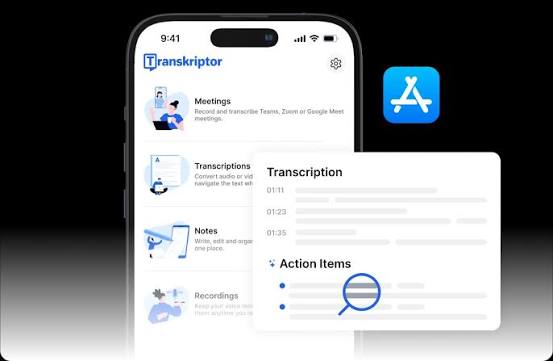
For mobile, Transkriptor provides apps for iPhone, iPad, and Android, available from the respective app stores. The mobile apps let you record and transcribe directly from your phone or tablet, which is useful for capturing in-person conversations, lectures, and meetings on the go, and everything syncs back to your account so you can continue working with the transcript on a larger screen later. The cross-device experience, where you can start on mobile and finish on the web, is smooth and is part of what makes Transkriptor convenient for people who work in more than one place.
The core workflow is genuinely simple, which is one of the most consistent themes in user feedback. You upload an audio or video file, or paste a link, or record directly, and Transkriptor processes it into a transcript. Batch uploading lets you queue multiple files to process one after another, which is far more practical for high-volume work than the one-at-a-time approach some competitors require. The YouTube and video-link transcription is a nice convenience for content creators who want to transcribe their own or others' published videos without downloading anything first. The upload process is generally described as smooth and efficient across many file formats, with notifications when processing finishes, though some users note that very large files or mobile uploads can occasionally be slow.
Once a transcript exists, the online editor is where you review and refine it. You can correct errors, adjust text, work with timestamps, and then export to editable TXT, Word, or SRT subtitle files depending on what you need. The editor is functional and serviceable, and for most users it does the job well. It is also, honestly, the part of the experience users most often wish were a little smoother, which we cover in the user experience section, but the overall online and app experience is one of the platform's clear strengths and a major reason it is so easy to recommend for everyday transcription.
Login and Signing In
Getting started with Transkriptor is quick and low-friction. You sign up at the Transkriptor website with an email address, and signing in afterward gives you access to the full platform across the web and the mobile apps using the same account, so your transcripts and settings follow you across devices. There is no complicated setup or lengthy onboarding; the platform is designed so that you can sign in and have your first transcript underway within a couple of minutes, which matches its overall emphasis on ease of use.
Because Transkriptor is online and account-based, your transcripts are stored in your account and accessible from any device where you sign in, whether that is the web platform in a browser or the app on your phone. This cloud-based model is convenient for accessing your work anywhere, and the platform's compliance credentials, including SOC 2, ISO 27001, GDPR, and HIPAA, are relevant here because they speak to how your account data and the sensitive content of your transcripts are handled and secured, which matters for professional and regulated users storing confidential material.
Account and billing management is handled within the platform settings, where you can view your plan, change it, and manage your subscription. One practical detail worth knowing is that the platform allows downgrading back to the free tier from within the billing settings, which is reassuring for users worried about being locked into a paid plan. The login and account experience is not where any meaningful friction lies; it is straightforward, and the main things to be aware of are the cloud-based storage of your transcripts and the compliance credentials that govern how that data is protected.
Meeting Recording and Integrations
One of Transkriptor's most valuable capabilities for professionals in 2026 is its meeting integration, which removes the manual step of recording a call and uploading it afterward. Through its integrations, including a browser extension and calendar connections, Transkriptor can join and record online meetings on the major platforms, namely Zoom, Microsoft Teams, and Google Meet. After the meeting, you receive a transcript with speaker labels alongside an AI-generated summary with action items, which turns a call into documented, searchable output without anyone taking manual notes.
The calendar integration deepens this further by connecting to Google Calendar and Microsoft Outlook, allowing Transkriptor to automatically join and transcribe meetings when they start, so the documentation happens without you having to remember to set it up each time. For teams that run a lot of meetings and want consistent records of decisions and action items, this automation is a genuine productivity benefit and one of the features that lifts Transkriptor above being just a file transcriber into being a meeting documentation tool as well.
Beyond meetings, the integrations and AI features combine to make the transcripts more useful. The AI chat lets you ask questions about your transcripts and get answers drawn from the content, which is valuable when you have long recordings and need to find specific information quickly. The ability to transcribe directly from YouTube and other video links extends the tool's usefulness for content creators and researchers who work with published video. Taken together, the meeting integrations, calendar automation, AI summaries and chat, and video-link transcription make Transkriptor a broad and capable platform rather than a narrow single-purpose tool, which is a significant part of why it earns a high overall rating.
Transkriptor Free Plan and Pricing in 2026
Transkriptor offers a free tier and affordable paid plans, which is part of its appeal. Here is the general structure as found in our 2026 research:
|
Plan |
Price |
What You Get |
|
Free |
EUR 0 / $0 |
A free allowance to try the platform, with a limited amount of transcription (a daily or monthly free quota) and core features, so you can test accuracy and the workflow before paying. No install required. |
|
Lite |
From around $9.99/month |
Entry paid plan for individuals with moderate needs, covering a few hours of audio per month. Suits freelancers, students, and solo professionals. Affordable starting point. |
|
Pro |
Higher monthly tier |
The main plan for professionals transcribing both meetings and recorded files, with significantly expanded monthly capacity and meeting-specific features beyond the entry tier. |
|
Premium / Unlimited |
Around $19.99/month |
Unlimited transcription with all AI features, meeting recording, and transcript storage, for heavy users who want no caps to worry about. |
|
Team / Business |
Custom or higher tier |
Plans for teams needing shared use, collaboration, and business features, with pricing scaled to the organization. |
Pricing reflects 2026 research and varies by region and billing choice. A free tier and a free trial are available to evaluate the tool before paying. Plans are structured largely around monthly transcription hours, with an unlimited option for heavy users. You can downgrade back to the free tier from within the billing settings. Confirm current pricing and exact plan limits on the official site before subscribing.
Is the Pricing Worth It?
For most users, Transkriptor's pricing represents good value, which is why pricing still scores well in our ratings despite being the most common area of user complaint. The free tier lets you genuinely test the platform on your own audio before paying, the entry plan is affordable for individuals, and the unlimited option provides cost predictability for heavy users who do not want to track hours. Compared with paying for manual transcription or piecing together multiple single-purpose tools, the subscription model offers real savings for anyone transcribing at a consistent volume, and the breadth of features included in a single affordable subscription is part of what makes it competitive.
The honest caveat is that a meaningful number of users do find the pricing on the higher side, and this is the most frequently raised criticism in user feedback. The concern is most common among occasional users, who may not transcribe enough to justify a recurring subscription, and among users in certain regions, where the pricing can feel expensive relative to local norms. Some users also wish for more flexible plan options, more affordable entry packages, or the ability to buy additional credits within a plan. None of this means the pricing is unreasonable for regular users, but it is a genuine consideration, and the practical advice is to estimate your actual monthly transcription volume and match it to the right plan rather than overcommitting, and to use the free tier first to confirm the tool fits your needs before subscribing.
User Experience: Fast, Accurate, With a Few Rough Edges
The overall user experience with Transkriptor is strongly positive, which the consistently high review averages across major platforms reflect. The dominant themes in user feedback are accuracy, speed, ease of use, and time saved. Users describe the platform as intuitive and easy to navigate for both beginners and professionals, with a straightforward setup and a fast turnaround from upload to finished transcript. The core experience of getting an accurate transcript quickly, in the language you need, is where Transkriptor consistently delivers, and many users describe it as having genuinely simplified their workflow and boosted their productivity.
The multilingual strength comes through especially clearly in user feedback. People transcribing in languages that are often poorly served by transcription tools repeatedly express surprise and delight at how well Transkriptor handles them, and this is one of the most distinctive positive themes. The speaker differentiation, the handling of various file formats, the smooth upload process, and the convenience of the AI chat for querying meeting transcripts all draw specific praise. For the central job of turning speech into accurate, usable text across many languages, the user sentiment is clearly and consistently favorable.
The rough edges that keep the experience from being flawless cluster in two areas. The first is editing. While the transcription itself is strong, some users find that refining the text afterward can be fiddly, with occasional issues around timestamps, punctuation, and the editing interface sometimes disrupting workflow, so that manual correction takes longer than they would like. The second is the accuracy variability already discussed, where heavy accents, overlapping speakers, or muddy audio require more manual cleanup. There are also occasional reports of minor bugs or slow uploads on large files or mobile. These are real and worth knowing, but they are the kind of edge-case friction that most users encounter only sometimes rather than constantly.
It is also fair to note, as any honest review should, that not every user is satisfied. As with any widely used tool, there are individual accounts of disappointment, particularly around accuracy on specific languages or audio that did not meet expectations, and around the short refund window for those who paid and were unhappy. These exist alongside a large majority of positive experiences, and the platform's customer support is visibly responsive in addressing concerns. The balanced picture is of a tool that works very well for most users most of the time, with a minority of cases, usually involving difficult audio, specific languages, or high expectations of perfection, where it falls short. That balance is exactly what a 4.5 rating is meant to capture: excellent and reliable, with honest, manageable limitations.
Pros and Cons
What Transkriptor Gets Right
Strong transcription accuracy, performing at the top of the mid-tier on clear English audio and saving genuine time on the core transcription job
Exceptional language coverage of well over 100 languages, with standout praise for languages many competitors handle poorly, including Hebrew, Turkish, Tamil, Malay, and Portuguese
Online and browser-based with no installation required, plus companion apps for iPhone, iPad, and Android that sync across devices
Versatile input handling, including uploaded files, real-time recording, batch uploading of multiple files, and direct transcription from YouTube and other video links
Meeting integration that joins and records Zoom, Microsoft Teams, and Google Meet calls, returning transcripts with speaker labels plus AI summaries and action items
Calendar integration with Google Calendar and Outlook that automatically joins and transcribes meetings when they start
AI features including automatic summaries and an AI chat that answers questions about your transcripts, plus domain-specific vocabulary for medical, legal, and technical content
Speaker identification, multiple export formats including TXT, Word, and SRT, and a free tier plus affordable entry pricing
Serious compliance credentials including SOC 2, ISO 27001, GDPR, and HIPAA, which matter for professional and regulated use
Consistently high review averages across major platforms, reflecting genuine user satisfaction and reliance
Where Transkriptor Could Improve
Accuracy drops on heavy or regional accents, overlapping multiple speakers, and noisy audio, where manual correction is needed
Accuracy on non-major languages is more variable than on clear English, so testing on a sample of your own audio before committing is wise
The editing interface can occasionally disrupt workflow, with users reporting issues around timestamps and punctuation that make refinement time-consuming
A meaningful number of users find the pricing on the higher side, especially for occasional use or in certain regions
Some users wish for more flexible plan options, more affordable entry packages, or the ability to buy additional credits within a plan
Occasional minor bugs and slow uploads on very large files or on mobile are reported by some users
Specialized domains like medical, legal, and financial transcription require building transcript review time into the workflow rather than treating output as final
The refund window is short, which has frustrated the minority of users who paid and were dissatisfied
Frequently Asked Questions About Transkriptor (2026)
1. What is Transkriptor and what does it do?
Transkriptor is an AI-powered transcription platform that converts audio and video into accurate, editable text in well over 100 languages. You give it a recording, whether an uploaded audio or video file, a live recording, an online meeting, or a video link such as a YouTube URL, and it returns a transcript you can read, edit, search, and export. It is used by students transcribing lectures, journalists turning interviews into quotes, researchers processing qualitative data, content creators captioning videos, and professionals documenting meetings. Beyond basic transcription, it identifies and distinguishes between multiple speakers, supports domain-specific vocabulary for medical, legal, and technical content, generates AI summaries and offers an AI chat that answers questions about your transcripts, and exports to editable TXT, Word, and SRT subtitle files. It can also join and record meetings on Zoom, Microsoft Teams, and Google Meet through its integrations. It is primarily an online, browser-based tool with no installation required on a computer, and it also has apps for iPhone, iPad, and Android. In short, Transkriptor turns spoken content into usable text quickly, accurately, and across a very wide range of languages.
2. How accurate is Transkriptor?
Transkriptor's accuracy is one of its strongest features. On clear, single-speaker English audio, it performs at the top of the mid-tier, producing transcripts that need only light correction, and for clean audio in well-supported languages, accuracy can be very high. Its most distinctive strength is multilingual accuracy: users transcribing languages that many competitors handle poorly, including Hebrew, Turkish, Tamil, Malay, and Portuguese, consistently praise how well it performs, which makes it a genuine standout for international and multilingual users. It also distinguishes between multiple speakers and handles background noise reasonably well, and it supports domain-specific vocabulary so that medical, legal, and technical terms are recognized more reliably than with standard speech models. The honest caveat, which applies to all automated transcription, is that accuracy varies with the recording. Clear single-speaker audio is the best case, while multi-speaker recordings with overlapping dialogue, heavy background noise, or strong regional accents require more manual correction, and non-major languages are more variable than English. For specialized or critical work, you should build in time to review the transcript rather than treating it as final. The practical advice is to test Transkriptor on a sample of your own typical audio using the free tier before committing, so you know how it performs on your specific use case.
3. Is Transkriptor free?
Transkriptor offers a free tier and a free trial, so you can use it without paying to evaluate the platform. The free tier provides a limited transcription allowance along with core features, which is enough to test the accuracy, try the workflow, and decide whether the tool fits your needs before subscribing. For regular use beyond the free allowance, paid plans start at an affordable entry tier of around $9.99 per month for individuals with moderate needs, rising through higher tiers that expand the monthly transcription capacity and add meeting features, up to an unlimited plan at around $19.99 per month for heavy users who do not want to track hours. There are also team and business plans for organizations. You can downgrade back to the free tier from within the billing settings if you decide a paid plan is not right for you. The free tier is genuinely useful for evaluation and light occasional use, but anyone transcribing regularly will need a paid plan once the free allowance is used, since transcription pauses until you upgrade.
4. Does Transkriptor have an app, and do I need to download anything?
Transkriptor is primarily an online, browser-based tool, which means you do not need to download or install anything to use it on a computer. You simply sign in through any web browser and use the full platform, including uploading, recording, editing, and exporting, directly online. This no-install approach is one of its conveniences. For mobile use, Transkriptor does offer apps that you can download for iPhone, iPad, and Android from the respective app stores, which let you record and transcribe directly from your phone or tablet, useful for capturing in-person meetings, lectures, and conversations on the go. Everything syncs to your account, so you can record on mobile and then continue editing on the web, or vice versa. So the answer depends on how you want to use it: on a computer, there is nothing to download and you work entirely online, while on mobile you can download the app for added convenience. Both connect to the same account and the same transcripts.
5. How do I sign in to Transkriptor?
You sign in to Transkriptor at the Transkriptor website using the email account you registered with, and the same account works across both the web platform and the mobile apps for iPhone, iPad, and Android. Signing up and signing in is quick and low-friction, with no complicated setup, so you can typically have your first transcript underway within a couple of minutes of creating an account. Because Transkriptor is cloud-based, your transcripts are stored in your account and accessible from any device where you sign in, which is convenient for working across a computer and a phone. Account and billing management, including viewing your plan, changing it, and managing your subscription, is handled within the platform settings. If you ever want to move back to the free tier, you can do that from the billing section of the settings. The platform's compliance credentials, including SOC 2, ISO 27001, GDPR, and HIPAA, govern how your account and the content of your transcripts are secured, which is relevant for anyone storing sensitive or confidential material.
6. What languages does Transkriptor support?
Transkriptor supports well over 100 languages, and broad language coverage is one of its defining strengths. More important than the raw number is the quality across that range. Users consistently praise its accuracy in languages that many competing transcription tools handle poorly, with specific positive feedback for Hebrew, Turkish including archaic vocabulary, Tamil, Malay, and Portuguese, among others. This makes Transkriptor a particularly strong choice for multilingual professionals, international researchers, and anyone working in languages outside the major Western European set that most tools optimize for. The platform's natural language processing adapts well to different speech styles and maintains natural-sounding text across languages and dialects. The honest note is that accuracy is highest on clear audio in well-supported major languages and more variable on some non-major languages or with difficult audio, so if you work in a specific less-common language, it is worth testing Transkriptor on a sample of your own audio first using the free tier to confirm the accuracy meets your needs. For the great majority of languages and use cases, though, the language support is both broad and genuinely high quality, which is why it earns top marks in our assessment.
7. Can Transkriptor transcribe meetings and videos?
Yes, and this is one of its most useful capabilities for professionals. For meetings, Transkriptor can join and record calls on Zoom, Microsoft Teams, and Google Meet through its integrations, and after the meeting it returns a transcript with speaker labels along with an AI-generated summary and action items, which documents the call without anyone taking manual notes. Its calendar integration connects to Google Calendar and Microsoft Outlook so it can automatically join and transcribe meetings when they start, removing the need to set it up each time. For videos, Transkriptor can transcribe directly from YouTube and other video links without requiring you to download the file first, which is convenient for content creators and researchers working with published video, and it handles uploaded video files as well, exporting to SRT subtitle format among others. It also supports batch uploading so you can queue multiple files to process sequentially, which is practical for high-volume work. Between meeting recording, calendar automation, video-link transcription, and file uploads, Transkriptor covers essentially all the common ways people need to turn spoken content into text, which is a major part of why it is rated so highly.
8. Is Transkriptor secure and good for professional or sensitive content?
Transkriptor carries serious compliance credentials that make it suitable for professional and sensitive content. It is compliant with SOC 2, ISO 27001, GDPR, and HIPAA, which together address security controls, information security management, data protection, and the handling of health information. For professionals in fields like healthcare, legal, and business who handle confidential material, these credentials are meaningful, because they speak to how the platform secures your account data and the content of your transcripts, which are stored in the cloud under your account. The HIPAA compliance in particular matters for anyone transcribing medical content, and the GDPR compliance is relevant for users handling personal data, especially in Europe. Beyond compliance, the platform supports domain-specific vocabulary for medical, legal, and technical fields, which improves accuracy on specialized terminology. The practical advice for sensitive or critical professional work is to take advantage of these strengths while also building transcript review time into your workflow, since automated transcription should be checked before being relied upon in high-stakes contexts. Overall, Transkriptor's security and compliance posture is a genuine strength and is appropriate for professional use, including with sensitive content, provided you handle the output with the normal care any transcription requires.
9. What are the main downsides of Transkriptor?
Transkriptor is a strong tool, but it has a few honest downsides worth knowing. First, accuracy variability: while it performs well on clear audio, it requires more manual correction on heavy or regional accents, overlapping multiple speakers, and noisy audio, and accuracy on some non-major languages is more variable than on English. Second, the editing experience: although the transcription itself is strong, some users find that refining the text afterward can be fiddly, with occasional issues around timestamps and punctuation and an editing interface that can disrupt workflow, making correction more time-consuming than they would like. Third, pricing: a meaningful number of users find it on the higher side, particularly for occasional use or in certain regions, and some wish for more flexible plan options or the ability to buy extra credits within a plan. Fourth, minor issues some users report include occasional bugs and slow uploads on very large files or on mobile, and a short refund window that has frustrated the minority who paid and were dissatisfied. None of these undercut the core value of the tool, and most users encounter them only occasionally rather than constantly, but they are the genuine limitations that keep Transkriptor at a 4.5 rather than a perfect score. The most practical way to avoid disappointment is to test it on your own typical audio with the free tier first.
10. Is Transkriptor worth it in 2026?
For most people who need transcription, Transkriptor is genuinely worth it and is one of the best options available in 2026. It does the core job well, with strong accuracy, exceptional language coverage of well over 100 languages including many that competitors handle poorly, and a fast, easy, no-install online platform backed by mobile apps. It goes beyond basic transcription with meeting recording for Zoom, Teams, and Google Meet, calendar automation, AI summaries and chat, speaker identification, domain-specific vocabulary, multiple export formats, and serious compliance credentials, all in one affordable tool. Its consistently high review averages across major platforms reflect genuine user satisfaction. It is especially worth it for students, journalists, researchers, content creators, and professionals who deal with spoken content regularly, and particularly for multilingual users who are underserved by other tools. The reasons for measured expectations are the accuracy dips on difficult audio and less-common languages, the occasionally fiddly editing, and pricing that some find on the higher side. The smart approach is to use the free tier to test it on your own typical recordings first, choose the plan that matches your actual transcription volume, and build in transcript review time for critical work. Do that, and Transkriptor delivers excellent value and reliable results, which is why our overall assessment is a strong 4.5.
Icon polls Verdict
Transkriptor earns a 4.5 out of 5 from Icon Polls in 2026. The rating reflects a genuinely excellent, well-rounded AI transcription platform that does the core job well across an unusually wide range of needs, with only a small set of honest limitations keeping it from a perfect score.
The strengths are substantial and genuine. The transcription accuracy is strong, performing at the top of the mid-tier on clear audio, and the language coverage of well over 100 languages is not just broad but genuinely high quality, with standout performance in languages that many competitors handle poorly, which makes Transkriptor a rare strong choice for multilingual and international users. The platform is online and requires no installation, with mobile apps that sync across devices, and it handles files, live recording, batch uploads, video links, and meeting recording on the major platforms. The AI summaries and chat, speaker identification, domain-specific vocabulary, multiple export formats, and serious compliance credentials including SOC 2, ISO 27001, GDPR, and HIPAA round out a platform that does far more than basic transcription, all at an affordable price with a free tier to start. The consistently high review averages across major platforms confirm that users genuinely rely on it and value it.
The limitations that hold it to a 4.5 rather than a 5 are honest and manageable. Accuracy drops on heavy accents, overlapping speakers, and noisy audio, and is more variable on some non-major languages, so difficult recordings need manual correction. The editing interface can occasionally be fiddly with timestamps and punctuation. And a meaningful number of users find the pricing on the higher side, especially for occasional use or in some regions, and wish for more flexible plan options. These are real, but none of them undercut the core value, and most users encounter them only sometimes rather than constantly.
The practical guidance from Icon Polls: Transkriptor is an excellent choice for students, journalists, researchers, content creators, and professionals who need fast, accurate, multilingual transcription in one affordable, easy-to-use platform, and it is especially strong for multilingual users underserved by other tools. Start with the free tier to test it on your own typical audio, since how it performs on your specific recordings and languages is the best guide to whether it fits your needs. Choose the plan that matches your actual monthly transcription volume rather than overcommitting, and build in transcript review time for specialized or critical work. Do that, and Transkriptor delivers reliable, high-quality results and genuine value, which is exactly why it stands as one of the best AI transcription tools of 2026 and earns a strong 4.5.