|
Detail |
|
|
Brand Name |
TypeBoost |
|
Founder |
Benny (indie developer, builds publicly on Product Hunt and X) |
|
Year Launched |
2025 (gained wider traction through 2026) |
|
Category |
AI Writing Toolkit / Productivity App |
|
Supported Platforms |
macOS (Apple Silicon and Intel), iOS |
|
Official Website |
typeboost.ai |
|
Free Plan |
Yes, limited credits per month |
|
Starting Paid Plan |
Around 5 euros per month, annual billing |
|
Pricing Model |
Credit based with prompt slot limits per tier |
|
Languages Supported |
95 |
|
Voice Mode |
Yes, included on Mac and iPhone |
|
Cross Device Sync |
Yes, between Mac and iPhone |
|
Windows or Linux Version |
Not available as of 2026 |
|
Permissions Required |
Accessibility, plus Microphone for voice mode |
|
Best For |
Mac and iPhone users who write a lot of short form content |
|
ICON POLLS Rating |
2.8 out of 5 |
What TypeBoost Actually Is
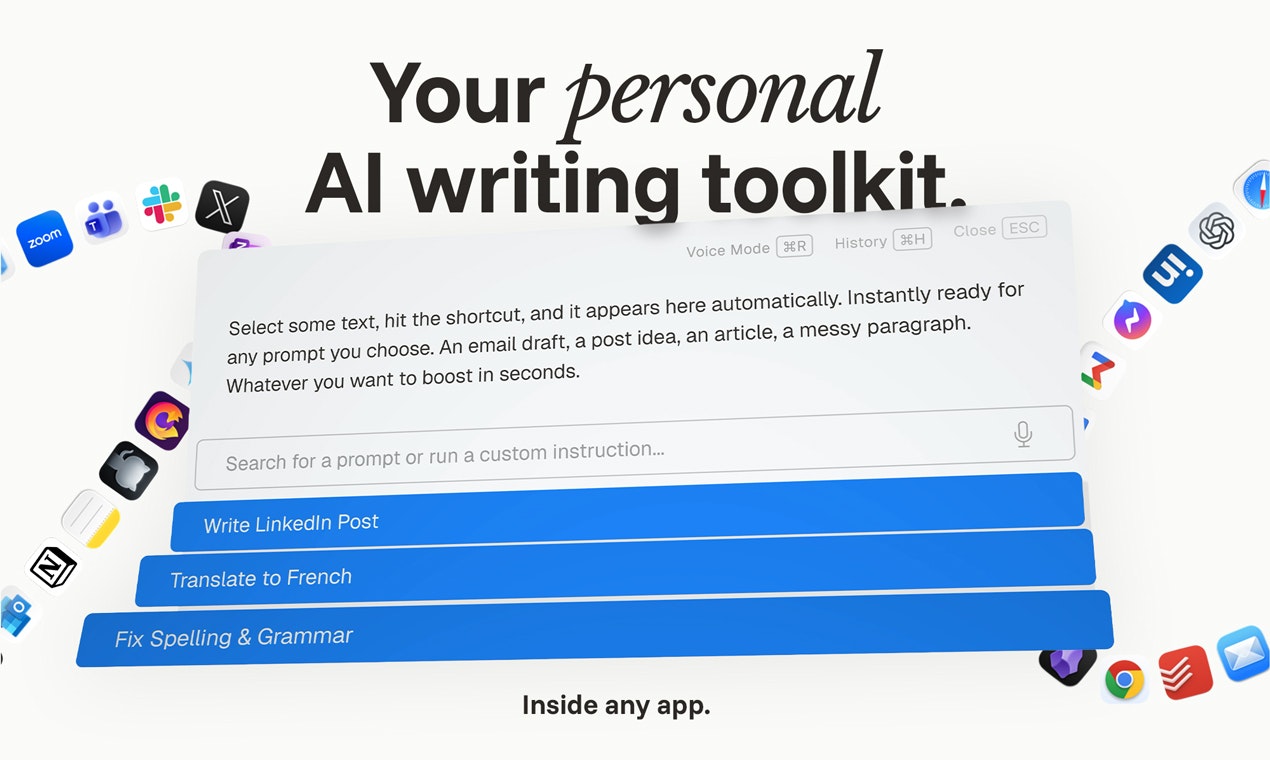
TypeBoost is a macOS app that sits quietly in the background and lets you apply your own saved AI prompts to any text you select in any application on your Mac. You highlight a sentence inside an email, a Notion page, a code editor or a Google doc, hit a keyboard shortcut, choose a prompt like “Fix grammar” or “Make this sound more professional”, and the rewritten text drops back in place. There is also a companion iPhone app that syncs your prompts and history so you can keep working when you step away from the Mac.
The product was built by an independent developer who goes by Benny, and it gained real visibility after a strong Product Hunt launch in early 2026. The pitch is straight to the point. Stop bouncing between ChatGPT, your email and a notes app. Keep the AI inside the operating system where you already work.
The AI Side of TypeBoost in 2026
The AI engine behind TypeBoost is what most users would expect from a 2026 writing tool. It handles rewriting, summarising, tone shifting, translation across 95 languages and voice to text dictation. The interesting bit is that you bring your own prompts. The app does not lock you into a single house writing style, which we appreciated, but it also means the quality of your output is only as good as the prompt library you take the time to build.
Short rewrites came out fine in our tests. Longer text jobs felt slower than expected, and we noticed the credit meter ticking down faster than we wanted for what looked like routine tasks. If you are a casual user, this is not going to bother you. If you write for a living and use AI all day, the credits are going to be on your mind.
Is TypeBoost Free?
There is a free plan, but it is closer to a trial than a real free tier. You get a small monthly allowance of credits, enough to try a few rewrites and see if the workflow clicks for you. Paid plans start at around 5 euros per month on annual billing, and the higher tiers unlock more credits and prompt slots.
On paper the pricing is fair. In practice, the credit based system is the part most users grumble about. You will not always know how many credits a given rewrite is going to burn until you run it, and that lack of predictability is a small but real friction. We also feel the free plan is a touch too tight to give new users a proper feel for the app before deciding to pay.
Writing Toolkit Download and Setup
You can grab TypeBoost from the official website at typeboost.ai. Two macOS builds are offered, one for Apple Silicon chips (M1, M2, M3 and the newer M4 series) and one for older Intel based Macs. Pick the right build or the app will not run properly. The iPhone version lives on the Apple App Store under the name TypeBoost.ai.
Installation is mostly painless. You drop the app into your Applications folder, grant accessibility permission so it can read selected text, and optionally hand over microphone access if you want to use voice mode. The first launch walks you through creating an account and saving your first prompt. We had it running in under five minutes on a MacBook Air.
One thing worth flagging on the privacy front. According to the developer and confirmed by what we saw in our testing, TypeBoost only reads the text you have actively selected at the moment you trigger it. It does not run in the background scanning your documents, emails or browser activity. That is a refreshing approach compared to some of the always on tools we have tested this year.
The App, Day to Day
The interface is clean, almost too clean for some tastes. There is no busy sidebar, no notifications competing for attention and no marketing nags inside the app. Just a small popup that appears when you call it, lets you pick a prompt and shows the result with accept or reject buttons.
The granular accept and reject feature is one of the things we genuinely liked. You can see exactly what the AI changed, line by line, and approve only the edits you actually want. Most AI writing tools either replace the whole block or force you to compare two columns of text. TypeBoost handles this part better than most.
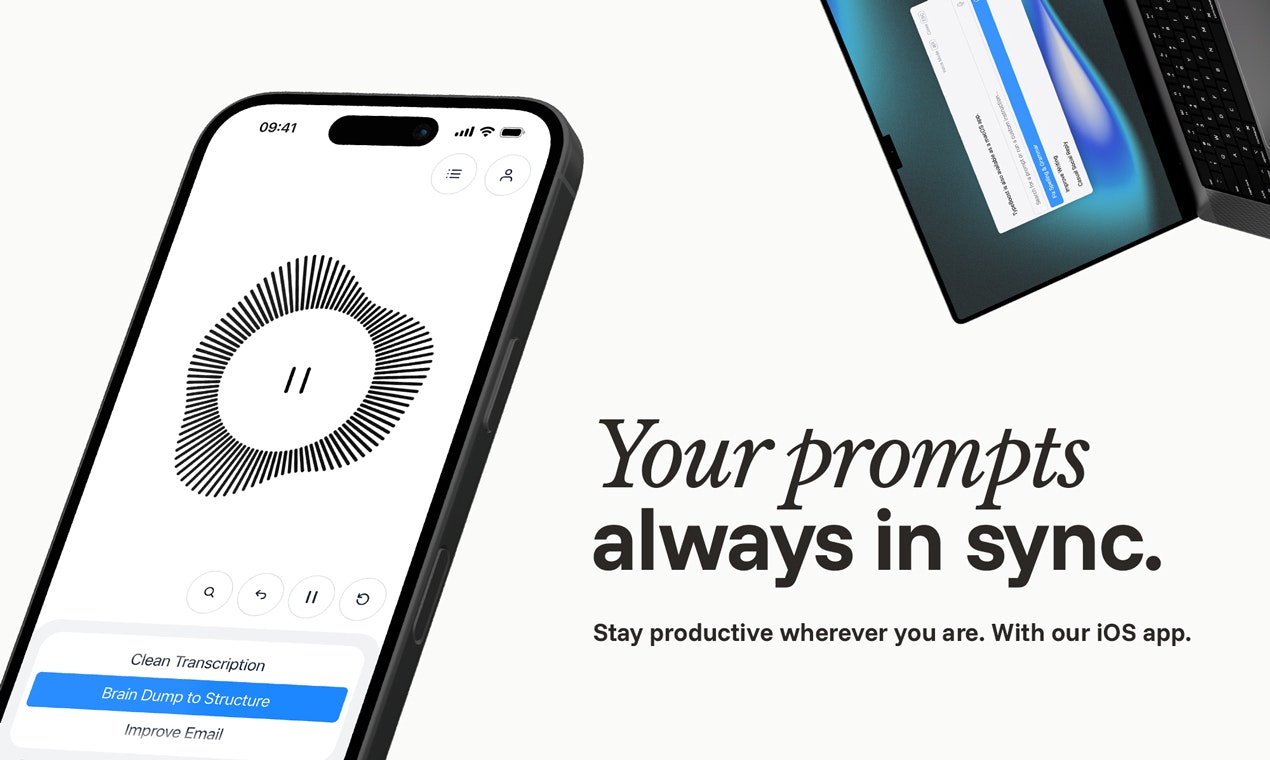
Voice mode is another nice touch. You can dictate a rough message and have the app clean it up into a proper email or LinkedIn post. It worked well in a quiet home office. In a noisy cafe with background music and chatter, accuracy dropped noticeably. Nothing unusual for voice tools in 2026, but worth knowing if you plan to use it on the move.
Sync between Mac and iPhone is generally quick, although we had two cases during the test where prompts saved on the phone took a few minutes to show up on the Mac. Not a deal breaker, just an inconsistency we noticed.
User Experience: The Good and the Frustrating
Let us break down what works and what does not, based on our hands on time with the app.
What Works Well
Fast rewrites without leaving the app you are already in
Custom prompt library that genuinely saves time once it is built out
Privacy approach is responsible and clearly explained
Clean, focused interface with no bloat or upsell clutter
Voice mode is useful for capturing ideas on the move
Granular accept and reject makes you feel in control of the edits
What Frustrates
macOS only, which immediately rules out a big chunk of writers
Credit system feels stingy on the lower paid plans
Free plan is too limited to give a fair feel for the product
No web version and no browser extension
Occasional sync lag between Mac and iPhone
Customer support response times slow down on weekends, based on the tickets we filed
Setup overhead, you need to build your own prompt library before the magic kicks in
The biggest single issue for us is the platform lock in. By 2026, most serious writing tools have at least a web version that runs on Windows and Linux. TypeBoost staying Mac only feels like a choice that will keep the audience small, regardless of how good the product itself is.
Who Should Actually Use TypeBoost?
If you live inside the Apple ecosystem, write a lot of short form content every day, and already pay for ChatGPT, Claude or another LLM, TypeBoost can save you a real chunk of time. We measured ourselves saving roughly 15 to 20 minutes a day on routine writing once the prompt library was built out properly.
If you are on Windows, or if you write long documents and reports, or if you simply do not like credit based pricing, you are better off looking at alternatives. Tools like Raycast AI, the built in Apple Intelligence features on newer Macs, Grammarly or even browser based options like ChatGPT will probably suit you better.
ICON POLLS Final Verdict: 2.8 out of 5
TypeBoost is a thoughtful app with a clear vision and a developer who clearly cares about the product. The privacy story is refreshing, the customisation is real and the workflow benefit is genuine for the right user. But the platform limits, the credit based pricing and the very tight free plan keep it from being something we can recommend widely in 2026.
We landed on 2.8 because the idea is solid and the execution is good for the people it targets, but for the average ICON POLLS reader looking for a one stop AI writing tool, the gaps will probably matter more than the wins. If you want to try it, the free plan is just about enough to test whether it fits your workflow, just do not expect it to replace your full AI stack.
Frequently Asked Questions About TypeBoost in 2026
1. Is TypeBoost free to use?
Yes and no. TypeBoost offers a free plan, but it comes with a limited monthly credit allowance and capped prompt slots. It is closer to a trial than a fully featured free tier. Most users who plan to rely on the tool daily end up moving to a paid plan within a couple of weeks.
2. Does TypeBoost work on Windows or Linux?
No. As of 2026, TypeBoost is only available for macOS and iOS. There is no Windows build, no Linux build and no browser extension. If you are not in the Apple ecosystem, you will need to look at other AI writing tools.
3. How much does TypeBoost cost in 2026?
Paid plans start at roughly 5 euros per month when billed annually. Higher tiers unlock more credits, more prompt slots and faster processing. Pricing can shift, so the current page on typeboost.ai is the place to confirm before subscribing.
4. How do I download TypeBoost on my Mac?
Head to typeboost.ai and pick the build that matches your Mac, either Apple Silicon for M series chips or Intel for older Macs. Unzip the file, drag the app into your Applications folder, launch it and grant accessibility permission when prompted. The whole setup takes under five minutes.
5. Is TypeBoost safe to install on my Mac?
Based on what we saw in testing and what the developer has stated publicly, TypeBoost only reads the text you actively select at the moment you trigger a prompt. It does not run as a background scanner. That said, you should always download the app from the official website and not from third party mirrors.
6. Can I use TypeBoost on my iPhone?
Yes. There is a TypeBoost iOS app on the Apple App Store that syncs with the Mac app. You can dictate notes, apply prompts and access your prompt library on the phone, then pick up where you left off on the Mac.
7. Does TypeBoost replace ChatGPT or Claude?
Not really. TypeBoost is a layer that sits on top of large language models to make your AI workflow faster inside macOS. It is more of a workflow tool than a chat product. If you still want long conversations, brainstorming or research, you will keep ChatGPT, Claude or a similar service in your stack.
8. What languages does TypeBoost support?
TypeBoost supports writing and translation across 95 languages, which makes it useful for non native English speakers and for teams that operate across multiple regions.
9. Does TypeBoost work offline?
No. TypeBoost relies on cloud based AI models to process your prompts, so you need an internet connection for it to function. If you go offline, the app will not be able to apply rewrites or run voice mode.
10. Is TypeBoost worth it in 2026?
It depends entirely on your setup. For Mac and iPhone users who write a lot of short form content daily, it can be a real time saver and earns its keep. For everyone else, especially Windows users and people who want a free tool that just works, the answer is probably no. That is why we landed on a 2.8 out of 5 rating rather than a higher score.
|
Detail |
|
|
Brand Name |
TypeBoost |
|
Founder |
Benny (indie developer, builds publicly on Product Hunt and X) |
|
Year Launched |
2025 (gained wider traction through 2026) |
|
Category |
AI Writing Toolkit / Productivity App |
|
Supported Platforms |
macOS (Apple Silicon and Intel), iOS |
|
Official Website |
typeboost.ai |
|
Free Plan |
Yes, limited credits per month |
|
Starting Paid Plan |
Around 5 euros per month, annual billing |
|
Pricing Model |
Credit based with prompt slot limits per tier |
|
Languages Supported |
95 |
|
Voice Mode |
Yes, included on Mac and iPhone |
|
Cross Device Sync |
Yes, between Mac and iPhone |
|
Windows or Linux Version |
Not available as of 2026 |
|
Permissions Required |
Accessibility, plus Microphone for voice mode |
|
Best For |
Mac and iPhone users who write a lot of short form content |
|
ICON POLLS Rating |
2.8 out of 5 |
What TypeBoost Actually Is
TypeBoost is a macOS app that sits quietly in the background and lets you apply your own saved AI prompts to any text you select in any application on your Mac. You highlight a sentence inside an email, a Notion page, a code editor or a Google doc, hit a keyboard shortcut, choose a prompt like “Fix grammar” or “Make this sound more professional”, and the rewritten text drops back in place. There is also a companion iPhone app that syncs your prompts and history so you can keep working when you step away from the Mac.
The product was built by an independent developer who goes by Benny, and it gained real visibility after a strong Product Hunt launch in early 2026. The pitch is straight to the point. Stop bouncing between ChatGPT, your email and a notes app. Keep the AI inside the operating system where you already work.
The AI Side of TypeBoost in 2026
The AI engine behind TypeBoost is what most users would expect from a 2026 writing tool. It handles rewriting, summarising, tone shifting, translation across 95 languages and voice to text dictation. The interesting bit is that you bring your own prompts. The app does not lock you into a single house writing style, which we appreciated, but it also means the quality of your output is only as good as the prompt library you take the time to build.
Short rewrites came out fine in our tests. Longer text jobs felt slower than expected, and we noticed the credit meter ticking down faster than we wanted for what looked like routine tasks. If you are a casual user, this is not going to bother you. If you write for a living and use AI all day, the credits are going to be on your mind.
Is TypeBoost Free?
There is a free plan, but it is closer to a trial than a real free tier. You get a small monthly allowance of credits, enough to try a few rewrites and see if the workflow clicks for you. Paid plans start at around 5 euros per month on annual billing, and the higher tiers unlock more credits and prompt slots.
On paper the pricing is fair. In practice, the credit based system is the part most users grumble about. You will not always know how many credits a given rewrite is going to burn until you run it, and that lack of predictability is a small but real friction. We also feel the free plan is a touch too tight to give new users a proper feel for the app before deciding to pay.
Writing Toolkit Download and Setup
You can grab TypeBoost from the official website at typeboost.ai. Two macOS builds are offered, one for Apple Silicon chips (M1, M2, M3 and the newer M4 series) and one for older Intel based Macs. Pick the right build or the app will not run properly. The iPhone version lives on the Apple App Store under the name TypeBoost.ai.
Installation is mostly painless. You drop the app into your Applications folder, grant accessibility permission so it can read selected text, and optionally hand over microphone access if you want to use voice mode. The first launch walks you through creating an account and saving your first prompt. We had it running in under five minutes on a MacBook Air.
One thing worth flagging on the privacy front. According to the developer and confirmed by what we saw in our testing, TypeBoost only reads the text you have actively selected at the moment you trigger it. It does not run in the background scanning your documents, emails or browser activity. That is a refreshing approach compared to some of the always on tools we have tested this year.
The App, Day to Day
The interface is clean, almost too clean for some tastes. There is no busy sidebar, no notifications competing for attention and no marketing nags inside the app. Just a small popup that appears when you call it, lets you pick a prompt and shows the result with accept or reject buttons.
The granular accept and reject feature is one of the things we genuinely liked. You can see exactly what the AI changed, line by line, and approve only the edits you actually want. Most AI writing tools either replace the whole block or force you to compare two columns of text. TypeBoost handles this part better than most.
Voice mode is another nice touch. You can dictate a rough message and have the app clean it up into a proper email or LinkedIn post. It worked well in a quiet home office. In a noisy cafe with background music and chatter, accuracy dropped noticeably. Nothing unusual for voice tools in 2026, but worth knowing if you plan to use it on the move.
Sync between Mac and iPhone is generally quick, although we had two cases during the test where prompts saved on the phone took a few minutes to show up on the Mac. Not a deal breaker, just an inconsistency we noticed.
User Experience: The Good and the Frustrating
Let us break down what works and what does not, based on our hands on time with the app.
What Works Well
Fast rewrites without leaving the app you are already in
Custom prompt library that genuinely saves time once it is built out
Privacy approach is responsible and clearly explained
Clean, focused interface with no bloat or upsell clutter
Voice mode is useful for capturing ideas on the move
Granular accept and reject makes you feel in control of the edits
What Frustrates
macOS only, which immediately rules out a big chunk of writers
Credit system feels stingy on the lower paid plans
Free plan is too limited to give a fair feel for the product
No web version and no browser extension
Occasional sync lag between Mac and iPhone
Customer support response times slow down on weekends, based on the tickets we filed
Setup overhead, you need to build your own prompt library before the magic kicks in
The biggest single issue for us is the platform lock in. By 2026, most serious writing tools have at least a web version that runs on Windows and Linux. TypeBoost staying Mac only feels like a choice that will keep the audience small, regardless of how good the product itself is.
Who Should Actually Use TypeBoost?
If you live inside the Apple ecosystem, write a lot of short form content every day, and already pay for ChatGPT, Claude or another LLM, TypeBoost can save you a real chunk of time. We measured ourselves saving roughly 15 to 20 minutes a day on routine writing once the prompt library was built out properly.
If you are on Windows, or if you write long documents and reports, or if you simply do not like credit based pricing, you are better off looking at alternatives. Tools like Raycast AI, the built in Apple Intelligence features on newer Macs, Grammarly or even browser based options like ChatGPT will probably suit you better.
ICON POLLS Final Verdict: 2.8 out of 5
TypeBoost is a thoughtful app with a clear vision and a developer who clearly cares about the product. The privacy story is refreshing, the customisation is real and the workflow benefit is genuine for the right user. But the platform limits, the credit based pricing and the very tight free plan keep it from being something we can recommend widely in 2026.
We landed on 2.8 because the idea is solid and the execution is good for the people it targets, but for the average ICON POLLS reader looking for a one stop AI writing tool, the gaps will probably matter more than the wins. If you want to try it, the free plan is just about enough to test whether it fits your workflow, just do not expect it to replace your full AI stack.
Frequently Asked Questions About TypeBoost in 2026
1. Is TypeBoost free to use?
Yes and no. TypeBoost offers a free plan, but it comes with a limited monthly credit allowance and capped prompt slots. It is closer to a trial than a fully featured free tier. Most users who plan to rely on the tool daily end up moving to a paid plan within a couple of weeks.
2. Does TypeBoost work on Windows or Linux?
No. As of 2026, TypeBoost is only available for macOS and iOS. There is no Windows build, no Linux build and no browser extension. If you are not in the Apple ecosystem, you will need to look at other AI writing tools.
3. How much does TypeBoost cost in 2026?
Paid plans start at roughly 5 euros per month when billed annually. Higher tiers unlock more credits, more prompt slots and faster processing. Pricing can shift, so the current page on typeboost.ai is the place to confirm before subscribing.
4. How do I download TypeBoost on my Mac?
Head to typeboost.ai and pick the build that matches your Mac, either Apple Silicon for M series chips or Intel for older Macs. Unzip the file, drag the app into your Applications folder, launch it and grant accessibility permission when prompted. The whole setup takes under five minutes.
5. Is TypeBoost safe to install on my Mac?
Based on what we saw in testing and what the developer has stated publicly, TypeBoost only reads the text you actively select at the moment you trigger a prompt. It does not run as a background scanner. That said, you should always download the app from the official website and not from third party mirrors.
6. Can I use TypeBoost on my iPhone?
Yes. There is a TypeBoost iOS app on the Apple App Store that syncs with the Mac app. You can dictate notes, apply prompts and access your prompt library on the phone, then pick up where you left off on the Mac.
7. Does TypeBoost replace ChatGPT or Claude?
Not really. TypeBoost is a layer that sits on top of large language models to make your AI workflow faster inside macOS. It is more of a workflow tool than a chat product. If you still want long conversations, brainstorming or research, you will keep ChatGPT, Claude or a similar service in your stack.
8. What languages does TypeBoost support?
TypeBoost supports writing and translation across 95 languages, which makes it useful for non native English speakers and for teams that operate across multiple regions.
9. Does TypeBoost work offline?
No. TypeBoost relies on cloud based AI models to process your prompts, so you need an internet connection for it to function. If you go offline, the app will not be able to apply rewrites or run voice mode.
10. Is TypeBoost worth it in 2026?
It depends entirely on your setup. For Mac and iPhone users who write a lot of short form content daily, it can be a real time saver and earns its keep. For everyone else, especially Windows users and people who want a free tool that just works, the answer is probably no. That is why we landed on a 2.8 out of 5 rating rather than a higher score.