|
Attribute |
Details |
|
Product Name |
Wispr Flow |
|
Parent Company |
Wispr AI, Inc. |
|
Founders |
Tanay Kothari and Sahaj Garg |
|
Headquarters |
San Francisco, California, USA |
|
Year Founded |
2021 |
|
Product Launch |
2024 |
|
Category |
AI Voice Dictation Software |
|
Platforms |
macOS, Windows, iOS, Android |
|
Official Website |
wisprflow.ai |
|
Free Plan |
Yes, capped at 2,000 words per week |
|
Pro Pricing |
$15 per month or $12 per month billed annually ($144 per year) |
|
Teams Pricing |
$12 per user per month (3-seat minimum) |
|
Supported Languages |
Over 100, with code-switching |
|
Internet Requirement |
Required (cloud-only, no offline mode) |
|
Compliance |
HIPAA, SOC 2 Type II, ISO 27001 |
|
Open Source |
No, closed source proprietary product |
|
Trial Period |
14-day Flow Pro free trial, no card required |
|
ICON POLLS Rating |
2.2 out of 5 |
Wispr Flow Download in 2026
Downloading Wispr Flow is straightforward. The official download lives at wisprflow.ai, and the site detects your operating system and offers the right installer automatically. For Mac users the file is a standard .dmg, while Windows users get an .exe installer. Both installs took us under two minutes on a normal home internet connection.
There is no torrent, no cracked download, and no third party mirror that we would recommend. If you see Wispr Flow on a random software site, do not trust it. The company has full control over distribution because the product depends on a cloud subscription anyway, so a pirated version would not function for long even if it existed.
Important note: Wispr Flow needs internet access every time you dictate. There is no offline installer that lets you keep using it without a connection. That is fine if you live on stable wifi but a real problem if you travel a lot, work in spotty environments, or care about privacy.
Wispr Flow on Android
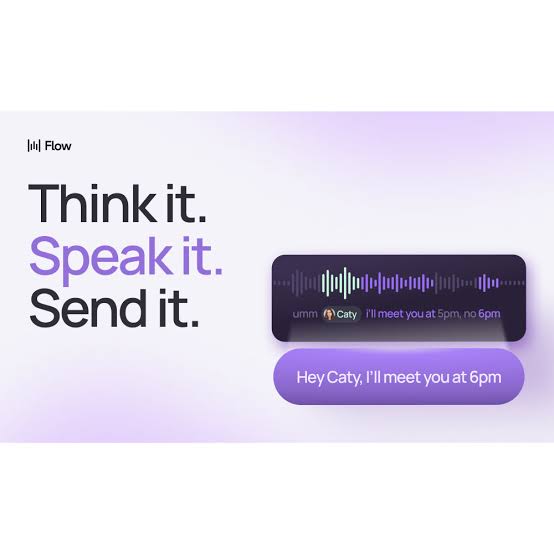
The Android version of Wispr Flow arrived later than the Mac and iOS apps, and you can feel it. The app uses the Android Accessibility Service to detect when you tap into a text field, then shows a small floating bubble that lets you start dictation. When you finish speaking, the cleaned up text is pasted into the field, whether you are inside WhatsApp, Instagram, Slack, Gmail, or ChatGPT.
The Accessibility Service approach is the only realistic option on Android because Google does not give third party apps a clean way to insert text into other apps without it. Wispr Flow is up front about this in the permissions screen, and they list HIPAA, SOC 2 Type II, and ISO 27001 compliance, which is reassuring on paper.
Our honest take after using the Android app for a few weeks: it is usable but feels rough. The Flow bubble sometimes disappears when switching apps, the mic occasionally stays on after you stop talking, and battery drain is real during heavy use. One iOS user we cross checked with reported losing 49 percent of battery during an intense session, and our Android numbers were not far off. If your phone is your primary device, temper your expectations.
Wispr Flow APK
Many readers searching for Wispr Flow APK want a direct file they can sideload, usually because they cannot find the app on the Play Store in their region or want an older version. Sites like APKMirror and Uptodown host the APK files signed by Wispr AI, Inc., and we did see versions ranging from 1.0.0 through 1.7.1 available at the time of writing.
If you choose to install the APK manually instead of going through the Play Store, only download from sources that verify the developer signature. APKMirror is generally considered safe because every upload is manually reviewed and signature checked. Random APK sites with intrusive ads are not worth the risk because the app handles sensitive voice data and accessibility permissions.
A word of caution: APK side loading does not change the fact that you still need a Wispr Flow account, an internet connection, and a paid subscription once you exceed 2,000 words per week. The APK is not a way around the paywall. Anyone promising a cracked or modded APK is almost certainly distributing malware.
Wispr Flow Login
Logging into Wispr Flow uses standard authentication options. You can sign in with Google, Apple, or a plain email and password combination. There is no requirement to provide payment details up front, which we appreciate because the 14-day Flow Pro trial is genuinely free to start.
After signing in on your first device, the account syncs your dictionary, settings, and writing style across every other platform you use. So if you set up custom vocabulary on your Mac at the office, the same words will be recognized on your iPhone and Android device. That cross device continuity is one of the genuinely good parts of the experience.
Login problems we ran into were mostly billing related. Several users on G2 and Reddit reported a frustrating pattern where the app starts requiring a re login after a few days, sometimes wiping recent dictation history. The support team does answer billing tickets, but the experience can feel like a frequent interruption if you depend on the tool every day.
Wispr Flow on GitHub
If you searched for Wispr Flow on GitHub hoping to find the source code, you will be disappointed. Wispr Flow is a closed source proprietary product. There is no official Wispr AI repository that ships the dictation app itself, and the team has not announced any plan to open source it. The company runs cloud infrastructure on AWS through Baseten, and that backend is part of what you pay the subscription for.
What you will find on GitHub are community alternatives that openly call themselves Wispr Flow clones or replacements. Projects like FreeFlow by Zach Latta, VoiceTypr by Moinul Moin, Whishpy by Prasanjit, and VoiceInk by Beingpax all aim to give you a similar dictation experience without the subscription. Some of them run locally on your machine using Whisper or Parakeet models, which means your audio never leaves your computer. If privacy or cost matters to you, these are worth looking at.
Wispr Flow itself does have a use case page for GitHub the platform, where they show how you can dictate commit messages, issues, and code reviews using the app. That is a marketing page, not a code repository. So if your search was about open source, the answer is no, but if you wanted to dictate into GitHub, the answer is yes.
Wispr Flow User Experience
This is the section where the 2.2 rating starts to make sense. The first few days with Wispr Flow are genuinely impressive. Hold the hotkey, speak in your normal rhythm, and watch clean text appear inside Gmail or Slack. The AI cleanup is real. It catches filler words, smooths out half finished sentences, and even adjusts tone based on the app you are inside. For about a week, it felt like a glimpse of the future.
Then the cracks started showing. Accuracy drifted on background noise. The Windows version was visibly heavier than the Mac version, eating RAM and spinning up our laptop fans even when idle. The cloud round trip was usually one to two seconds, which is fine for paragraphs but annoying when you want word by word feedback. And the most frustrating pattern, echoed across multiple Trustpilot and Reddit reports, is that the app feels slower and less accurate after you become a paying customer than it did during the free trial.
Privacy was another issue we could not ignore. Independent reporting has flagged Wispr Flow for capturing screenshots of your active window to power its context awareness features. The company explains the behavior in its documentation, but the average user does not read documentation. Several workplaces explicitly ban screen capture software, which means Wispr Flow can be a non starter for compliance teams.
Battery drain on iOS and Android was steeper than expected. Heavy users reported chewing through nearly half a battery during sustained dictation sessions. Long recordings beyond seven or eight minutes sometimes failed silently. The mic occasionally stayed live after we thought we had stopped it, which is the kind of bug that makes you not want to use a voice tool at all.
On the positive side, the cross device sync, the 100 plus language support with code switching, and the compliance certifications are all genuine strengths. For native English speakers working in quiet home offices on a Mac, the experience is closer to what the marketing promises. For everyone else, results vary widely.
Wispr Flow Pricing
Wispr Flow uses a four tier pricing structure as of 2026. Basic is free but capped at 2,000 words per week, which is roughly 285 words a day before the wall hits. Pro is $15 per month if you pay monthly, or $12 per month if you commit annually for $144 a year. Teams costs $12 per user per month with a three seat minimum. Enterprise is custom quoted.
That makes Wispr Flow the most expensive serious dictation app in the category. Competitors like Spokenly, VoiceInk, VoiceTypr, and FreeFlow either offer free open source alternatives or much cheaper paid versions. The pricing only makes sense if you dictate so heavily that the time saved more than covers the subscription, which is true for some power users but not most casual users.
There is no public discount code or coupon for Wispr Flow in 2026. The only savings are the annual billing discount (about 20 percent off) and a student discount worth roughly 50 percent that requires verification. There is no lifetime license option, so the cost compounds forever as long as you stay subscribed.
Pros and Cons at a Glance
|
Pros |
Cons |
|
Solid first impression and clean onboarding experience. |
No offline mode at all, the app simply stops working without internet. |
|
Works across many apps once permissions are set. |
Costs $15 per month, which is the priciest option in its category. |
|
Strong accuracy for native English speakers in quiet rooms. |
Heavy resource usage, around 800 MB of RAM and 8 percent CPU at idle on Mac. |
|
Supports over 100 languages with automatic code-switching. |
Trustpilot rating of 2.7 out of 5, with repeated complaints about quality dropping after the free trial. |
|
HIPAA, SOC 2 Type II, and ISO 27001 compliance for sensitive workflows. |
Reported screen capture behavior used for context awareness, which many users find intrusive. |
|
Has a free tier so you can try before paying. |
Windows version is Electron based and known to be sluggish on older machines. |
Final Verdict: 2.2 Out of 5
Wispr Flow is one of the most polished dictation experiences on the market in 2026, and for the right person it can genuinely change how you work. But the combination of high price, cloud only architecture, screen capture privacy concerns, heavy resource usage on Windows, and the well documented gap between trial performance and post payment performance forced us to land at 2.2 out of 5.
Our verdict is straightforward. If you are a heavy dictator on Mac and iOS, work in a quiet environment, and your employer is comfortable with cloud processing, you might still get value out of Pro. For everyone else, the open source alternatives on GitHub or the cheaper paid competitors are the smarter buy in 2026.
ICON POLLS will keep an eye on Wispr Flow because the team behind it clearly has the engineering talent to fix many of these issues. If a future version adds an offline mode, reins in resource usage on Windows, drops the screen capture behavior, and lowers the price, our rating will climb. Until then, 2.2 is where we stand.
Frequently Asked Questions About Wispr Flow
1. Is Wispr Flow free to use?
Wispr Flow has a free tier called Basic, but it caps you at 2,000 words per week, which works out to less than 300 words a day. After that you need to upgrade to Pro at $15 per month or $12 per month billed annually. The Pro plan also comes with a 14-day free trial that does not require a credit card up front.
2. Does Wispr Flow work offline?
No, Wispr Flow does not work offline. The app sends your voice to cloud AI models for processing, so an active internet connection is mandatory every time you dictate. If you need offline dictation, you will be better served by tools like VoiceInk, Spokenly, or local Whisper based projects on GitHub.
3. Is Wispr Flow available on Android?
Yes, Wispr Flow has an Android app that uses the Accessibility Service to insert dictated text into any app on your phone, including WhatsApp, Gmail, Slack, and ChatGPT. The Android version is newer than the Mac and iOS versions and feels less polished, with occasional bugs around the Flow bubble and battery drain during heavy use.
4. Where can I download the Wispr Flow APK?
The official APK is hosted on APKMirror and Uptodown, signed by Wispr AI, Inc. We only recommend downloading from those verified sources because the app handles sensitive voice data and accessibility permissions. Avoid any site offering a cracked or modded APK because those are almost always malware.
5. Is Wispr Flow open source on GitHub?
No, Wispr Flow is a closed source proprietary product and there is no official source code on GitHub. What you will find on GitHub are community built alternatives like FreeFlow, VoiceTypr, Whishpy, VoiceInk, and OpenWhispr that aim to provide a similar dictation experience for free or at much lower cost.
6. How do I log in to Wispr Flow?
You can sign in with Google, Apple, or an email and password combination. Once you log in on one device, your dictionary, settings, and writing style sync across every other platform you use. Some users do report occasional forced re logins, especially around billing events, but the core login flow is simple and quick.
7. Why does Wispr Flow have a low Trustpilot rating?
Wispr Flow sits at around 2.7 out of 5 on Trustpilot, which is well below its 4.5 G2 score and 4.8 iOS App Store rating. The Trustpilot complaints cluster around accuracy dropping after the free trial ends, billing problems, the screen capture privacy controversy, and the lack of a lifetime purchase option. The gap between curated and organic review platforms is itself part of the story.
8. Does Wispr Flow capture screenshots of my screen?
Yes, viral Reddit reports and independent reviews confirm that Wispr Flow captures screenshots of your active window to power context awareness features. The company documents this behavior on its website, but many users find it intrusive and some workplaces flat out prohibit screen capture software, which makes Wispr Flow unusable in those settings.
9. How does Wispr Flow compare to Apple Dictation or Google Voice Typing?
Wispr Flow does more than basic transcription. It cleans up filler words, fixes grammar, and adjusts tone based on the app you are typing in, while Apple Dictation and Google Voice Typing give you raw text more or less as you spoke it. The trade off is that Wispr Flow is paid, cloud based, and uses more resources, while the built in tools are free and work offline.
10. Is Wispr Flow worth $15 per month in 2026?
For most casual users, no. The price is the highest in the category and the free tier is genuinely tight. The tool can be worth it if you dictate heavily every day, work mainly on Mac or iOS, and are comfortable with cloud processing. For everyone else, the open source alternatives on GitHub or cheaper paid competitors offer better value in 2026.