|
App Name |
Wordy (Language Learning) |
|
Developer |
Appalex Ltd. (Hungary) |
|
Website |
wordy.info |
|
Year Founded |
2024 |
|
Category |
Education / Language Learning |
|
Available On |
iOS (App Store), Android (Google Play), Chrome Extension |
|
Languages Supported |
20+ (English, Spanish, French, German, Italian, Japanese, Korean, Russian, Portuguese, and more) |
|
Pricing Model |
Freemium (Free with daily limits, Premium from $9.99/month or $39.99/year) |
|
Content Library |
15,000+ curated movie and TV show clips |
|
Key Features |
Spaced repetition, real movie clips, guided learning paths, streak system, speech recognition |
|
App Store Rating |
4.7 / 5 (App Store) |
|
Google Play Rating |
4.5 / 5 (Google Play) |
|
ICON POLLS Rating |
3.8 / 5 |
Introduction
Language learning apps are everywhere in 2026, and it takes more than colorful icons and gamified streaks to stand out. Wordy, developed by Appalex Ltd., pitches itself as a different kind of tool. Instead of relying on robotic voiceovers and repetitive flashcards, the app pulls real clips from movies and TV shows to teach you how languages actually sound in the real world. On paper, this is a compelling idea. In practice, the experience is more nuanced than the marketing suggests.
We at ICON POLLS spent several weeks testing Wordy across both its free and premium tiers on Android and iOS. We dug into user feedback, explored the website, compared it against competing apps, and tracked our own progress to put together this review. Here is what we found.
The Wordy App: What It Actually Offers
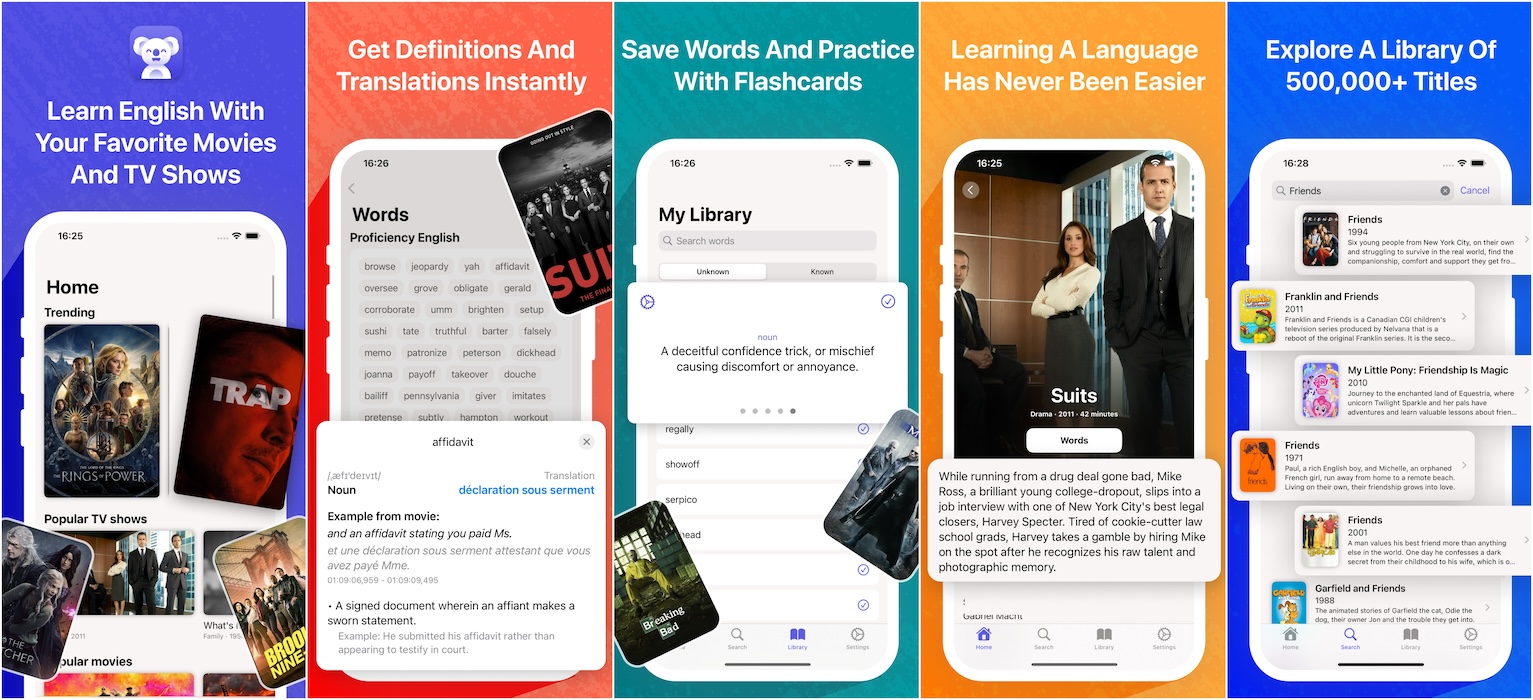
At its core, Wordy is a vocabulary building app wrapped in movie clips. When you open the app for the first time, you pick your target language (English and Spanish have full structured courses, while 20+ other languages offer clip libraries and vocabulary practice). The app then walks you through a placement process so it can figure out where you stand.
Each lesson introduces a small batch of new words, and then you see those words used in short scenes from actual films and shows. After watching, you go through exercises: matching meanings, building phrases from word blocks, spelling out vocabulary, and even speaking lines aloud while the app scores your pronunciation. The spaced repetition system schedules reviews based on how well you retain each word, which is a tried and tested method backed by memory research.
This approach works well for listening comprehension and picking up everyday expressions. You hear words at native speed with natural accents, which is something most competitors still do not deliver convincingly. However, Wordy is strongest as a vocabulary and listening tool. If you are looking for grammar explanations, reading practice, or writing exercises, you will need to look elsewhere.
Download and Setup
Wordy is available as a free download on both the Apple App Store and Google Play Store. There is also a Chrome browser extension that lets you learn from subtitles on streaming platforms like Netflix and YouTube, which is a nice bonus for desktop users. The app itself is lightweight, and installation takes less than a minute on most devices.
During our testing, the download was smooth and the initial onboarding process was straightforward. You sign up, pick your language, and you are in. One thing to note is that the app does push a premium trial during signup, and some users have complained that it requires entering credit card details to start the free trial. However, the developers have clarified that you can skip the trial entirely and use the free tier without providing payment information.
Wordy on Android
The Android version of Wordy requires Android 7.0 or higher, which means most devices released in the last several years should run it without issues. In our testing, the app performed reliably on mid-range and flagship Android devices alike. Video clips loaded quickly, the interface was responsive, and we did not experience any crashes during daily use.
That said, the Android experience feels slightly behind the iOS version in terms of polish. Some animations are not as fluid, and a few UI elements look a bit cramped on smaller screens. These are minor cosmetic issues and do not affect functionality, but they are worth noting for users who care about design consistency. The app receives regular updates on both platforms, with the most recent Android update dropping in August 2026.
Free vs Premium: What Do You Actually Get?
Wordy operates on a freemium model. The free version gives you a daily allowance of clips and exercises, which is enough for a short daily session but not enough for anyone who wants to study for extended periods. You still get access to spaced repetition, vocabulary saving, and the core learning path, just with limits on how much content you can consume each day.
The Premium subscription removes those daily caps and unlocks the full library of 15,000+ clips, all language courses, and advanced features. Pricing sits at $9.99 per month or $39.99 per year (with a free trial available). Compared to Duolingo Super at roughly the same annual price point and Babbel at a slightly higher one, Wordy is competitively priced. The question is whether the movie-based approach alone justifies the cost, especially when free alternatives cover grammar and conversation skills that Wordy does not.
Language Options and Course Depth
As of mid-2026, Wordy offers full structured learning paths for English and Spanish, with French and German courses reportedly on the way. Beyond those, the app supports clip libraries and vocabulary practice in over 20 languages, including Italian, Japanese, Korean, Russian, Portuguese, Dutch, Swedish, Polish, Greek, and Ukrainian, among others. The app interface itself is available in 26 languages, which makes it accessible for learners from many different backgrounds.
The vocabulary is organized by CEFR levels from A1 (beginner) to C2 (advanced), with around 9,000 words mapped per language. This structured approach is a genuine strength. However, the depth of content varies significantly across languages. English and Spanish learners get the richest experience, while learners of less popular languages may find the clip selection somewhat thin. If you are studying something like Croatian or Lithuanian, do not expect the same volume of material.
The Wordy Website
Wordy's official website (wordy.info) is clean and functional. It covers the basics: a summary of features, links to download the app, and a blog section with language learning tips, vocabulary guides, and movie recommendations organized by target language. The blog is surprisingly well maintained, with over 200 posts covering topics from greetings and essential phrases to culture guides and movie suggestions for language practice.
What the website does not have is a full web-based version of the app. You cannot log in and do lessons from your browser, which puts Wordy behind competitors like Duolingo and Busuu that offer fully functional web platforms. The Chrome extension partially fills this gap by letting you learn from streaming video, but it is not a substitute for a proper web app. For users who prefer studying on a laptop or desktop, this is a notable limitation.
User Experience
From a design standpoint, Wordy gets a lot right. The interface is modern and uncluttered, with a clean layout that does not overwhelm you with options. Navigation is intuitive: your learning path is front and center, saved words are easy to access, and the clip library is well organized by language and difficulty level. The app also supports dark mode, which is a small but appreciated touch for late-night study sessions.
One area where user experience falls short is the free tier. The daily usage limits, while understandable from a business perspective, can feel frustrating. Just when you start building momentum with a lesson, you hit the wall and have to come back tomorrow. Several user reviews on both app stores echo this complaint. The developers argue that short, consistent daily sessions are more effective than marathon study, and there is research to support that claim. But from a user satisfaction standpoint, the restriction still stings.
On the positive side, users consistently praise the ad-free experience, even on the free plan. In a market where many free language apps bombard you with intrusive ads between every exercise, Wordy's restraint here is refreshing and earns it real goodwill.
ICON POLLS Verdict
Wordy is a solid language learning app that does one thing really well: it exposes you to real, natural speech through movie and TV content. The spaced repetition system is effective, the clip quality is high, and the structured learning paths for English and Spanish are genuinely useful. For learners who are tired of robotic voices and want to hear how people actually talk, Wordy fills a gap that most apps ignore.
But it is not a complete language learning solution. The lack of grammar instruction, limited writing practice, and uneven content depth across languages hold it back from competing at the top level. The free tier is too restrictive for serious learners, and the absence of a proper web app is a missed opportunity. Wordy works best as a supplement to a broader study routine, not as a standalone tool.
We give Wordy a rating of 3.8 out of 5. It is a well-made app with a genuinely unique approach, but it needs to expand its teaching methods and language coverage to become a must-have.
Frequently Asked Questions (FAQs)
1. Is Wordy free to use in 2026?
Yes, Wordy offers a free tier that gives you daily access to a limited number of clips and exercises. You can use the app every day without paying anything. However, if you want unlimited access to the full clip library and all features, you will need a Premium subscription, which costs $9.99 per month or $39.99 per year.
2. What languages can I learn on Wordy?
Wordy currently supports over 20 languages, including English, Spanish, French, German, Italian, Japanese, Korean, Russian, Portuguese, Dutch, Swedish, Polish, Greek, and Ukrainian. Full structured courses are available for English and Spanish, while other languages offer vocabulary practice and clip-based learning. French and German courses are expected to launch later in 2026.
3. Is the Wordy app available on Android?
Yes. Wordy is available for download on the Google Play Store and requires Android 7.0 or higher. The app also has versions for iOS (iPhone and iPad) and a Chrome browser extension for learning while watching videos on streaming platforms.
4. How does Wordy compare to Duolingo?
Wordy and Duolingo take very different approaches. Duolingo focuses on gamified drills covering grammar, vocabulary, and reading across dozens of languages with a full web platform. Wordy focuses specifically on vocabulary and listening comprehension through real movie clips, which gives it an edge in teaching natural speech patterns. However, Duolingo offers broader language coverage and more well-rounded instruction. Many learners may benefit from using both.
5. Does Wordy require a credit card to start?
No. While the app does present a free trial offer during signup that may ask for payment details, you can skip this step entirely. The free daily allowance is accessible without entering any credit card information. Several users have reported confusion around this, but the developers have confirmed that card entry is optional.
6. Can I use Wordy on my computer or browser?
Wordy does not have a full web-based platform where you can log in and complete lessons. However, the company offers a Chrome browser extension that allows you to learn vocabulary while watching content on streaming services like Netflix and YouTube. For full lesson access, you will need to use the mobile app on iOS or Android.
7. Is Wordy good for complete beginners?
Wordy can work for beginners, especially through its guided learning paths that start at A1 level. The structured courses in English and Spanish are designed to take you from zero, introducing words gradually before placing them in movie clip contexts. That said, beginners may occasionally find native-speed dialogue challenging, and the app does not teach grammar rules or sentence construction, so pairing it with a more traditional resource is recommended.
8. Is Wordy worth the Premium subscription price?
That depends on how you plan to use it. If you are serious about improving your listening comprehension and building real-world vocabulary, the Premium tier removes daily limits and gives you access to the full library, which provides genuine value. At $39.99 per year, it is priced competitively with other language apps. However, if you need a complete language course that covers grammar, writing, and conversation, the subscription may not deliver enough on its own to justify the cost.
9. Does Wordy show ads?
No. Wordy is ad-free on both the free and premium plans. This is one of the features that users praise most in app store reviews. You will not encounter banner ads, video ads, or pop-ups during your learning sessions, which makes for a cleaner and less distracting experience compared to many free competitors.
10. Who developed Wordy and where is the company based?
Wordy is developed by Appalex Ltd., a company based in Hungary. The team behind the app focuses specifically on language learning through authentic media content. The company maintains active support channels and responds regularly to user reviews on both app stores, which suggests a hands-on and responsive development team.