Quick Verdict
Zoom was one of the defining technology stories of the pandemic era, and the product genuinely worked when people needed it most. But the Zoom of 2026 is a different animal. What started as a clean, fast video conferencing tool has expanded into a bloated platform that most users find increasingly difficult to navigate. The billing practices have generated thousands of verified complaints across Trustpilot, PissedConsumer, G2, and the BBB. The customer service experience ranges from non-existent to actively obstructive. The company attempted to quietly use customer call data to train AI models without meaningful consent, a trust violation it has never fully recovered from. And the free plan's 40-minute meeting limit continues to frustrate millions of non-paying users while the paid plans carry renewal traps and hidden upgrade costs that blindside customers. We rate Zoom 1.2 out of 5. The core technology still functions, but the company surrounding it has lost its way.
At a Glance: Icon Polls Ratings
Here is how Zoom scored across the areas we evaluated in our 2026 research:
|
Category |
Stars |
Score |
|
App and Download Experience |
★★★☆☆ |
2.5/5 |
|
Meeting Quality and Features |
★★★☆☆ |
3/5 |
|
Login and Account Access |
★★☆☆☆ |
2/5 |
|
Zoom Workplace Platform |
★★☆☆☆ |
2/5 |
|
Billing and Pricing Fairness |
★☆☆☆☆ |
1/5 |
|
Customer Service |
★☆☆☆☆ |
1/5 |
|
Privacy and Data Practices |
★☆☆☆☆ |
1/5 |
|
Overall |
★☆☆☆☆ |
1.2/5 |
What Is Zoom?
Zoom Video Communications was founded in 2011 by Eric Yuan, a former Cisco WebEx engineer who left to build something simpler and more reliable. The company went public in 2019 and its stock became one of the most-watched in technology. When the COVID-19 pandemic arrived in early 2020, Zoom went from a well-regarded business tool to a cultural phenomenon practically overnight. Within months, the word zoom had become a verb in most households. Schools, hospitals, families, and businesses of every size were running on Zoom.
That moment of necessity-driven dominance came with a significant downside for Zoom: it revealed security and privacy vulnerabilities that the company was not prepared to address at scale. Zoombombing, where uninvited participants disrupted meetings with offensive content, became a widespread problem. Questions about end-to-end encryption and where meeting data was routed raised serious concerns. Zoom addressed many of these issues over subsequent years, but the experience left a mark on how security-conscious users view the platform.
By 2026, Zoom has repositioned itself from a video conferencing company into what it calls a unified communications platform. The product is now marketed under the Zoom Workplace banner and encompasses video meetings, team chat, phone systems, email and calendar, whiteboards, AI-powered meeting summaries, webinars, and a marketplace of third-party integrations. It is a far more complex product than the clean meeting tool that made Zoom famous. Whether that complexity represents genuine value or feature bloat depends heavily on who you ask.
The company's financials show continued revenue but slowing growth as competition from Microsoft Teams and Google Meet intensifies. Both of those alternatives are included in productivity suites that hundreds of millions of organizations already pay for, which makes Zoom's paid tiers a harder sell than they once were.
The Zoom App and Download Experience
Downloading and installing Zoom remains relatively straightforward. The application is available for Windows, macOS, iOS, Android, and Linux. You can download it from zoom.us or from the relevant app store for your device. The installer is not particularly large and setup takes a few minutes on most devices.
The experience of actually using the app after download is where the story gets more complicated. The Zoom client has become considerably heavier and more feature-dense than it was during the platform's peak simplicity years. When you open the app in 2026, you are greeted by a home dashboard that presents a calendar, suggested contacts, recent chats, AI summaries, and a range of feature tiles. One G2 reviewer in 2026 put it bluntly: sometimes you just want a big new meeting button to just start. That sentiment captures something real about how the product has evolved.
The app also has a documented tendency to run in the background and consume system resources even when you are not in a meeting. Multiple users have reported their webcam activity light turning on unprompted after the Zoom app is installed, suggesting the application is accessing the camera without a clear user-triggered reason. This is a serious concern in a climate of heightened awareness about software surveillance.
Mobile app performance is generally functional, with the iOS and Android versions supporting the core meeting experience. Some features available on desktop are absent or reduced on mobile, and settings changes often require navigating to the web portal rather than being editable from within the app itself, a friction point noted in multiple Capterra reviews.
For users who simply want to join a meeting without downloading the desktop app, Zoom does offer a browser-based option, though it is more limited in features than the full client. First-time meeting participants often do not realize this option exists and are directed through the full app installation flow by default.

Zoom Meetings: What Still Works and What Has Gotten Complicated
The core meeting functionality of Zoom, the video and audio call experience, is still reasonably good. Video quality at 1080p is supported for paid plans. Audio clarity is reliable on a decent internet connection. Screen sharing is fast and practical. Breakout rooms work well for workshops and educational settings. The recording capability, with cloud storage on paid plans, is a genuine asset for teams that need archived meeting content.
Zoom's Multiview feature, which lets participants see multiple speakers simultaneously, and its noise cancellation have both improved meaningfully over the past couple of years. For a business running large-scale meetings or webinars, the infrastructure is capable and has a track record of holding up under load.
The free plan's 40-minute time limit on group meetings remains one of the most complained-about restrictions in all of consumer software. It does not apply to one-on-one calls, but the moment a third participant joins, the clock starts. The 40-minute cap is deliberately disruptive, it cuts off meetings mid-conversation rather than giving a warning with any grace period that makes a difference, and it is entirely designed to push users toward a paid subscription rather than to serve any technical purpose. Many users have resorted to ending and restarting meetings, a workaround that is both inconvenient and embarrassing in professional settings.
AI Features in Zoom Meetings
Zoom has invested heavily in AI capabilities under the AI Companion branding. The features include automatic meeting summaries, action item extraction, smart recording with searchable chapters, catch-up summaries for late arrivals, and chat drafting assistance. These features are included with the Pro plan and above and are off by default, requiring the host to enable them.
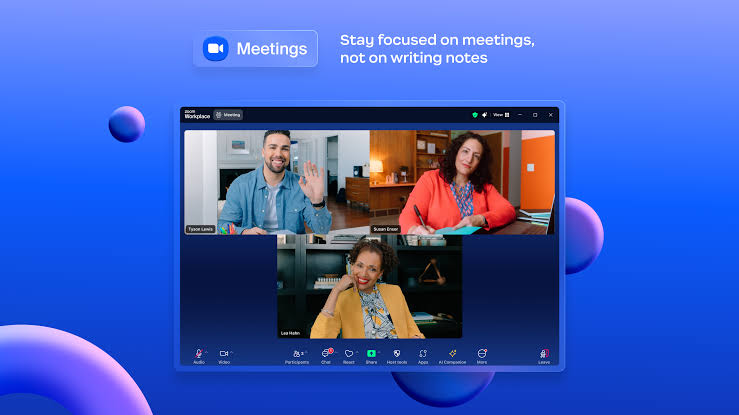
The AI tools are genuinely useful when they work accurately. The ability to join a meeting late and ask what you missed without interrupting the conversation is a practical time-saver. The meeting summary feature reduces the administrative burden of manual note-taking. For teams already paying for Zoom, the AI Companion adds value without an additional charge.
However, the AI features carry an important caveat that cannot be overlooked. In 2023, Zoom updated its terms of service in a way that many users interpreted as allowing the company to use meeting content, including audio, video, and transcripts, to train AI models without meaningful opt-out options. The resulting backlash was significant. Zoom clarified its position and said it would not use customer content to train AI without consent, but the damage to trust was real and lasting. The very fact that a major communications platform was discovered to have included such a clause in its terms of service raised legitimate questions about how seriously the company takes privacy. For organizations that handle sensitive conversations, this history deserves to be taken seriously when evaluating whether to enable Zoom's AI features.
Login and Account Access: More Friction Than Necessary
Logging into Zoom should be simple. For many individual users it is, using the standard email and password flow at zoom.us or through the desktop and mobile apps. Single sign-on integration is available on Business plans and above, which makes the login experience seamless for enterprise users within a managed IT environment.
Where login becomes a problem is when something goes wrong. Users who are locked out of their accounts, who have forgotten their passwords, who encounter two-factor authentication issues, or who need to access an account after their organization's IT has made changes describe a support process that is slow, unresponsive, and dependent on automated bot interactions rather than human assistance.
Multiple Trustpilot reviewers from 2026 describe missing job interviews and important work calls because Zoom refused to sign them in despite entering correct credentials, with no live support available to resolve the issue in real time. For a platform that positions itself as business-critical infrastructure, the absence of rapid-response login support for paying customers is a serious operational gap.
The login experience is also complicated by the product structure itself. If your organization uses Zoom Phone, Zoom Webinars, or Zoom Rooms in addition to the core meetings product, each may have separate admin configurations, permission levels, and in some cases separate portals. The account management interface, particularly for business and enterprise customers managing multiple licenses, has been described by IT administrators as confusing and difficult to navigate without error.
Zoom Workplace: A Platform in Search of a Purpose
Zoom Workplace is the brand name under which Zoom now markets its full suite of products. It encompasses Zoom Meetings, Zoom Phone, Zoom Team Chat, Zoom Mail and Calendar, Zoom Whiteboard, Zoom Docs, Zoom Contact Center, and the AI Companion features. The idea is that Zoom can serve as a single platform for everything a workplace needs in terms of communication and collaboration.
The concept is not bad. The execution has real problems. The platform has grown through a combination of organic development and acquisition, and the seams show. Moving between different Zoom Workplace modules does not always feel like moving within a unified system. The navigation structure has become dense. Users who came to Zoom for simple meetings and are now being asked to manage chats, mail, calendars, docs, and phone systems within the same interface describe the experience as overwhelming.
One G2 reviewer who administers Zoom Workplace for an IT department described a particularly frustrating experience: the company was upgraded to a more expensive version without requesting it, spent two years trying to get the billing corrected, submitted a pre-arbitration demand, never had the issue fully resolved, and paid over ten thousand dollars for a product they did not want. The company was canceling its business licenses at time of writing. That kind of story, where Zoom's billing and account management processes inflict real financial harm on customers, is not rare in the review record.
For smaller teams that primarily need video meetings and team chat, Zoom Workplace's breadth creates more confusion than value. Microsoft Teams and Google Workspace both offer comparable or superior collaboration suites and are typically already paid for as part of broader organizational subscriptions. The question of why a company would add a separate Zoom Workplace subscription on top of those is increasingly difficult to answer with a straight face.
Billing and Pricing: The Darkest Chapter
Zoom's billing practices are the single most documented source of customer harm across every review platform we examined. The pattern is consistent, recent, and serious enough to constitute the primary driver of the 1.2 overall rating this review assigns.
Pricing Structure in 2026
Zoom's pricing in 2026 is organized around the Zoom Workplace tiers. Here is the basic structure, noting that additional products like Zoom Phone, Webinars, and Rooms are separate paid add-ons not included in these plans:
|
Plan |
Monthly Billing |
Annual Billing |
Key Limits |
|
Basic (Free) |
Free |
Free |
40-min group meetings, 100 participants, local recording only |
|
Pro |
$16.99/user |
$13.33/user |
30-hr meetings, 100 participants, 10GB cloud storage, AI Companion |
|
Business |
$21.99/user |
$18.33/user |
300 participants, SSO, managed domains. 10-user minimum |
|
Enterprise |
Custom |
Custom |
1,000 participants, unlimited cloud storage. Contact sales |
Zoom Phone, Webinars ($66.67+/mo), Rooms ($41.58/room/mo), and Events are all separate paid add-ons. Annual plans lock you in for 12 months with auto-renewal. Renewal uplifts of 5 to 40 percent have been documented by independent pricing research.
Auto-Renewal and Charge-After-Cancellation Complaints
The volume of complaints about Zoom's auto-renewal and post-cancellation billing is exceptional. On Trustpilot alone, multiple 2026 reviews describe the same scenario: a user cancels their subscription, often the same day it renews, and is still charged. One reviewer described canceling on the renewal date, finding their card had insufficient funds so the charge failed, depositing money into that account two weeks later for unrelated purposes, and having Zoom immediately process the subscription charge at that moment. Another described canceling in February and being charged again weeks later for a renewed membership, with a customer service team that refused to refund the payment citing a no-refund policy. Descriptions of this company as thieves and the experience as straight-up theft appear in multiple independent reviews.
The no-refund policy is itself worth examining. Zoom's standard terms do not provide refunds for annual plan renewals even when a cancellation attempt was made in good faith and documented. When customers escalate these disputes, the support process directs them through chatbots and automated ticket systems with long response times. Real-time human support is available only on higher-tier plans. For a Pro plan customer paying $13.33 per month, the only support channel available is a chat system that multiple reviewers describe as an AI goose chase that never leads to a human agent.
Hidden Costs and Unexpected Upgrades
Beyond the auto-renewal issue, Zoom's enterprise billing has generated complaints about unauthorized plan upgrades. One IT administrator on G2 described Zoom changing their organization to a more expensive plan without authorization, billing them for two years at the higher rate, and never fully resolving the dispute despite following Zoom's escalation process including a pre-arbitration demand. The administrator's team paid over ten thousand dollars for a product they did not want and ultimately decided to abandon the platform entirely.
Independent pricing research has documented renewal uplifts at Zoom that range from 5 to 40 percent, meaning enterprise customers who negotiate a rate at contract signing should not assume that rate will hold at renewal. The elimination of free licenses that were previously bundled into enterprise deals has also been documented as a mechanism through which renewal costs increase significantly without the customer being clearly notified.
Customer Service: Where Zoom Has Failed Its Users
Zoom's customer service in 2026 is widely described as inaccessible, bot-dependent, and inadequate for the needs of paying customers. The complaints are consistent across Trustpilot, PissedConsumer, Gartner Peer Insights, and G2.
For customers on the free Basic plan, there is no meaningful human support channel at all. Support is limited to the help center documentation. For Pro plan customers, live chat support is available, but multiple reviewers describe the chat system as an AI chatbot maze that resists directing conversations to a human agent. One reviewer summarized the experience as you basically have to fight your way through an AI chat bot to even get into a chat with an actual person. Enterprise customers have dedicated support, but the bar for accessing it is being a high-paying customer, which means the users with the most resources to work around problems get help while those most vulnerable to billing errors get automated responses.
There is no widely publicized phone support number for Zoom's consumer-facing issues. For billing disputes in particular, the absence of a real-time phone resolution channel means that customers who believe they have been charged in error face a slow, asynchronous process during which Zoom may refuse to reverse the charge citing its no-refund policy before the customer has had a genuine opportunity to make their case to a human being.
The irony here is not subtle. Zoom built its reputation on making communication easier, and it cannot provide its own paying customers with a reliable channel to communicate with it when something goes wrong.
User Experience: Two Very Different Zoom Customers
If you read Zoom's reviews on Capterra and Gartner Peer Insights, which skew toward business software evaluators in managed enterprise environments, the picture is reasonably positive. IT administrators who have Zoom integrated into their organization's infrastructure describe reliable video quality, useful AI features, smooth calendar integration, and a platform that does what it promises for large-scale meeting needs. These reviewers are not wrong about what they experience.
If you read Zoom's reviews on Trustpilot and PissedConsumer, which skew toward individual consumers and small business owners dealing with billing and account issues, the picture is very different. These reviewers describe being charged after canceling, being unable to reach support, having their account access blocked while investigations into billing disputes drag on, and losing money they cannot recover due to the no-refund policy. They are also not wrong about what they experience.
The two populations reflect a genuine split in what Zoom is and who it serves well. For large organizations with IT departments, dedicated account managers, enterprise support contracts, and the leverage to negotiate billing terms, Zoom Workplace is a functional and reasonably capable platform. For individual users, freelancers, educators, small business owners, and anyone who interacts with Zoom primarily as a solo customer rather than through a corporate procurement process, the experience is significantly worse and the risks around billing are real.
The privacy dimension deserves a separate mention. The terms of service controversy around AI training data was not a minor miscommunication. A major video conferencing platform attempted to include language in its legal terms that would allow it to use the content of customer meetings, including what people say in private calls, to improve its products. The company backed down after significant public pressure. But the willingness to attempt this in the first place, and to bury the relevant clause in updated terms rather than communicating the change clearly, represents a fundamental failure of customer trust that no subsequent clarification fully repairs.
Pros and Cons
What Zoom Still Does Well
Core video and audio meeting quality remains reliable for most users on adequate internet connections
Screen sharing, breakout rooms, and recording features are practical and well-implemented
The free plan, despite its 40-minute limit, still allows individuals to join and host short meetings without payment
AI Companion meeting summaries and action item extraction add genuine productivity value for paid users
Broad device and platform compatibility across Windows, macOS, iOS, Android, and Linux
Browser-based meeting joining is available for participants who prefer not to install the app
Large-scale webinar and event infrastructure is capable and has held up for major enterprise use cases
Integration with Google Calendar and Microsoft Outlook works reliably for scheduling
What Makes Zoom Difficult to Recommend
Billing practices have generated thousands of documented complaints about unauthorized charges, charges after cancellation, and a no-refund policy that protects the company at customers' expense
Customer service is largely inaccessible for free and basic paid users, relying on chatbots that multiple reviewers describe as impossible to escalate to a human agent
The 2023 terms of service controversy revealed the company's willingness to use private meeting data for AI training, with an opt-out embedded in legal terms rather than clearly communicated to users
The platform has grown into a bloated suite that many users find cluttered and overwhelming, losing the simplicity that made it popular
Free plan's 40-minute meeting limit is deliberately disruptive and exists purely to drive subscription upgrades
Enterprise renewal uplifts of 5 to 40 percent and undisclosed free license eliminations have caught IT departments with significant unexpected costs
The webcam access behavior when the app is in the background raises unresolved privacy concerns
Login and account access issues can block users from critical meetings with no real-time support available
The primary competition, Microsoft Teams and Google Meet, is included in productivity suites many organizations already pay for, making Zoom's pricing an increasingly hard sell
How Zoom Compares to the Competition in 2026
Zoom vs Microsoft Teams: Microsoft Teams is included with Microsoft 365 business plans that most organizations already pay for. It offers video meetings, team chat, file sharing, and deep integration with the Microsoft productivity suite. Meeting quality is comparable to Zoom. The interface is arguably more complex for new users, but for organizations already invested in Microsoft 365, there is no compelling reason to add a separate Zoom subscription. Teams has its own customer service challenges but does not have the billing abuse complaint volume that Zoom carries.
Zoom vs Google Meet: Google Meet is included with Google Workspace and is free for personal Google accounts with no time limits on meetings. It is simpler and lighter than Zoom, loads directly in the browser without requiring a download, and integrates naturally with Gmail and Google Calendar. For small teams and individuals who do not need Zoom's advanced features, Google Meet removes almost every friction point that Zoom has introduced.
Zoom vs Webex: Cisco Webex was the enterprise video conferencing standard before Zoom displaced it. In 2026, Webex has reinvested in AI meeting features and remains a credible option for large enterprise deployments with high security requirements. It is more expensive than Zoom for most use cases and has a steeper learning curve, but its security posture and compliance certifications are stronger.
Frequently Asked Questions About Zoom (2026)
These are the questions people search most often about Zoom in 2026, answered based on our research.
1. Is Zoom free to use in 2026?
Yes, Zoom has a free Basic plan available at zoom.us that requires no payment to access. The free plan allows unlimited one-on-one meetings with no time limit and group meetings with up to 100 participants, but group meetings are capped at 40 minutes before the session is cut off. The free plan includes local recording, screen sharing, virtual backgrounds, and breakout rooms. Cloud recording is not available on the free plan. The 40-minute group meeting limit is the most significant restriction and is the primary reason many users upgrade to a paid tier. If you host frequent group meetings, the free plan becomes frustrating quickly and is designed to be so.
2. How do I download the Zoom app in 2026?
Download the Zoom desktop application for Windows or macOS by visiting zoom.us and clicking the Download Center link, or by searching for Zoom in your system's app store. For mobile devices, download the Zoom app from the Apple App Store for iOS or Google Play for Android. The installation process takes a few minutes and is straightforward on most devices. After installation, you can either sign in to an existing account or create a new one. If you prefer not to download the app, you can also join most meetings directly through a web browser, though browser-based Zoom has fewer features than the desktop client.
3. How do I log in to Zoom?
Log in to Zoom at zoom.us by clicking the Sign In button and entering your email and password. You can also sign in through the Zoom desktop app using the same credentials. Zoom supports login through Google, Facebook, or Apple account authentication as alternatives to a direct email and password. For organizations using single sign-on through an identity provider like Okta or Microsoft Azure AD, login is handled through that system. If you forget your password, click the Forgot Password link on the sign-in page and follow the reset instructions. Login issues that require account-level support are handled through Zoom's ticketing system, which can be slow to respond.
4. How much does Zoom cost per month in 2026?
Zoom's paid plans are priced at $13.33 per user per month on annual billing for the Pro plan, or $16.99 per month if you pay monthly. The Business plan is $18.33 per user per month annually, or $21.99 monthly, with a minimum of 10 users. Enterprise pricing is custom and requires contacting Zoom's sales team. Annual billing saves roughly 20 percent compared to monthly, but locks you in for 12 months with auto-renewal. If you cancel before the annual term ends, refunds are generally not provided under Zoom's standard terms. Add-ons including Zoom Phone, Webinars, and Zoom Rooms are each separately priced and not included in the base plan fees listed above.
5. What is Zoom Workplace?
Zoom Workplace is the name Zoom uses for its full collaboration platform in 2026. It encompasses Zoom Meetings, Zoom Team Chat, Zoom Phone, Zoom Mail and Calendar, Zoom Whiteboard, Zoom Docs, and AI Companion features, all within a single application interface. Zoom rebranded to this name to position itself as a comprehensive workplace communication suite rather than just a video conferencing tool. The practical effect for most users is that the Zoom app they use for meetings now also houses team messaging, document editing, and other workplace tools. Whether this added complexity is useful or disruptive varies significantly by user and organization type.
6. Is Zoom safe and private in 2026?
Zoom is safer and more private than it was at the start of the pandemic, when security vulnerabilities including Zoombombing and questions about routing of meeting data through Chinese servers drew serious scrutiny. End-to-end encryption has been added for meetings that require it. Security features have been strengthened. However, the platform carries an unresolved trust deficit from the 2023 controversy in which its terms of service were updated to include language permitting the use of meeting content to train AI models, with no clear opt-out for existing users. Zoom said after public backlash that it would not use customer content for AI training without consent, but the willingness to attempt the policy change in the first place is a legitimate concern for any organization that discusses sensitive matters in Zoom meetings.
7. Why does Zoom keep charging me after I cancel?
Post-cancellation billing is one of the most documented complaints about Zoom in 2026. The problem typically occurs for one of a few reasons. First, Zoom's auto-renewal processes the charge before the cancellation is fully processed, particularly when the cancellation is requested close to the renewal date. Second, some users describe a situation where Zoom attempted to charge a card that declined, and then successfully charged it when funds became available weeks later, treating the subscription as still active. Third, some users believe they have canceled but have only paused the account. If you are charged after what you believe was a cancellation, Zoom's terms do not generally provide refunds on annual subscriptions. Your most effective options are to dispute the charge with your bank or credit card company and to document all cancellation attempts with screenshots for that dispute process.
8. What is the 40-minute Zoom limit and how do I get around it?
The 40-minute meeting limit applies to group meetings, meaning meetings with three or more participants, on Zoom's free Basic plan. One-on-one meetings between two participants have no time limit on the free plan. When a group meeting reaches 40 minutes, Zoom sends a warning and then ends the session. The workarounds used by free plan users include ending the meeting and immediately restarting it with the same participants, using a separate free video conferencing tool like Google Meet that has no time limit for free users, or upgrading to a paid Zoom Pro plan at $13.33 per month annually which removes the limit entirely. Zoom occasionally offers free accounts temporarily extended limits during specific holidays, though this is not a reliable ongoing policy.
9. How does Zoom's AI Companion work and is it private?
Zoom AI Companion is an AI assistant built into Zoom Workplace that provides automatic meeting summaries, action item extraction, smart recording with searchable chapters, late-arrival catch-up features, and chat drafting assistance. It is included with the Pro plan and above at no extra charge and must be enabled by the meeting host. Meeting participants are notified when AI Companion features are active. The privacy concern with Zoom's AI features stems from the 2023 terms of service controversy where the company included language permitting use of customer data to train AI models. Zoom has since clarified that it does not use customer content for AI training without consent. However, the AI features do process meeting content through Zoom's cloud systems, meaning organizations with strict data sovereignty requirements should review their specific use case carefully before enabling them.
10. What are the best alternatives to Zoom in 2026?
The best Zoom alternatives in 2026 depend on your specific needs. For individuals and small teams wanting free video meetings without time limits, Google Meet is the most practical option. It works in any browser, integrates with Gmail and Google Calendar, and has no group meeting time restrictions on the free tier. For organizations using Microsoft 365, Microsoft Teams is included in most plans and offers comparable meeting features with deep Office integration. For larger enterprise deployments with high security and compliance requirements, Cisco Webex is worth evaluating despite its higher price. For asynchronous video communication, tools like Loom offer a fundamentally different approach that suits teams working across time zones. For anyone experiencing frustration with Zoom's billing practices specifically, any of these alternatives resolves that problem by elimination.
Icon polls Verdict
Zoom's 1.2 out of 5 rating from Icon Polls reflects a product that functions adequately at its technical core but is surrounded by a company whose practices toward its own customers have become genuinely difficult to defend. The billing complaints are not anecdotal, they are verified, documented, and consistent across thousands of independent reviews on multiple platforms. The customer service experience for ordinary paying customers is not just poor, it is by design structured to avoid resolution. The AI data privacy controversy revealed a company willing to monetize customer trust in ways customers would not have consented to if asked directly.
The technology underneath Zoom still works. Video meetings connect. Audio is reliable. The AI meeting summaries are useful when the privacy tradeoffs are acceptable to your organization. For enterprise customers with dedicated account management and enough leverage to negotiate contract terms, Zoom may remain part of the toolkit. For everyone else, the combination of what Zoom charges, how it handles billing disputes, and how it treats privacy should prompt a serious reconsideration.
If you are currently a free Zoom user and Google Meet or Microsoft Teams works for your needs, switch. If you are a paid Zoom subscriber renewing an annual plan, examine your billing history and renewal terms carefully before committing. If you are an organization evaluating communication platforms, ask the hard questions about data handling and support escalation before signing a contract. The product you got during the pandemic was something different. What Zoom is in 2026 requires a more skeptical eye.