|
Agent Builder by Thesys: Profile Snapshot |
|
|
Product Name |
Agent Builder by Thesys |
|
Developer / Parent Company |
Thesys |
|
Category |
No-Code Generative UI Platform / AI Agent Builder |
|
Public Launch Date |
February 10, 2026 |
|
Headquarters |
United States |
|
Core Technology |
C1 Generative UI API |
|
Pricing Model |
Freemium with usage-based credits |
|
Free Plan |
Yes, free tier available |
|
Paid Plan Starting Price |
$499 per month (Scale plan) |
|
Platform Availability |
Web-based (browser) |
|
Supported Languages |
JavaScript, Python (via API) |
|
Login Method |
Email or SSO via thesys.dev |
|
Open Source Status |
Going open source (GitHub repository available) |
|
Notable Integrations |
Snowflake, BigQuery, PostgreSQL, Salesforce, HubSpot, Notion, Slack, GitHub, Jira, Stripe, Google Drive |
|
Best For |
Product teams, growth teams, founders, ops teams, developers |
|
Our Rating |
3.9 / 5 |
|
Website |
thesys.dev/agent-builder |
What is Agent Builder by Thesys?
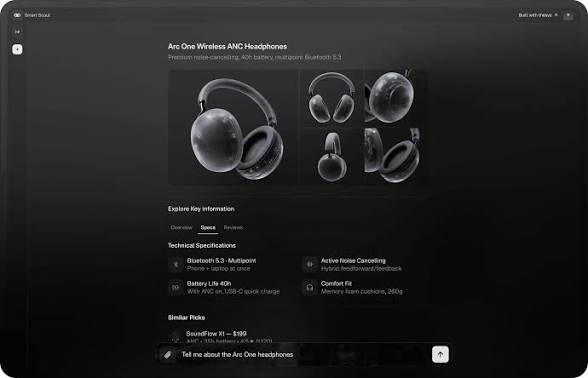
Agent Builder by Thesys is a no-code platform that lets you build and deploy AI agents that respond with interactive user interface elements instead of plain text. Think charts, forms, cards, tables, slides, and full reports generated on the fly. The platform is powered by what Thesys calls the C1 Generative UI API, which is the underlying engine that turns a model's reasoning into actual visual components on the screen.
The basic pitch is simple. A normal chatbot answers your question with a wall of text and then leaves you to figure out what to do with it. A Thesys agent answers the same question with a chart you can read, a table you can sort, or a form you can fill in. The agent adapts its output to the task instead of forcing every reply into one long paragraph.
From what we have tested, this is most useful when you are building a customer-facing copilot, an internal analytics agent, or any tool where users need to take action on the answer instead of just reading it. If your team already has structured data living in Snowflake, PostgreSQL, HubSpot or a similar tool, Agent Builder gives you a way to put a friendly interface in front of that data without writing a full frontend.
Agent Builder by Thesys Login Process
Getting into Agent Builder is straightforward. You go to thesys.dev/agent-builder, click the Get Started button, and you are taken to a sign up flow. The platform supports standard email registration and single sign on options, so most teams will not need to do anything special to get an account running.
Once you are signed in, you land in the Thesys console where your agents live. The dashboard is clean. You see a list of any agents you have created, a button to create a new one, and quick access to billing, data connections, and the API console. We found the onboarding to be one of the gentler experiences in this category. There is no overwhelming wizard, no twenty step setup. You can have a basic agent running on a test dataset within ten minutes if you know what you want to build.
One small thing to note. The console.thesys.dev URL is also part of the same platform, and that is where developers go to test prompts and prototype with the C1 API directly. If you are not a developer, you can ignore that side of the product entirely and stick to the no-code builder.
Is Agent Builder by Thesys Free?
Yes, there is a free plan, and it is more useful than most freemium AI tools we have reviewed this year. Thesys uses a usage-based pricing model. You only pay for what your agents actually generate, meaning the charts, cards, forms, and other UI outputs that get produced for users. You can start for free and add credits as your usage grows.
The free tier is intentionally designed so that small teams and individual builders can get a complete agent up and running without paying anything. You can build the agent, connect a data source, customize the branding, and even deploy it to a Thesys hosted URL. The free plan is enough to validate an idea, run an internal proof of concept, or even support a small user base if your traffic is low.
Above that, the paid tier we found mentioned most often is the Scale plan at $499 per month, which is targeted at companies that want security features, analytics, and priority support. There is also an enterprise tier with negotiated limits for larger organizations. One important note on cost. LLM usage is billed separately at your model provider's rates. So if you are using Claude, OpenAI, or another model, those API costs sit on top of what you pay Thesys.
Agent Builder by Thesys vs Elastic Agent Builder
A lot of people searching for Agent Builder by Thesys also end up looking at Elastic Agent Builder, and we want to clear up the confusion because these are two very different products that happen to share part of a name.
Elastic Agent Builder is a feature inside the Elastic platform. It is designed to let you build AI agents that answer questions and take actions over your Elasticsearch data using natural language. It plugs into your existing Elastic deployment, uses tools and skills that query your indices, and exposes agents through MCP and REST APIs. It is the right choice if your team is already running Elastic and you want to put a conversational layer on top of your indexed data.
Agent Builder by Thesys, on the other hand, is a standalone no-code platform. It connects to a wide range of data sources, not just Elasticsearch, and the entire point of the product is the generative UI output. Where Elastic Agent Builder mostly returns structured text and tool results, Thesys returns full visual components that adapt to the question being asked.
In short, Elastic is the better fit if your data lives in Elasticsearch and you want agents that work inside that ecosystem. Thesys is the better fit if you want a flexible, UI-first agent that can sit on top of multiple data sources and feel like a real product to your end users.
Agent Builder by Thesys GitHub Presence
Thesys has been making a public push toward open source, and you can see this front and center on their website where they invite users to star them on GitHub. The company has signaled that parts of its stack are moving in an open source direction, including its OpenUI standard for generative UI, which was launched in March 2026 as the open standard underlying the platform.
For developers, this matters for a few reasons. First, having a public GitHub presence makes it easier to read source code, raise issues, and contribute. Second, the company seems serious about establishing OpenUI as an industry standard, which gives a bit more confidence to teams worried about being locked into a single vendor. Third, if you want to extend or integrate Agent Builder with other developer tools, having open repos to reference is a real time saver.
That said, the core Agent Builder product itself is still a hosted SaaS, not a self-hosted open source tool. So GitHub is useful for the supporting libraries, examples, and the OpenUI specification, but you are not going to download the agent platform and run it on your own server.
Agent Builder by Thesys User Experience
This is where we spent the most time during our testing, because a no-code tool lives and dies by how it actually feels to use. The short answer is that the user experience is solid, with a few rough edges worth knowing about before you commit.
What Works Well
The builder itself is clean. You set up an agent by giving it instructions in plain English, connecting one or more data sources, and choosing how it should present results. The templates speed things up significantly. The Website Assistant template, for example, lets you paste a URL and have a deployable copilot ready within minutes. Branding is also smooth. You can match the agent's colors, typography, and overall style to your company without writing CSS.
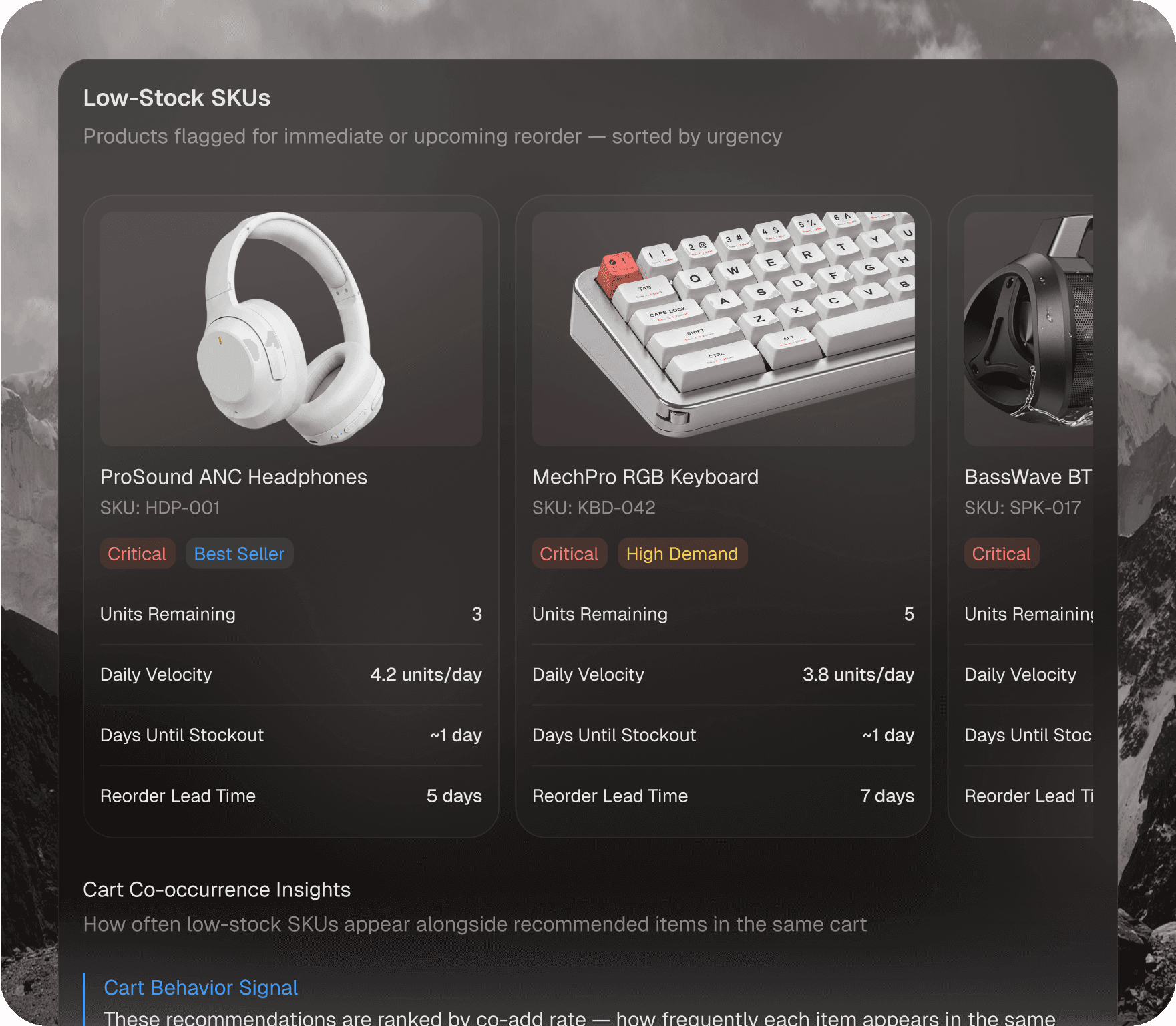
The generative UI output is the real star. When you ask a sales question, you get a chart. When the agent needs to confirm something, you get a form. When you ask for a list, you get a sortable table. After using it for a while, going back to a plain text chatbot feels limiting.
What Could Be Better
Debugging is still light. If the agent produces a chart that does not match what you expected, it can be hard to figure out whether the issue was in the data, the instructions, or the model. External reviewers have flagged the same gap, and we agree that a richer audit trail would make troubleshooting much easier.
Native actions are also limited right now. The agent can show you a form or a button, but wiring that interaction to trigger a real backend operation still requires some custom work. For operational use cases where the user needs to actually do something based on the agent's response, this is the area we would most like to see improved.
Lastly, the ease of use score across reviewers tends to land in the high sixties out of one hundred, and that lines up with what we observed. It is approachable, but it is not the most beginner-friendly tool on the market. You will move faster if you have at least one person on the team who understands data sources and prompt design.
ICON POLLS Verdict
After all the testing and research, our rating for Agent Builder by Thesys lands at 3.9 out of 5. It is a strong product that does something genuinely new in the AI agent space, and the generative UI direction is one of the more exciting shifts we have seen this year. The pricing is fair, the free plan is generous enough to actually build something real, and the integrations cover most of the data sources teams care about.
It is not a perfect five out of five because the debugging tools need more depth, the native action support is still maturing, and the learning curve is a touch steeper than the marketing suggests. If you are a product team, a founder, a growth lead, or anyone who wants to put a real interface in front of AI responses, this tool is worth a serious look. If you just need a basic FAQ chatbot, you will probably find this overpowered for your needs.
Bottom line. Agent Builder by Thesys is one of the more thoughtful AI agent platforms we have reviewed in 2026, and the trajectory looks promising.
Frequently Asked Questions About Agent Builder by Thesys
1. What exactly is Agent Builder by Thesys and what does it do?
Agent Builder by Thesys is a no-code platform for creating AI agents that respond with interactive user interface elements like charts, tables, forms, and cards instead of plain text. You connect your data sources, write instructions in plain language, and the agent uses the C1 Generative UI API to render visual responses that users can actually interact with. It is designed for product teams, founders, growth teams, and anyone who wants to put a real interface in front of AI output.
2. Is Agent Builder by Thesys free to use?
Yes, there is a free plan. Thesys uses a usage-based pricing model where you only pay for the outputs your agents generate, such as charts, cards, and forms. You can start for free, build a complete agent, connect data, and deploy it without paying anything. Paid plans like the Scale tier at $499 per month add security features, analytics, and priority support. Note that LLM usage is billed separately at your model provider's rates.
3. How do I log in to Agent Builder by Thesys?
Go to thesys.dev/agent-builder and sign up using email or single sign on. After signing in you land in the Thesys console, where you can create agents, connect data sources, and manage billing. Developers can also work in console.thesys.dev to prototype directly with the C1 API.
4. Is Agent Builder by Thesys the same as Elastic Agent Builder?
No, they are completely different products. Elastic Agent Builder is a feature inside the Elastic platform that builds agents on top of your Elasticsearch data. Agent Builder by Thesys is a standalone no-code platform that connects to many data sources and focuses on generative UI responses. If your data lives in Elasticsearch and you want agents inside that ecosystem, go with Elastic. If you want a flexible, UI-first agent that works across multiple data sources, Thesys is the better fit.
5. Does Agent Builder by Thesys have a GitHub repository?
Yes, Thesys has a public GitHub presence and is actively pushing toward open source. The company has launched OpenUI as an open standard for generative UI and invites users to star their GitHub. The hosted Agent Builder product itself is still a SaaS platform, but the supporting libraries, examples, and the OpenUI spec are available openly.
6. What data sources can Agent Builder by Thesys connect to?
It connects to a wide range of sources including Snowflake, BigQuery, Databricks, PostgreSQL, MongoDB Atlas, Supabase, HubSpot, Salesforce, Intercom, Stripe, Shopify, Notion, Slack, GitHub, Jira, Google Drive, PostHog, Mixpanel, Amplitude, Google Analytics, and many more. It also supports any REST API or MCP server you wire up, and there is no per-integration fee on paid tiers.
7. Is coding required to use Agent Builder by Thesys?
No, the platform is designed as a no-code tool. You can build, customize, and deploy an entire agent from the Thesys interface using natural language instructions and visual controls. Developers who want more control can extend functionality through the C1 API, but that is optional. Most product and growth teams will never need to touch code.
8. How is the user experience and is it worth the price?
The user experience is solid overall. The builder is clean, templates speed up setup, branding controls are smooth, and the generative UI output is the standout feature. The main weaknesses are limited debugging tools for failed UI generations and a learning curve that is slightly steeper than the marketing suggests. For teams building real products with real data, the value is strong, and the free plan lets you validate before paying. Our overall rating is 3.9 out of 5, which we think reflects a strong product with a few areas still maturing.