|
Profile item |
ICON POLLS research finding |
|---|---|
|
Product |
Lindy Assistant |
|
Company |
Lindy.ai |
|
Category |
AI executive assistant and no-code agent platform |
|
Main use |
Inbox management, scheduling, meeting notes, follow-ups, and custom automations |
|
Access |
Web dashboard at chat.lindy.ai, plus iMessage and SMS |
|
Mobile app |
No official native app is required; phone access works through iMessage or SMS |
|
Build system |
Custom agents using workflows, triggers, actions, conditions, integrations, and memory |
|
Free option |
Seven-day trial; no permanent free plan shown on the current official pricing page |
|
Starting price |
$49.99 per month for Plus |
|
Top listed price |
$199.99 per month for Max; Enterprise is custom |
|
Official security claims |
Encryption, SOC 2 Type II, GDPR, HIPAA, and PIPEDA compliance |
|
ICON POLLS rating |
1.6 out of 5 |
Lindy Assistant Review in 2026: Quick Verdict
Lindy Assistant has an attractive promise. It can watch an inbox, prepare users for meetings, draft replies, arrange calls, take notes, and run custom workflows across connected services. The idea is useful, and the product looks easier to approach than many traditional automation platforms.
The problem is the gap between promise, price, and public confidence. The Plus plan starts at $49.99 a month, the current official offer is a seven-day trial rather than a lasting free tier, and recent user feedback contains serious complaints about unreliable results, billing, cancellation, and support. These reports do not prove that every customer will have the same experience, but they are too consistent to ignore in a buying decision.
Our verdict is 1.6 out of 5. Lindy may still suit a professional who has a narrow, repeatable workflow and is willing to supervise it closely. For a casual user, a small business watching costs, or anyone expecting a fully dependable digital employee, it is difficult to recommend at its present price and risk level.
How ICON POLLS Researched Lindy Assistant
For this review, ICON POLLS checked Lindy’s live pricing page, quick-start documentation, workflow-builder guides, mobile access instructions, and security statements on 30 July 2026. We then compared those claims with an independent review from Zapier and the pattern of recent customer comments on Trustpilot.
We paid attention to five practical questions: What does it do? How easy is it to start? What does it really cost? Can users control its actions? What happens when the assistant, billing flow, or support process goes wrong? This matters because an assistant connected to email and calendars needs more than clever demos. It needs predictable behaviour and clear account controls.
Lindy Assistant AI
Lindy Assistant is positioned as an AI executive assistant rather than a simple chatbot. Its core jobs include inbox sorting, email drafting, meeting preparation, note-taking, follow-ups, scheduling, and daily briefings. It is designed to use the context in a connected email account and calendar, then act on routine work in the background.
That approach is more practical than opening a general chatbot and explaining the same work every morning. Lindy can also remember preferences and use connected tools, which gives it a wider working range. The official documentation says users can control settings for email labels, drafts, meeting preparation, and related tasks.
Still, AI autonomy is also the risk. A draft that sounds confident can contain a wrong detail, and an automated workflow can repeat a mistake at scale. Recent Trustpilot reviewers have alleged hallucinated or wrongly formatted outputs. These are individual reports, not controlled tests, but they reinforce a basic rule: keep approval steps in place and check important messages before they leave your account.
Lindy Assistant Build
The Build side of Lindy is the custom-agent system. A user can create an agent from workflows made up of triggers, actions, agent steps, integrations, conditions, loops, and memory. In plain language, you choose what wakes the assistant, what information it should use, what it should do next, and what rules should stop or redirect it.
Templates give beginners a working starting point. This is useful for jobs such as lead handling, customer support, CRM updates, meeting preparation, or internal alerts. People who understand their process can build something useful without writing a full application.
No-code does not mean no thinking. Complex automations still need careful instructions, test data, permissions, fallback steps, and limits. Zapier’s independent review found the text interface easy to use but judged Lindy better for personal-assistant tasks than for complicated automation. That is a fair warning for buyers expecting enterprise-grade process engineering from a few prompts.
Lindy Assistant App
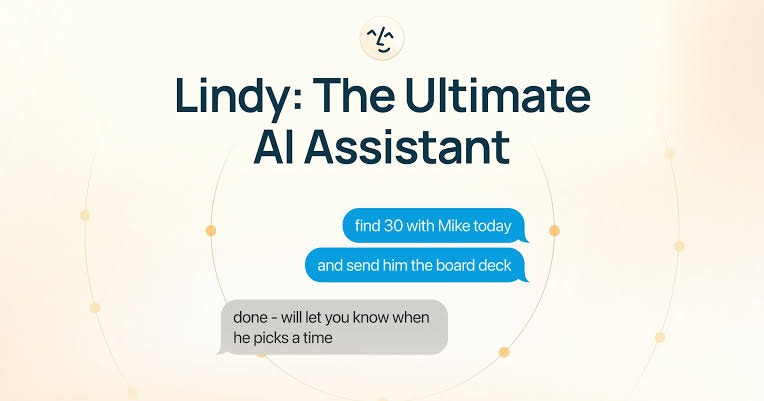
People searching for a Lindy Assistant app may expect a normal Android or iPhone download. Lindy’s official 2026 documentation takes a different route. The main product runs through its web interface, while mobile delegation works through iMessage and SMS. Lindy explicitly says there is no app to install for this phone experience.
For iPhone users, iMessage makes the service feel close to a personal assistant. Android users can send and receive standard SMS, according to the official pricing FAQ. This is convenient because there is nothing new to learn, but it can also feel limited to users who want a full native app with a dedicated dashboard, notifications, and account controls.
Be careful with similarly named apps in mobile stores. An app using the word Lindy is not automatically the official Lindy.ai assistant. The safest route is to start from lindy.ai or chat.lindy.ai and follow the company’s own setup instructions.
Lindy Assistant Login
To log in, go to chat.lindy.ai. New users can start from lindy.ai and choose Try for Free. The official quick-start page says signup supports Google or an email address. Users can then add a phone number, verify it with a code, and connect an email account and calendar.
Read the permission screen before approving access. Email and calendar access are central to the product, but they also expose sensitive business information. Start with one inbox, keep sending approvals enabled, and review the assistant’s early work until you understand how it interprets your priorities.
If the login page fails, confirm that you are using chat.lindy.ai, try the original sign-in method, and check whether the Google or email account still has permission. Billing and cancellation should also be checked inside account settings before the trial deadline.
Is Lindy Assistant Free?
Lindy Assistant is not shown as permanently free on its current official pricing page. The live offer is a seven-day free trial, followed by a paid plan unless cancelled under the applicable trial terms. The quick-start documentation also says payment information is required.
There is one point buyers should verify during signup. Lindy’s quick-start page says the trial includes full Pro features, while the pricing page says it includes all Plus features. That conflict is small on paper but important when evaluating computer use, model selection, and usage limits. Take a screenshot of the exact offer shown at checkout and confirm the renewal amount.
Older articles may mention a free plan with monthly credits. Those references should not be treated as the current offer unless Lindy shows the same plan inside your account. Pricing and trials can change, so use the live checkout page as the final authority.
Lindy Assistant Pricing in 2026
|
Plan |
Monthly price |
Usage / inboxes |
Main extras |
|---|---|---|---|
|
Plus |
$49.99 |
Standard; up to 2 inboxes |
Email, meetings, scheduling, SMS/iMessage, 100+ integrations |
|
Pro |
$99.99 |
3x Plus; up to 3 inboxes |
Computer use and model selection |
|
Max |
$199.99 |
7x Plus; up to 5 inboxes |
Higher usage for heavier workloads |
|
Enterprise |
Contact sales |
Custom |
Shared usage, support, SSO, SCIM, audit logs, BAA |
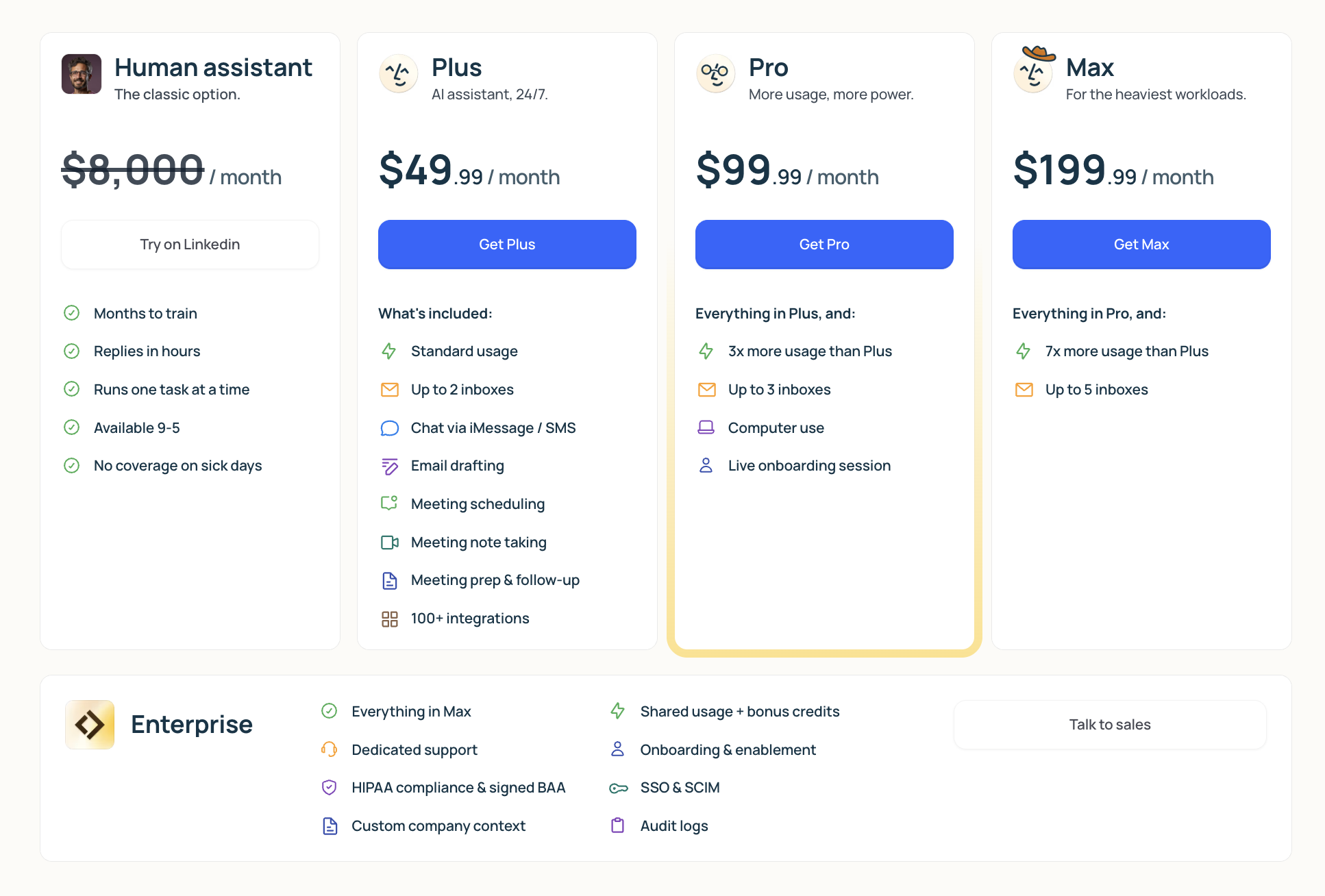
The pricing table is simple, but the value question is harder. The entry plan costs more than many general productivity subscriptions, and the public page describes usage as Standard, 3x Plus, or 7x Plus instead of showing a clear task count on the main pricing grid. A customer should check the account’s detailed usage rules before moving a busy inbox or business process onto the service.
Lindy Assistant User Experience
The best part of the user experience is familiarity. Texting a request is easier than learning a large automation dashboard. Connecting email and calendar also allows useful actions to happen where work already lives. Independent reviewers have praised the simple text interface, the combination of meeting scheduling, preparation, and follow-up, and the option to approve messages before sending.
The weak part is confidence. An AI assistant saves time only when users do not have to inspect every step, chase support, or worry about billing. Trustpilot showed a 1.7 out of 5 score from 37 reviews when checked for this article, with 78 percent of reviewers selecting one star. Recent complaints mentioned cancellation, continued charges, support, and output quality. Public review sites are self-selecting and can lean negative, so this is not a scientific measure of all customers. It is still a serious warning signal.
There is also a clear split in public opinion. Zapier found Lindy easy to use and useful for personal-assistant work, while calling it expensive and less suitable for complex automation. That mixed picture is why we do not dismiss the product completely, but it is also why we would not connect a critical workflow without a tightly controlled trial.
What We Liked
A clear assistant concept built around email, meetings, calendars, and follow-ups.
Fast access through web, iMessage, and SMS, with no mobile app required.
Templates and a no-code workflow builder for custom agents.
Approval controls can reduce the chance of an unwanted message being sent.
Useful integrations and enterprise security claims, including SOC 2 Type II and GDPR.
What Needs Improvement
The starting price is high for individuals and small teams testing an AI assistant.
The public pricing grid should explain usage limits in exact, practical numbers.
The official pages should agree on whether the seven-day trial unlocks Plus or Pro.
Public complaints about billing, cancellation, support, and unreliable outputs need a convincing response.
A native mobile app would give users clearer account, usage, and billing controls on the move.
Why ICON POLLS Rates Lindy Assistant 1.6/5
|
Area reviewed |
Score |
Reason |
|---|---|---|
|
Feature scope |
2.5/5 |
Strong list of inbox, meeting, scheduling, and agent tools |
|
Setup and usability |
2.4/5 |
Simple sign-up and familiar text interface |
|
Reliability confidence |
1.2/5 |
AI supervision remains important; recent output complaints |
|
Value for money |
1.0/5 |
High entry price and no current permanent free plan |
|
Billing and support confidence |
0.9/5 |
Recent cancellation, charging, and support complaints |
|
Overall editorial rating |
1.6/5 |
Promising idea, but current price and trust concerns outweigh convenience |
A 1.6 rating does not mean Lindy has no useful features. It means the full buying decision is weak at the time of review. Useful automation, quick setup, and a clean interface cannot fully offset a $49.99 entry price, unclear public usage detail, inconsistent trial descriptions, and a recent pattern of serious user complaints.
Who Should Consider Lindy Assistant?
Lindy may be worth a controlled trial for a founder, consultant, recruiter, or executive who spends hours on email and meetings and can measure the time saved. The best starting case is narrow and reversible, such as drafting replies for review or preparing meeting briefs.
It is a poor fit for buyers seeking a completely free assistant, people who do not want to connect private email and calendar data, or teams that need deterministic automation with detailed logs and strict process controls. It is also risky for anyone who will forget the trial renewal date.
Final Verdict
Lindy Assistant is built around a genuinely useful idea: let one AI handle the administrative work scattered across email, calendars, meetings, and connected apps. Its no-code builder and text access make that idea approachable.
In 2026, however, the product asks buyers to pay a premium before it has earned enough public trust. The short trial, conflicting trial descriptions, vague headline usage labels, and recent customer complaints make caution the sensible position. ICON POLLS rates Lindy Assistant 1.6 out of 5 and recommends testing only a low-risk workflow, setting a cancellation reminder, and keeping human approval turned on.
Frequently Asked Questions About Lindy Assistant
1. What is Lindy Assistant?
Lindy Assistant is an AI executive assistant from Lindy.ai. It can help manage inboxes, draft email replies, prepare meetings, take notes, schedule appointments, send follow-ups, and run custom workflows through connected apps.
2. Is Lindy Assistant free in 2026?
No permanent free plan is shown on Lindy’s current official pricing page. The company advertises a seven-day free trial, and its quick-start documentation says payment information is required. Check the live checkout terms before starting.
3. How much does Lindy Assistant cost?
As of 30 July 2026, Plus costs $49.99 per month, Pro costs $99.99 per month, and Max costs $199.99 per month. Enterprise pricing is available through sales.
4. How do I log in to Lindy Assistant?
Go to chat.lindy.ai and use the Google account or email address connected to your Lindy account. New users can start from lindy.ai, choose Try for Free, and follow the account setup steps.
5. Does Lindy Assistant have an Android or iPhone app?
Lindy’s official documentation says no app is needed for phone access. Users can delegate through iMessage or SMS. The main account and settings are available through the web interface.
6. Does Lindy Assistant work on Android?
Yes. Lindy says Android users can text the assistant and receive replies through standard SMS. The experience is presented as more optimized for iMessage on iOS.
7. What can I build with Lindy AI?
You can build custom agents for tasks such as lead follow-up, customer support, CRM updates, meeting workflows, internal alerts, research, and data handling. Workflows use triggers, actions, conditions, integrations, loops, and memory.
8. Can Lindy Assistant send emails automatically?
Lindy can draft and manage email-related tasks. The official pricing FAQ says messages are drafted for review and users control what gets sent. Keep approval steps enabled for important or external communication.
9. What apps does Lindy Assistant integrate with?
Lindy lists more than 100 integrations on its Plus plan and names services such as Gmail, Outlook, Google Calendar, Slack, and Notion. Its documentation also covers tools including HubSpot, Salesforce, Zoom, Google Drive, and Microsoft Teams.
10. Is Lindy Assistant safe to connect to email?
Lindy claims encryption and compliance with SOC 2 Type II, GDPR, HIPAA, and PIPEDA. Even with those controls, users should review permissions, connect only necessary accounts, and supervise sensitive actions.
11. Can I cancel Lindy Assistant before the trial ends?
Lindy’s official pricing FAQ says users can cancel from account settings. Because recent public reviewers have alleged cancellation and billing problems, confirm the cancellation status, retain screenshots or emails, and contact support promptly if the account does not update.
12. Is Lindy Assistant worth it in 2026?
It may be worth a tightly controlled trial for a busy professional with a measurable email or meeting workload. For most casual users and cost-conscious small teams, ICON POLLS does not recommend it at the present price and confidence level.