|
PRISM 2026 BRAND PROFILE |
DETAILS |
|---|---|
|
Product Name |
Prism (also marketed as OpenAI Prism) |
|
Parent Company |
OpenAI |
|
Launch Date |
January 27, 2026 |
|
Product Category |
AI-native LaTeX workspace for scientific writing |
|
Underlying AI Model |
GPT-5.2 |
|
Platform Type |
Cloud-based web app (browser only) |
|
Native Apps |
No official desktop or mobile app at the time of writing |
|
Download Required |
No, runs fully in the browser |
|
Pricing |
Free for ChatGPT account holders (Free, Go, Plus, Pro) |
|
Business and Enterprise Access |
Rolling out gradually; Edu plans planned |
|
Built On |
Crixet, a LaTeX platform acquired by OpenAI |
|
Primary Use Case |
Drafting and editing research papers in LaTeX |
|
Key Features |
Inline AI editing, real-time co-authoring, citation tools, equation builder, voice editing |
|
Target Audience |
Researchers, scientists, PhD students, academic writers |
|
Official Website |
prism.openai.com |
|
ICON POLLS Rating |
3.0 out of 5.0 |
What Exactly Is Prism in 2026?
Prism is not a chatbot, and it is not a Word replacement. It is a cloud-based LaTeX editor with GPT-5.2 baked directly into the workspace. For readers outside academia, LaTeX is the typesetting system that most scientists, mathematicians, and engineers use to write papers because it handles equations, citations, and formatting in a way that Microsoft Word simply cannot match.
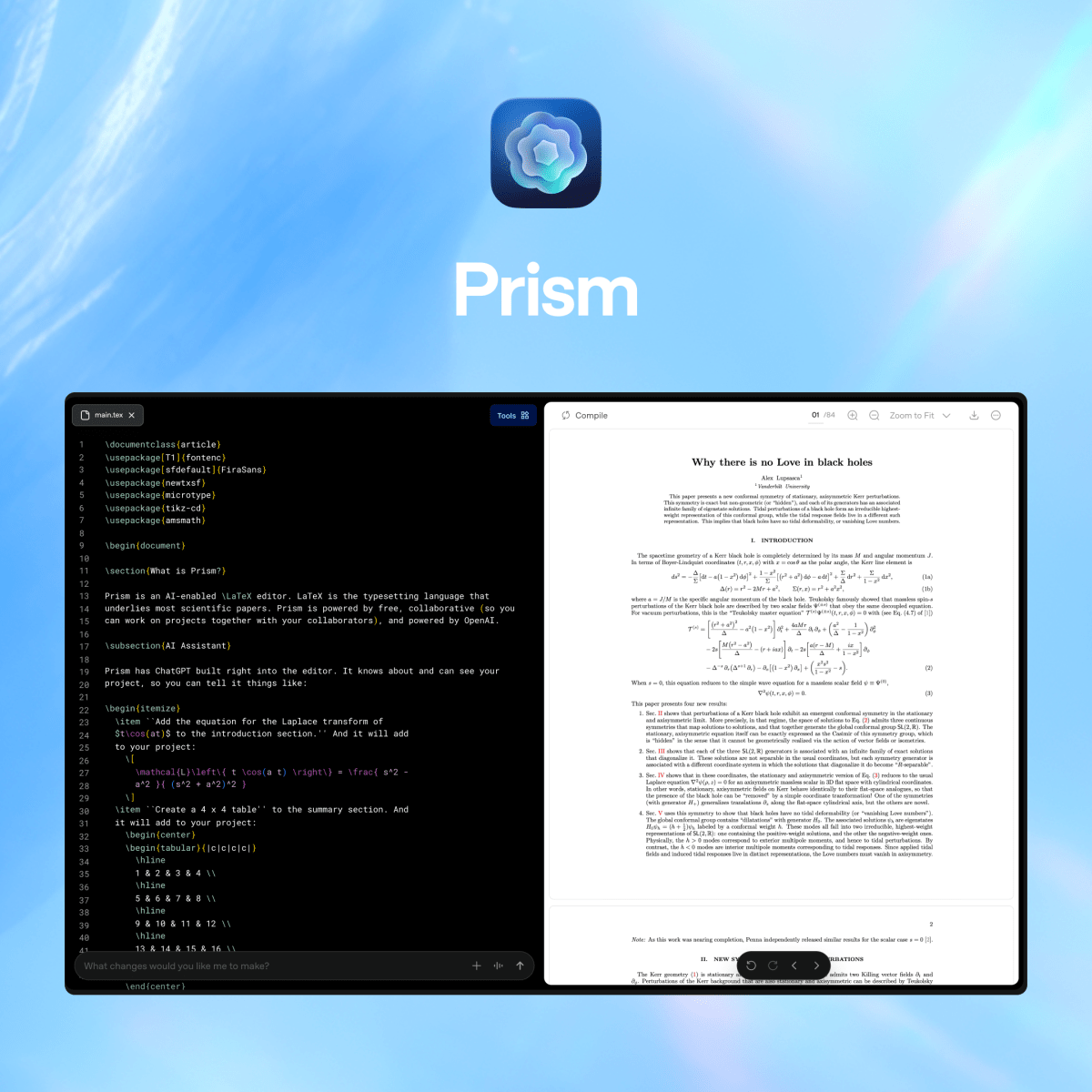
OpenAI did not build Prism from scratch. The company acquired a LaTeX platform called Crixet and rebranded it after layering its newest model, GPT-5.2, into the editor. What you get is an environment where you can draft a paper, see the compiled PDF render in real time on the right side of your screen, highlight a sentence and ask the AI to rewrite it, and collaborate with co-authors who are editing the same document at the same time.
OpenAI Vice President Kevin Weil said during the launch press call that the company expects 2026 to be for AI and science what 2025 was for AI and software engineering. Whether that prediction holds up is another conversation, but it tells you exactly how the company is positioning the product.
Prism AI: How the GPT-5.2 Integration Actually Works
The AI side of Prism is the headline feature, so we want to break down what it can and cannot do based on our testing.
Context-Aware Suggestions
Unlike using ChatGPT in a separate tab, the Prism AI sees your entire manuscript while it works. It knows your section structure, your equations, your figures, and your references. When you ask it to revise a paragraph in section 3, it can pull context from the introduction and the methods section to keep your terminology consistent. This is genuinely useful and is the strongest argument for using Prism over just copying and pasting into ChatGPT.
Inline Editing With Tracked Changes
You highlight text, type a prompt, and the AI returns suggestions as tracked edits with brief notes explaining each change. You can accept or reject each one. This workflow feels closer to working with a co-author than chatting with a bot, and it is one of the things Prism gets right.
Equation and Diagram Help
You can write LaTeX directly, use a visual equation builder, or upload a sketch of a diagram and have the AI convert it into clean LaTeX code. For people who are not fluent in LaTeX syntax, these features lower the entry barrier.
Where the AI Falls Short
In real use, the AI sometimes goes into what users have started calling repair loops. When you ask it to fix a compilation error, it can introduce a different error while solving the first one, then try to fix that one and break something else. We hit this issue twice during testing on documents with many cross-references. The AI is also not particularly good at generating original scientific content. If you give it a blank page and ask it to draft an introduction, the result feels generic. Prism works best as a refinement layer, not a content generator.
Prism App and Download: What You Need to Know
This is one of the questions our readers ask most often, so let us be very clear about it.
There is no Prism mobile app. There is no official desktop app. There is nothing to download. Prism runs entirely in your browser at prism.openai.com. You sign in with your ChatGPT account, and you are inside the workspace.
Some third party wrapper tools, such as WebCatalog, will let you open Prism in a standalone desktop window on Mac or Windows, but these are not made by OpenAI. They simply package the web app into something that looks like a native app. If you see a website offering a Prism download with a setup file or an APK, treat it with caution because OpenAI does not distribute the product that way.
On the upside, the browser-only approach means there is nothing to install, no environment to configure, and no LaTeX distribution to set up locally. On a fresh laptop you can be writing a paper inside ten minutes. On the downside, you cannot work offline, and if your internet connection drops mid-session, you depend on the autosave behaving correctly. We did notice during early use that some users reported file recovery issues during the launch month, which OpenAI later addressed by migrating the saving system internally.
Prism Software Features and Performance
Looking at Prism as a piece of software rather than just an AI product, here are the features that stood out during our review.
Real-time LaTeX compilation with a side by side PDF preview that keeps up with your typing without obvious lag, even on math heavy sections.
Unlimited projects and collaborators, with no seat limits, which is unusual for a free tool in this space.
Built-in citation management plus Zotero synchronization for pulling references from your own library.
Automatic bibliography building and the ability to surface relevant papers from arXiv directly into your manuscript.
Voice based editing for small tweaks, so you can speak a change instead of typing it.
Version history that lets you roll back to earlier drafts, which is a relief on long projects.
Inline comment threads for peer review and co-author feedback.
On performance, Prism feels responsive on a decent laptop with a stable connection. Compilation speeds were faster than we expected for a browser-based LaTeX engine. The visual equation builder is a nice touch for collaborators who are not LaTeX natives.
That said, the software is not without rough edges. We saw the occasional Failed to get word count error in the project summary panel, and other users have reported similar small reliability issues. For a product backed by a company as well resourced as OpenAI, these basic glitches feel like signs that the product was shipped while still in active development.
Prism User Experience: The Honest Verdict
The user experience of Prism is a mixed bag, and this is where our 3.0 rating mostly comes from.
What Feels Good
The interface is clean and uncluttered. The split view of source code on the left and rendered PDF on the right is intuitive. The AI prompts sit in a panel at the bottom and stay out of the way when you do not need them. Real time collaboration works smoothly, and watching a co-author's cursor move across a paragraph as they edit is genuinely useful when you are working across time zones.
What Feels Frustrating
Documentation is thin. Many features are present but barely explained, so you discover them by accident or by reading third party reviews. Some advanced controls that the marketing hints at, such as deeper enterprise governance, are not yet available in the consumer workspace. Prism also does not help you get from a blank page to a structured first draft. If you are a PhD student looking for chapter planning, thesis outlining, or argument shaping, Prism will not guide you through that. It assumes you already know what your paper should look like and helps you polish it.
The Bigger Concern
Beyond the product itself, there is an ongoing debate in the research community about whether tools like Prism will worsen the flood of low quality, AI assisted papers that journals already struggle with. This is not a Prism specific flaw, but it is part of the context in which the product is being adopted. Some journals are tightening their disclosure policies in response. If you plan to use Prism for a paper headed to a peer reviewed journal, check the submission rules for AI assistance before you start.
Prism 2026: Pros and Cons Summary
Pros
Free for any ChatGPT account holder, with no seat or project limits.
GPT-5.2 is built into the editor, so the AI understands the whole document context.
Real-time LaTeX compilation with live PDF preview.
Browser-based, so no local install or LaTeX setup required.
Solid real-time collaboration with comments and version history.
Useful equation builder and sketch-to-LaTeX conversion.
Cons
No mobile app, no desktop app, and no offline mode.
Documentation is thin and many features are underexplained.
AI can get stuck in repair loops on documents with complex cross-references.
Basic reliability issues, such as occasional word count failures, still surface.
Not useful for general document editing if you do not work in LaTeX.
Does not help with structuring a thesis or outlining chapters from scratch.
Business, Team, Enterprise, and Education access is still being rolled out.
Final Verdict and Our 3.0 Rating Explained
Prism is a competent and well intentioned product. The Crixet foundation gives it a mature LaTeX core, and the GPT-5.2 integration is the most thoughtful AI in a scientific writing tool we have seen so far. For researchers already comfortable with LaTeX who want a free alternative to Overleaf Pro, Prism is genuinely worth trying.
But the gap between what OpenAI promised at launch and what the product delivers today is the reason we cannot rate it higher. It is narrow in audience, rough around the edges, and not the discovery accelerating revolution that some of the launch coverage implied. The free price tag also raises the obvious question of how long it stays free as adoption grows, since OpenAI has hinted that more advanced features will be tied to paid ChatGPT plans over time.
Our final score: 3.0 out of 5.0. A good first step, useful for the right kind of user, but with enough rough patches and unmet promises that we cannot recommend it without reservations.
Frequently Asked Questions About Prism in 2026
1. Is Prism really free to use in 2026?
Answer: Yes, Prism is currently free for anyone with a personal ChatGPT account on the Free, Go, Plus, or Pro plans. There are no paid tiers at the time of writing, although OpenAI has stated that more advanced AI features may move behind paid ChatGPT plans in the future. Business, Team, Enterprise, and Education access is still being rolled out.
2. Is there a Prism app I can download on iPhone, Android, or my computer?
Answer: No. Prism does not have an official mobile or desktop application. It runs entirely in a web browser at prism.openai.com. Some third-party tools can wrap the web app in a standalone window, but those are not made by OpenAI. If you see a site offering a Prism setup file or APK, be cautious, because that is not how OpenAI distributes the product.
3. What is the difference between Prism and ChatGPT?
Answer: ChatGPT is a general-purpose chat assistant where you type prompts and get replies. Prism is a structured document workspace where the AI sits inside your manuscript and edits text in context. ChatGPT is better for asking questions and generating content from scratch. Prism is better for refining a paper you already have in LaTeX.
4. Is Prism a good replacement for Overleaf?
Answer: For researchers who use Overleaf mainly for real-time collaboration and LaTeX editing, Prism is worth trying as a free alternative. Overleaf still has the edge on template variety, git version control, and institutional single sign-on, especially on its Pro tier. If you rely heavily on those Overleaf features, you may want to use both for a while before deciding.
5. Can Prism write my research paper or thesis for me?
Answer: Not really. Prism is built for editing and refining existing content, not for generating a full paper from a blank page. It can help you polish language, suggest improvements, and check for logical gaps, but it does not plan chapters, structure arguments, or take you from outline to finished draft. If that is what you need, a thesis-focused tool will serve you better, possibly used alongside Prism.
6. Does Prism work with non-LaTeX documents like Microsoft Word?
Answer: No. Prism is LaTeX-native and does not support Word, Google Docs, or general rich text editing. If your workflow lives in Word or you need to share editable files with non-technical collaborators, Prism will not fit your process well. It is designed for scientific writers who already work in LaTeX or are willing to learn it.
7. Is it safe to use Prism for a paper I plan to submit to a journal?
Answer: It can be safe, but you must check the journal's AI disclosure policy before submitting. Many journals now require authors to declare any use of AI tools during writing. Some research communities have raised concerns about AI-assisted papers contributing to low-quality submissions, so transparency is important. Use Prism as an editing assistant, review every suggestion carefully, and disclose your use as required.
8. What are the biggest complaints about Prism so far?
Answer: The most common complaints we have seen include thin documentation, occasional bugs such as word count failures, AI repair loops that introduce new errors while fixing old ones, missing offline mode, and the fact that some marketing claims are ahead of what the product currently delivers. Most users still find it useful, but very few would call it a finished product.