|
Product |
NVIDIA PersonaPlex (personaplex-7b-v1) |
|
What it is |
An open speech-to-speech conversational AI model for real-time voice interactions. |
|
Release |
January 2026 |
|
Best for |
Developers building voice agents, interactive demos and customer-service prototypes. |
|
Core capability |
Full-duplex conversation: it can listen while speaking, allowing interruptions and quick turn-taking. |
|
Inputs and outputs |
24 kHz audio plus text prompts in; speech and text out. |
|
Runtime |
PyTorch / Moshi |
|
Supported setup |
Linux with NVIDIA GPU acceleration; A100 and H100 are listed as supported hardware. |
|
App availability |
No official consumer Android or iPhone app. The included Web UI is self-hosted. |
|
API availability |
No simple public, hosted PersonaPlex API was documented at review time. Developers run it locally or integrate its code. |
|
Licence |
Code: MIT. Model weights: NVIDIA Open Model License, with gated Hugging Face access. |
|
ICON POLLS rating |
3.9/5 |
Our verdict
NVIDIA PersonaPlex is one of the more interesting voice AI releases of 2026 because it is designed to behave less like a walkie-talkie and more like a real conversation. It can keep listening while it speaks, react when a person cuts in and maintain a prompted voice and role. That is a meaningful difference for teams building voice assistants, game characters or live service agents.
The catch is that this is still a technical product. PersonaPlex is not a ready-made chatbot app, and it is not a one-click API for a small business website. You need a Linux-friendly environment, NVIDIA GPU capacity, Hugging Face access and enough comfort with Python, audio dependencies and local hosting. ICON POLLS gives it 3.9/5: impressive technology with a real development path, but not yet a smooth product for everyday users.
What is NVIDIA PersonaPlex?
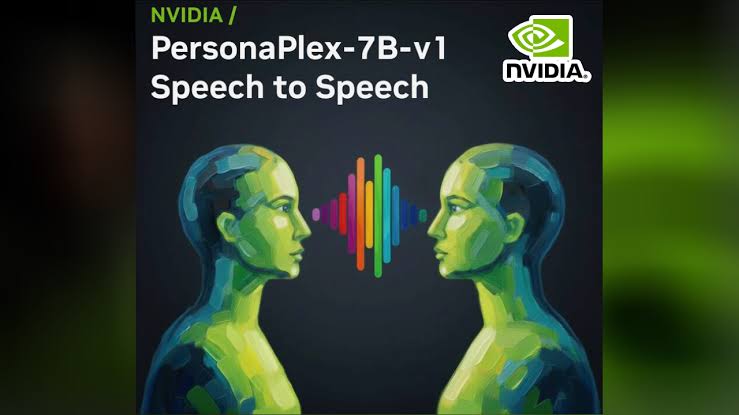
PersonaPlex is NVIDIA’s 7 billion parameter, real-time speech-to-speech conversational model built on the Moshi architecture. Rather than waiting for a speaker to finish, transcribing everything, composing a response and then speaking, it works with incoming and outgoing audio streams at the same time. The goal is more natural timing, including short acknowledgements, interruption handling, barge-ins and faster replies.
It is also controllable in two useful ways. A text prompt defines the role, background and scenario. An audio voice prompt sets vocal characteristics and speaking style. That makes PersonaPlex a better fit for an identifiable agent or character than a generic text-to-speech layer placed on top of a normal chatbot.
NVIDIA PersonaPlex app and download: what users should know
The word “app” causes some confusion in searches. PersonaPlex does not have an official consumer app on Google Play or the Apple App Store. NVIDIA provides source code, model weights through Hugging Face and a self-hosted browser interface. When the server is running, the Web UI is accessed in a browser, normally on port 8998.
To download it, developers clone the official NVIDIA GitHub repository, accept the model terms on Hugging Face, authenticate with an HF token and install the included Moshi package. Treat downloads claiming to be an unofficial PersonaPlex APK with caution. The official project is a developer package, not a phone APK.
How to install and use PersonaPlex
The official setup is relatively short on paper but assumes a prepared machine. On Ubuntu or Debian, install the Opus development library first, install the project’s Moshi package and accept the gated model licence on Hugging Face. Set the HF_TOKEN environment variable, then launch the Moshi server with a temporary SSL directory. The Web UI lets you choose a voice prompt, add a role prompt and speak to the model.
For testing without live interaction, the project also includes an offline workflow that accepts an input WAV file and writes an output WAV file plus text output. This is the sensible starting point for teams that want to evaluate tone, interruptions and role adherence before connecting a microphone or a customer-facing interface.
Requirements and performance expectations
PersonaPlex is optimized for NVIDIA GPU systems. The model card lists Linux as the preferred operating system and identifies NVIDIA Ampere A100 and Hopper H100 hardware as supported. Audio is handled at 24 kHz. NVIDIA’s public test hardware is an A100 with 80 GB of memory, which gives a fair clue about the level of hardware expected for dependable live work.
There is a CPU-offload option for GPUs with insufficient memory, and offline evaluation can run with CPU-only PyTorch. Those options are useful for experimentation, but they should not be confused with a guarantee of smooth real-time conversation. Public issue reports have included requests for lower-VRAM support and reports of choppy audio on some systems. Plan a proper technical test before promising a live deployment.
PersonaPlex API: is there an official API?
Not in the usual plug-in-an-API-key sense. At the time of this review, the official materials focus on source code, local server use and the Moshi Python runtime. That means there is no clearly documented, managed NVIDIA PersonaPlex endpoint with a public price list or a standard REST quick-start that a non-technical customer can use immediately.
Developers can still create an API around their own deployment. A practical architecture is a small backend that manages sessions, forwards browser audio to the running PersonaPlex service and applies authentication, logging, rate limits and safety checks. Production teams should also add consent notices for voice data and test the model with their own use case before launch.
User experience and Reddit-style community discussion
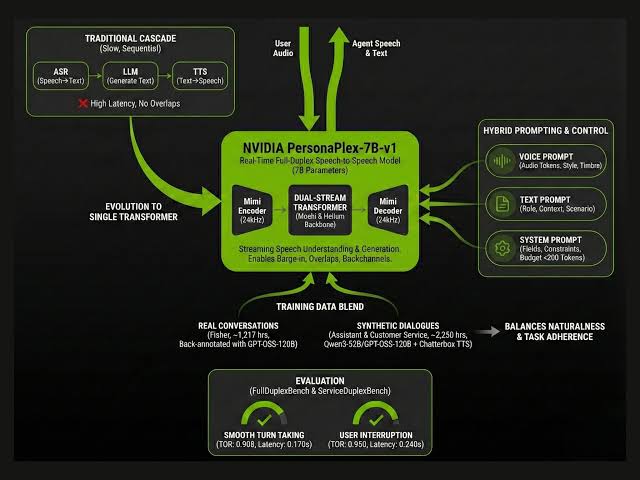
PersonaPlex is most compelling when conversation timing matters. It is built to avoid the awkward pause that can make many voice assistants feel mechanical. Its role prompting and included voice choices also make a prototype feel more intentional than a plain speech recognition and text-to-speech chain.
Still, the public developer conversation is largely about installation, operating system compatibility, memory pressure, voice options and bugs. That is the signal of a promising open model in an early product stage, not of a polished SaaS platform. We would recommend it to AI builders and research-minded teams, but not to someone looking for a simple voice assistant download today.
What we liked
True full-duplex design with support for interruptions and overlapping speech.
Text role prompts and audio voice conditioning give creators meaningful control.
Open code under the MIT licence and a clear local Web UI route.
Commercial use is indicated on the model card, subject to the model licence terms.
Offline evaluation makes it possible to test before building a live experience.
What needs improvement
No official consumer mobile app and no uncomplicated hosted API.
Setup requires Linux-oriented developer skills and Hugging Face model access.
Hardware demands are high for smooth real-time use.
English speech is the stated use case, so multilingual needs require separate validation.
Community reports show that performance and compatibility can vary by system.
Who should use NVIDIA PersonaPlex?
Use it if you are a developer, AI lab, game studio or product team with access to capable NVIDIA hardware and a reason to make spoken interaction feel natural. It is especially relevant for voice-agent research, customer-service prototypes, interactive characters and demos where interruption behaviour is part of the experience.
Skip it, for now, if you need a consumer app, a low-cost no-code tool, an easy API or a voice assistant that works reliably on an ordinary laptop. In that situation, a managed speech service will likely be easier, even if it does not reproduce PersonaPlex’s full-duplex behaviour.
Frequently asked questions
1. What is NVIDIA PersonaPlex?
It is NVIDIA’s real-time speech-to-speech AI model for full-duplex conversations. It uses text prompts for roles and audio prompts for voice style.
2. Is NVIDIA PersonaPlex an app?
Not as a consumer app. The official release is code and model weights with a self-hosted Web UI that runs in a browser.
3. Where can I download NVIDIA PersonaPlex?
Use the official NVIDIA PersonaPlex GitHub repository and the NVIDIA personaplex-7b-v1 page on Hugging Face. You must accept the model terms to access the weights.
4. Is there a PersonaPlex APK for Android?
NVIDIA does not provide an official PersonaPlex Android APK. Be careful with unofficial APK listings that use the name.
5. How do I install PersonaPlex?
Install the required Opus library, install the project’s Moshi package, accept the Hugging Face licence, set an HF token and run the local Moshi server. A Linux and NVIDIA GPU setup is the intended route.
6. Does NVIDIA PersonaPlex have an API?
There is no clearly documented public hosted API for PersonaPlex at review time. Developers generally run the model themselves and build an application layer around it.
7. What are the PersonaPlex system requirements?
Linux and NVIDIA GPU acceleration are the supported path. NVIDIA lists A100 and H100 compatibility and tested inference on an A100 80 GB. CPU offload is available, but it can affect real-time performance.
8. Can PersonaPlex run on a Mac or Windows PC?
The official model card names Linux as the preferred operating system. Community experiments may exist, but they are not the same as official support.
9. Is PersonaPlex free to use?
The code is MIT-licensed, while model weights are covered by NVIDIA’s Open Model License. Read and accept the current terms before downloading or deploying it.
10. Is PersonaPlex good for customer service?
It can be a strong prototype base because it supports role prompts and natural interruption handling. A production service still needs business data, guardrails, privacy controls, monitoring and use-case testing.
11. What do Reddit and community users say about PersonaPlex?
Discussion is mainly developer-focused: people ask about installation, GPU memory, Mac compatibility, voice choices and real-time audio issues. Read current project issues and community posts before choosing hardware.
12. Is NVIDIA PersonaPlex worth using in 2026?
Yes for technically capable teams exploring advanced real-time voice agents. For casual users or teams needing a ready-made app or low-friction API, it is not yet the easiest choice.